EasyManua.ls Logo

Inkbird ISC-027BW - User Manual

Inkbird ISC-027BW
16 pages
Print Icon
To Next Page IconTo Next Page
Loading...
Smoker
Controller
ISC-027BW
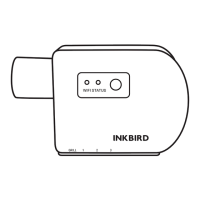
WIFI STATUS
GRILL 1 2 3
Question and Answer IconNeed help?

Do you have a question about the Inkbird ISC-027BW and is the answer not in the manual?

Summary

INKBIRD Smoker Controller Product Introduction

Status Indicator Light Guide

Explains the meaning of the green, red, and flashing red status indicator lights on the device.

Action Button Functionality

Details the short press to stop/start and long press to reset Wi-Fi connection functions of the action button.

Package Contents Overview

Lists all items included in the BBQ controller package, including probes and adaptors.

INKBIRD Smoker Controller Specifications

INKBIRD App Connection Guide

Download and Install the INKBIRD App

Guide on searching for and downloading the INKBIRD app from app stores or scanning a QR code.

INKBIRD App User Registration

Steps for creating an account by providing email and verification code for app usage.

Connect Controller to Your Phone

Instructions for pairing the ISC-027BW device with a smartphone via Wi-Fi.

INKBIRD Bluetooth Connection

INKBIRD App Main Interface

Overview of the graphical user interface for the ISC-027BW Smoker Controller within the INKBIRD application.

Air Duct Installation for Smoker Controller

Precautions for Smoker Controller Use

INKBIRD Smoker Controller Product Warranty

FCC Compliance Requirements

Overview

The INKBIRD ISC-027BW Smoker Controller is a device designed to manage and monitor the temperature of a smoker or oven, offering both Wi-Fi and Bluetooth connectivity for remote control and data logging. It comes with multiple probes for precise temperature measurement and an air duct for controlling the airflow to the smoker.

Function Description

The Smoker Controller allows users to monitor and control the temperature of their cooking process. It features a Wi-Fi indicator light and a status indicator light to show its operational state. The device includes probe ports for connecting up to four temperature probes: three meat probes and one oven probe. An action button is provided for short presses to stop/start working and long presses to reset the Wi-Fi connection. The device also has an air outlet for connecting an oven adaptor, which helps regulate the airflow.

A key feature is its ability to automatically pause operation when the oven cover is opened and restart when it's closed, provided this function is turned on. This intelligent pausing mechanism helps maintain cooking consistency and prevents overcooking during inspection.

The device connects to a smartphone app (INKBIRD App) via either Wi-Fi or Bluetooth. When connected via Wi-Fi, chart data is saved on a server, allowing for long-term tracking and analysis. If connected via Bluetooth, data is stored locally on the device for up to 3 days. The app provides a main interface where users can view current temperature, set target temperatures, control fan speed, set timers, and view real-time and historical temperature graphs.

Important Technical Specifications

  • Input Voltage: DC 5V, 1A
  • Short Time Measurement Range: 0°C to 300°C (32°F to 572°F)
  • Continuous Monitoring Range: 0°C to 250°C (32°F to 482°F)
  • Probe Temperature Accuracy:
    • ±0.5°C/±0.9°F (maximum) from +25°C to +140°C (77°F to 284°F)
    • ±1.0°C/±1.8°F (maximum) from 0°C to +185°C (32°F to 365°F)
    • ±1.5°C/±2.7°F (maximum) from 0°C to +250°C (32°F to 482°F)
    • ±2.0°C/±3.6°F (maximum) from 0°C to +300°C (32°F to 572°F)
  • Connection Methods: Supports Wi-Fi (2.4GHz Wi-Fi, IEEE 802.11b/g/n) and Bluetooth
  • Maximum Bluetooth Connection Distance: 164ft (distance may be shorter with interferences)
  • Calibration Range: ±12°C/±12°F
  • Probe Cable Length: Approximately 120cm/3.9ft (Teflon cable with stainless steel mesh)
  • App Compatibility:
    • iOS devices: iOS 10.0 or above
    • Android devices: Android 4.4 or above
  • Wi-Fi Router Support: 2.4GHz Wi-Fi routers only
  • Warranty: 1 year

Usage Features

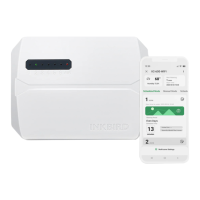
Product Introduction: The device features an Air Outlet for connecting an oven adaptor, an Action Button for control, a Wi-Fi Indicator Light, a Status Indicator Light, Probe Ports for temperature probes, and a USB Power Input Port.

Status Indicator Light:

  • Green light remains on: Working
  • Red light remains on: Stop working
  • Red light flashes: Pause (triggered by opening the oven cover if the function is enabled)

Action Button:

  • Short press: Stop/start working
  • Long press: Reset Wi-Fi connection

Package Contents: The package includes 1x BBQ Controller, 3x Meat Probes, 1x Oven Probe, 1x USB Power Plug+Cable, and 1x Oven Adaptor.

Data Storage:

  • Wi-Fi connection: Chart data saved on the server.
  • Bluetooth connection: Chart data saved in device local storage (up to 3 days of data).

App Connection (INKBIRD App):

  1. Download: Search for "INKBIRD App" on Google Play or App Store, or scan the provided QR code.
  2. Registration: Open the app, select Country/Region, enter email for a verification code, and complete registration. An account is required for first-time use.
  3. Connect to Phone:
    • Open the app and click "+" to select "ISC-027BW".
    • Plug the device into a USB power supply and click "Next Step".
    • Select the 2.4GHz Wi-Fi network, enter the password, and click "Next Step".
    • Press and hold the action button on the device until the Wi-Fi indicator flashes, then click "Next Step".
    • The phone will scan for the device; once found, click "Next Step".
    • The device will automatically pair with the network.
    • A "WiFi already connected" message indicates successful pairing. If pairing fails, unplug and restart the device, then repeat the connection steps.

Bluetooth Connection: If there is no Wi-Fi network, the device will automatically connect to the phone via Bluetooth after initial app connection setup. Users can also choose Bluetooth when adding the device. For Android phones, GPS must be turned on for the Google Play services to function correctly. Once paired, re-pairing is not necessary unless the phone is changed.

Main Interface of the INKBIRD App: The app displays:

  • Current Temperature
  • Oven Target Temperature
  • Furnace temperature fan status
  • Fan Speed control
  • Fan Switch
  • Timer
  • Oven Setting
  • Historical Temperature Graph
  • Real-time Temperature Graph

Air Duct Installation:

  1. Insert the air duct into the slot on the controller.
  2. Turn the air duct counterclockwise to tighten it.
  3. Push the switch up to lock the duct tightly.

Maintenance Features

Precautions:

  • Temperature Limits: Do not exceed 300°C/572°F for short-time measurement or 250°C/482°F for long-time measurement. Exceeding these limits will damage the probes and metal wires.
  • Probe Placement: Do not put probes or metal wires directly into fire or in contact with heating tubes.
  • Water Immersion: Do not immerse probes or metal wires in water, as this may lead to inaccurate measurements.
  • Probe Handling: Avoid pressing probes or metal wires too hard, as this can damage the plastic film and cause short circuits.
  • Silicon Case: Remove the silicon case from the probe before use.

Product Warranty: The device comes with a 1-year warranty covering defects in components or workmanship. Defective products will be repaired or replaced by INKBIRD at their discretion, free of charge.

FCC Requirement:

  • Changes or modifications not expressly approved by the responsible party could void the user's authority to operate the equipment.
  • The device complies with Part 15 of the FCC Rules, meaning it must not cause harmful interference and must accept any interference received.
  • If the equipment causes harmful interference, users are encouraged to reorient or relocate the receiving antenna, increase separation between equipment and receiver, or connect the equipment to a different circuit.
  • The equipment complies with FCC radiation exposure limits for an uncontrolled environment. It should be installed and operated with a minimum distance of 20cm between the radiator and the user's body. The transmitter must not be co-located or operating in conjunction with any other antenna or transmitter.

Inkbird ISC-027BW Specifications

General IconGeneral
BrandInkbird
ModelISC-027BW
CategoryController
LanguageEnglish

Related product manuals