Falcon Plus User Manual
9
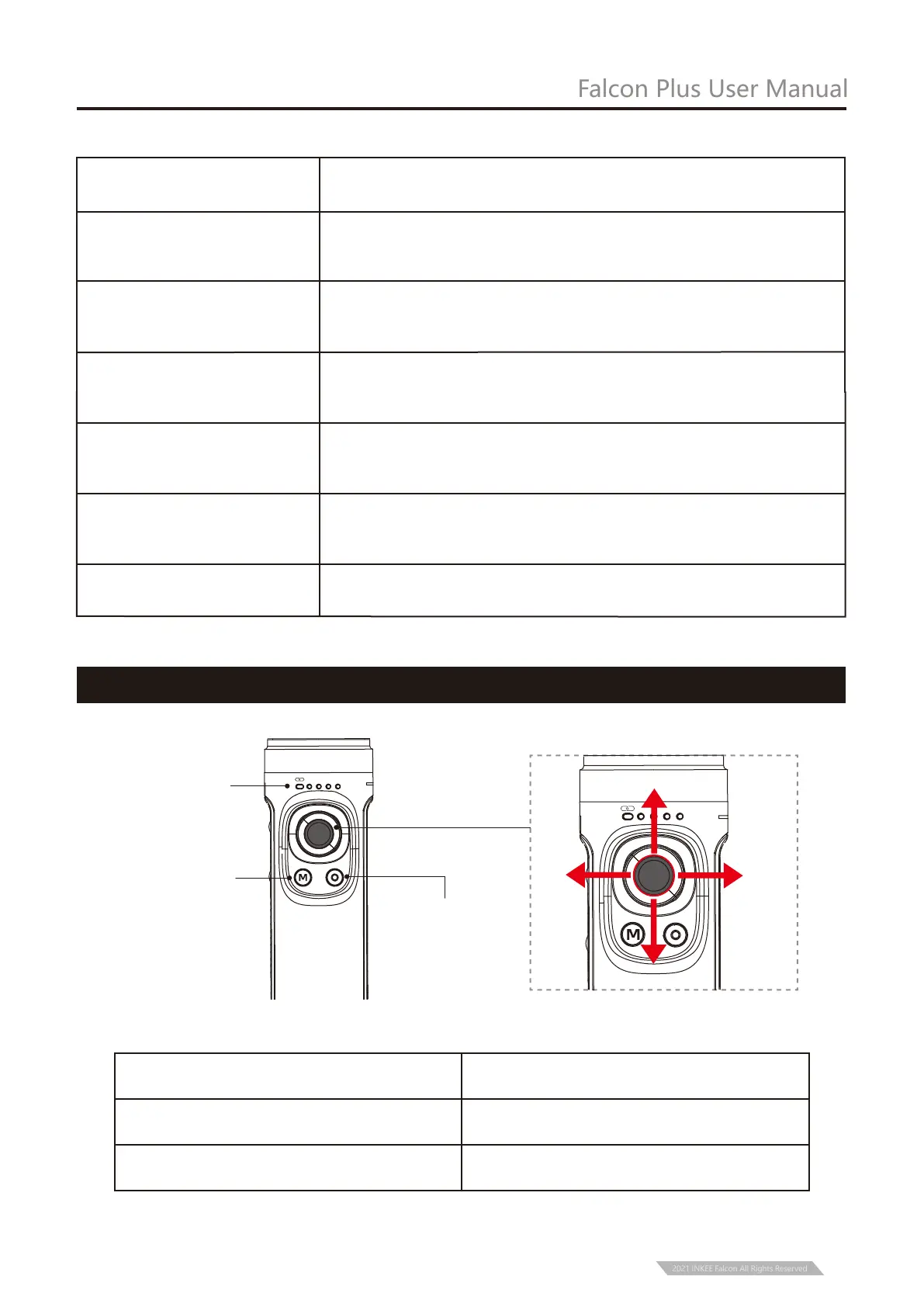
Status Indicator
Light
ON/OFF Button/ Power
Display Button
Mode Button
Four-directional Joystick
Four-directional Joystick Operation
Left
Up
Right
PF HL FPV
FL
Down
PF HL FPV
FL
Push upwards /downwards
Joystick Operation Description
Push left/right
Tilt axis rotates up or down
Pan axis rotates left or right.
2021 INKEE Falcon All Rights Reserved
Pan Follow (PF)
Horizontal Lock (HL)
(Default Mode)
First Person View (FPV)
Tilt axis and roll axis keep the same direction, and the lens
rotates with the direction of the handle.
The lens follows the projection direction of the handle to
simulate the first-person visual effect.
Roll axis remains horizontal, and the lens rotates in the
direction of the handle.
Mode
Flashlight Mode (FL)
Global Lock (GL)
When the handle is parallel to the ground, vertical shooting
with 360 rotation can be carried out.
Press and hold the trigger button to enter into full lock
under PF/HL mode.
Vertical Shooting
Assist the camera to shoot vertically.
Description


 To Next Page