Falcon Plus User Manual
Product Usage
Make sure to fully charge the stabilizer when use for the first time.
Please charge the stabilizer immediately if the power is too low and the
red-light flashes slowly.
Turn off the power if not in use.
Charging
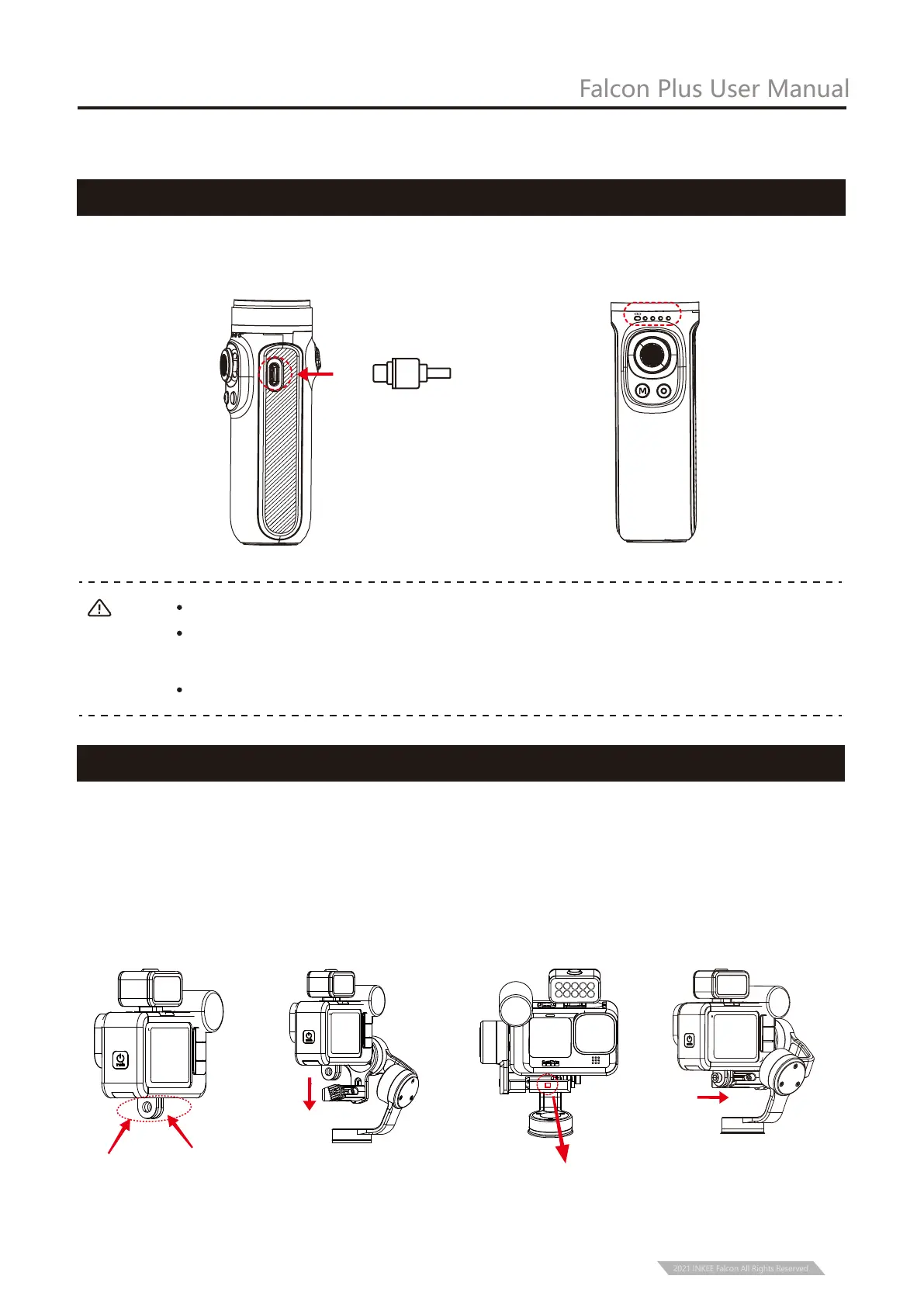
Use Type-C cable to charge. Blue light flashes during charging. All the four lights are always
on when fully charged.
Take GoPro HERO 10 + MEDIA MOD as an example:
① Pull apart the bottom mounting buckle of the action camera and install it on the stabilizer.
② Insert the screw into the hole corresponding to the stabilizer and then tighten the screw.
(*If the installed camera is GoPro hero 8 or GoPro hero 9, it may cause camera lock virtual
position. Please adjust the position of the camera)
Installation of camera
is completed.
Installation of Action Camera
3
PF
HL
FPV
FL
Note :
2021 INKEE Falcon All Rights Reserved
Tip: when installing the
camera, keep the camera
as close as possible to the
camera mounting base.


 To Next Page