Disclaimer
The contents mentioned in this article are related to your safety, legal
rights, and responsibilities. Please read them carefully and set up and use this product
correctly according to the instructions. If you do not follow the instructions and warnings
in this article, it may cause harm to you and the people around you and damage the
product or the products around you. Any illegal use by any user is prohibited. The user
will be responsible for all actions of purchasing and using the product. For this product,
the company does not bear all the risks and responsibilities (including direct, indirect, or
third-party losses) of the end customers during the debugging and use of this product.
Our company will not provide any service for any products obtained from abnormal
channels or for unknown purposes.
Falcon Plus User Manual
Warning
11
2021 INKEE Falcon All Rights Reserved
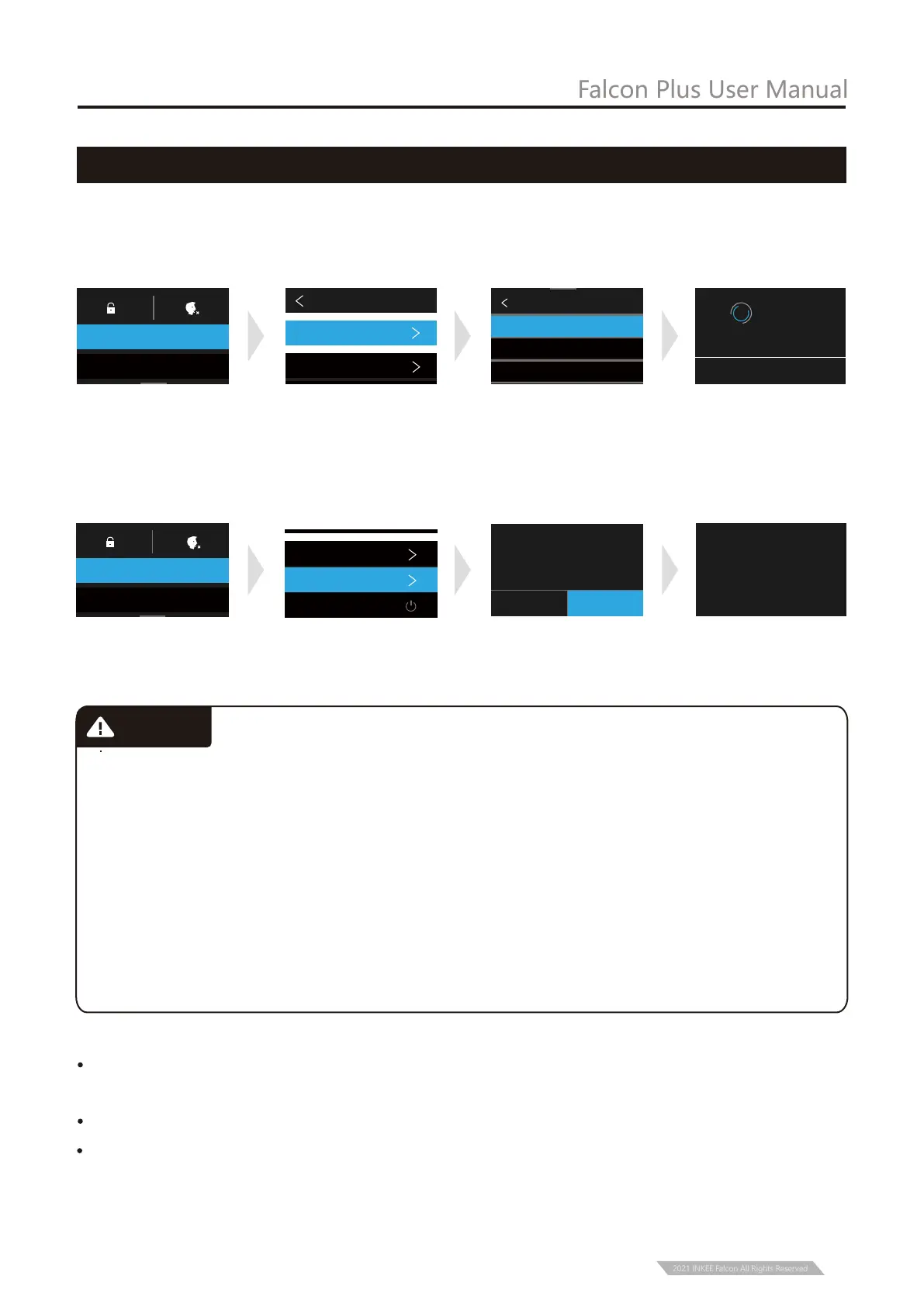
Connect to device
* Turn on the gimbal before connect to a device.
① Pull out the Selection Box from top to bottom, Click on “CONNECT”,
② Click on “Connect New Device”, ③ Click on“GOPRO APP”.
* If the above operation fails to connect the device, remove the pairing and make the
following steps, and once again repeat the above steps.
① Pull out the selection box from top to bottom, click on “CONNECT”,
②Click on “Reset Connections ”, ③ Click on “RESET”.
CONNECT NEW DEVICE
GOPRO App
Reom(Voice Remote )
Smart Remote
Return to
GoPro app and
follow Instructions
CANCEL
CAMERA NAME
GP********
PASSWORD
********
Connect New Device
CONNECTED DEVICES
CAMERA INFORMATION
Name & Password
CONNECT
CONNECT
PREFERENCES
CANCEL
RESET CONNECTIONS
Clear your connection list
(reconnect GoPro to the
required device)
RESET
ALL CONNECTIONS RESET
CONNECTED DEVICES
CAMERA INFORMATION
Name & Password
Reset Connections
Wireless Connections
CONNECT
PREFERENCES
Ensure that the motor rotation is not blocked by external force during and after the
stabilizer is powered on.
Make sure that the stabilizer is not exposed to water or other liquids.
Do not disassemble the whole stabilizer. If it is disassembled carelessly and causes
abnormal operation, please send it back for re-debugging. All the expenses arising
therefrom shall be borne by the customer.
Note:


 To Next Page