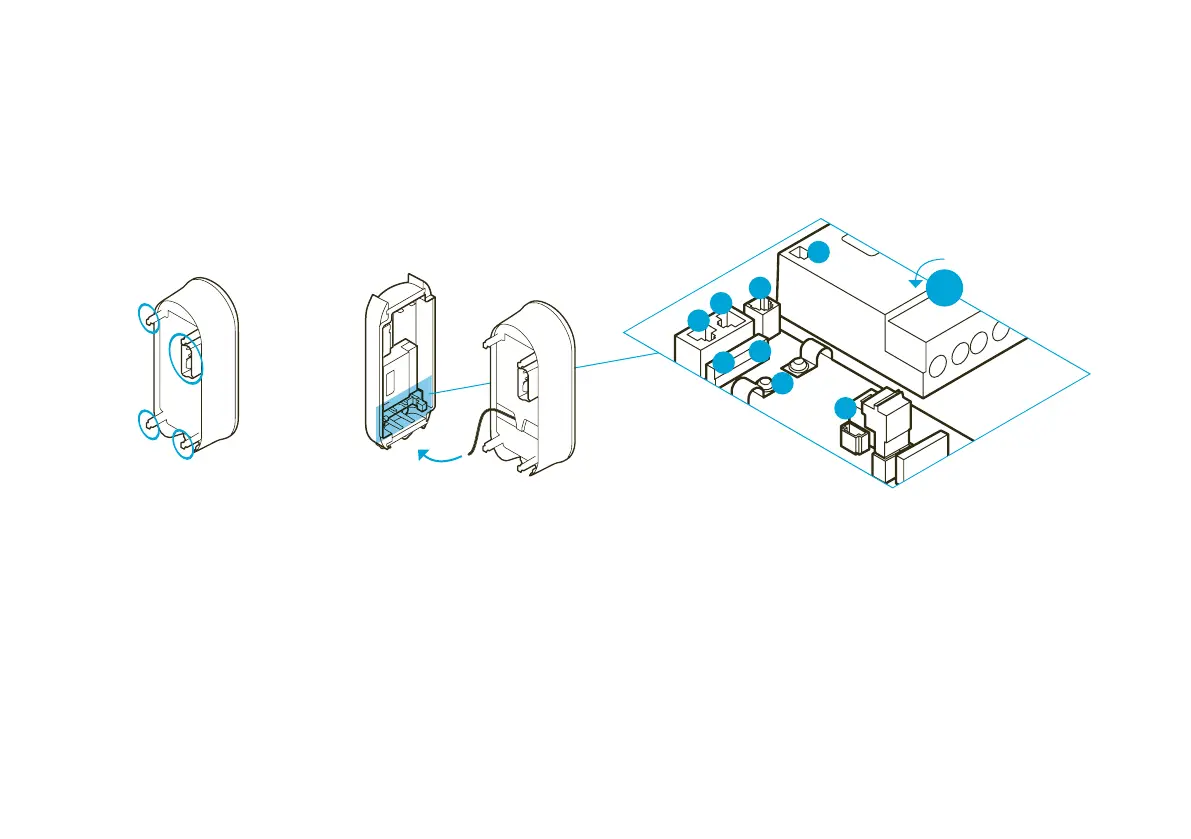
Clicking the eBox into the eClick
Clicking the eBox into the eClick
01
If an eSmartMeter is installed,
make sure the ports are connected
to the supplied data cable. Connect
port 3a (eSmartMeter) to port 3b
(eClick) using the data cable.
Take the eBox and identify the
connecting points (blue here) on
its rear side.
02
Connect the black ribbon data cable
of the eBox to port “5 Expansion
Terminal” at the bottom right of
the eClick.
90°
3a
3b
1
6
2a
4
5
2b
1 LAN 1 RJ45 (eBox communication)
2a LAN 2 RJ45 (deactivated)
2b LAN 2 LSA-Plus (deactivated)
3a eSmartMeter output (optional)
3b eSmartMeter input (optional)
4 Position of cable clips for S/FTP cable
5 Expansion terminal (eBox communication)
6 LAN 1 LSA-Plus to Internet router
Before mounting the eBox,
make sure there is no voltage across the eClick.


 To Next Page