innTOUCH User Instructions
Page 4 © Mass Electronics Pty Ltd 2011Edition 4.1 dated 19.01.2015
About innTOUCH Smart Sensor
The Innotech® innTOUCH Smart Sensor is an elegant Human Machine Interface (HMI) for Innotech
MiniMAX (MM01C/MM02C), MicroMAX (UM01C), and VAVMax(VM01C) controllers.
innTOUCH incorporates an attractive design and intuitive Liquid Crystal Display (LCD) interface for
viewing and adjusting various predened variables on supported Innotech controllers.
These User Instructions will help you to:
• Program the date and time
• Program Daylight Savings time
• Add, copy, edit or delete schedules
innTOUCH menu navigation
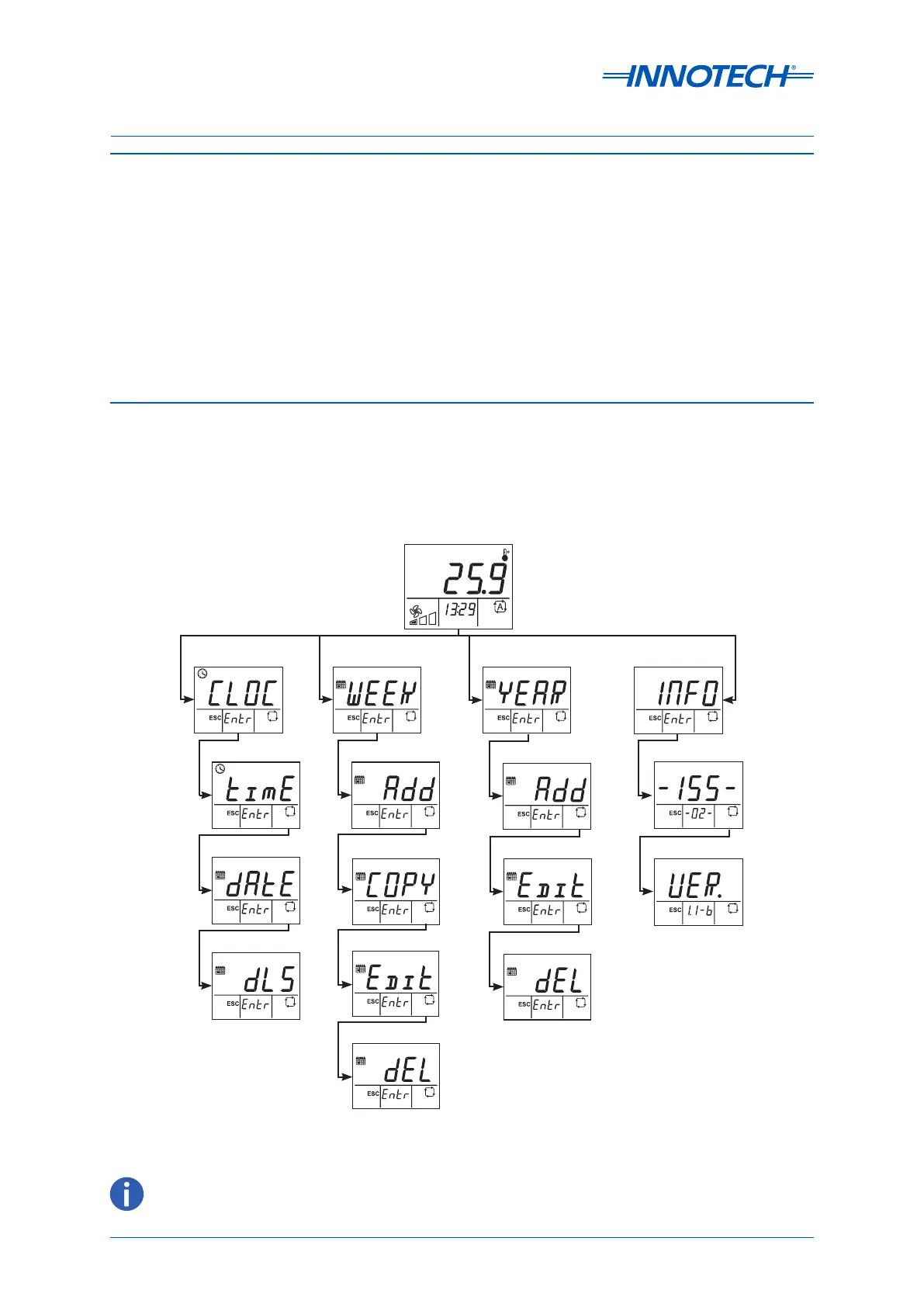
The diagram below at Figure 1 illustrates the overall menu structure of the device. You can use the
interface to easily navigate through the dierent menus and parameters as described in the following
pages.
Figure 1: innTOUCH menu navigation guide
OFF
DAY
MONTH
ON
SET
STARTSTOP
Rhppm
kWh
%
Default Screen
Clock Year Schedule
OFF
OFF
SET
Rhppm
%
Delete Schedule
Edit Schedule
OFF
OFF
SET
OFF
SET
Rhppm
%
OFF
SET
OFF
SET
Rhppm
%
Time
Daylight Savings
Date
Week Schedule
OFF
OFF
SET
Rhppm
%
Add Schedule
OFF
Rhppm
%
Copy Schedule
OFF
Edit Schedule
OFF
Rhppm
%
Delete Schedule
OFF
Rhppm
%
Add Schedule
Rhppm
%
Information
Firmware Version
ISS Model
Throughout this document, references to "innTOUCH" or "Sensor" refer to the innTOUCH Smart Sensor.


 To Next Page