innTOUCH User Instructions
Page 7 © Mass Electronics Pty Ltd 2011Edition 4.1 dated 19.01.2015
OFF
SET
OFF
OFF
DAY
OFF
MONTH
Rhppm
%
OFF
Rhppm
%
OFF
DAY
Rhppm
%
OFF
MONTH
Rhppm
%
OFF
Rhppm
%
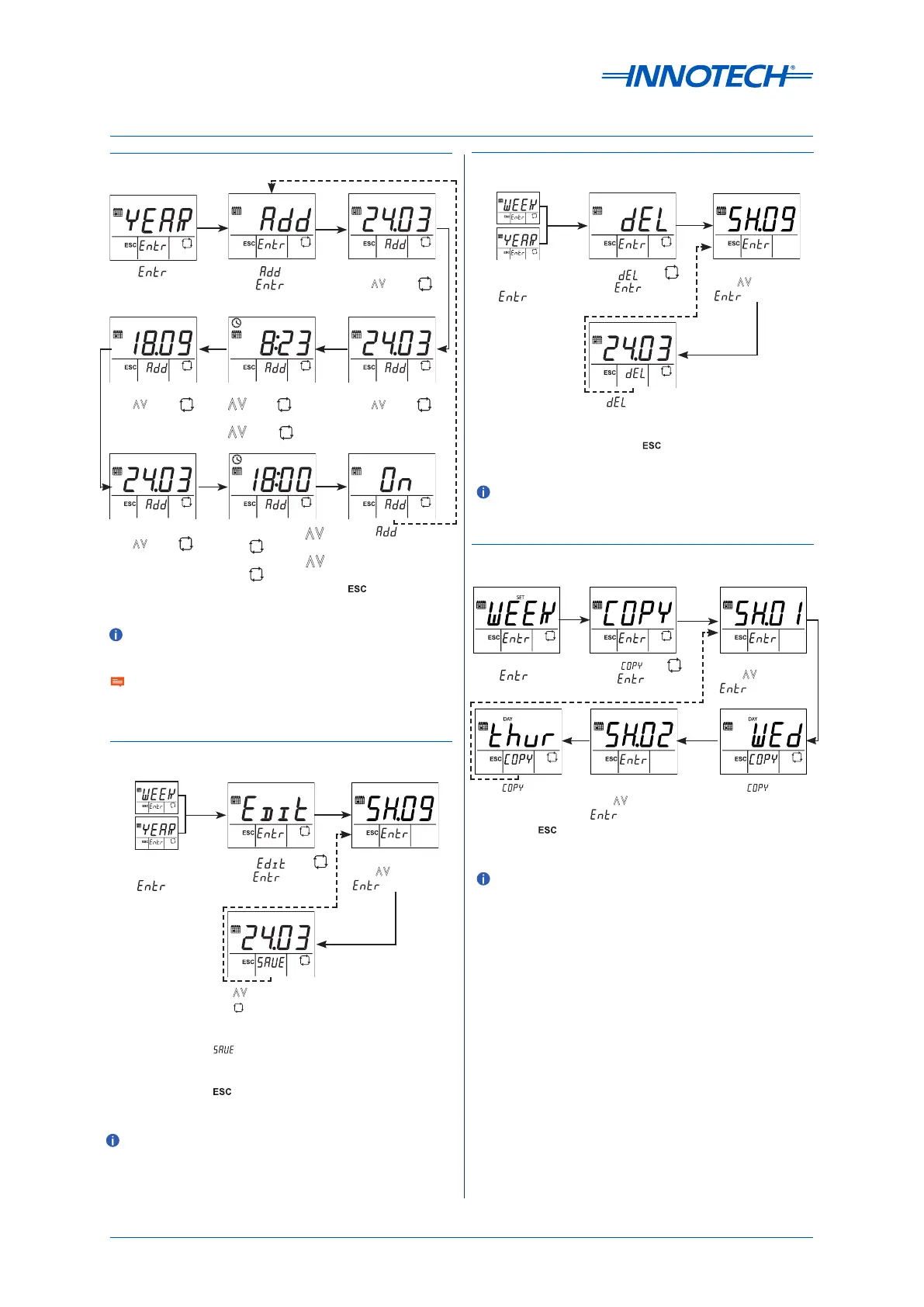
Add Yearly Schedule
Press .
Select .
Press .
Adjust start day
with . Press .
Adjust start month
with . Press .
OFF
Rhppm
%
Adjust START hour
.Press .
Adjust START mins
. Press .
Adjust STOP hour .
Press .
Adjust STOP mins .
Press .
Adjust stop day
with . Press .
Adjust stop month
with . Press .
Press to add
yearly schedule
and return to the
Add screen. Press
to exit without
saving.
Edit a Schedule
OFF
SET
Rhppm
%
OFF
SET
Rhppm
%
Select the Week
or Year screen and
press .
Select with .
Press .
Select schedule
with . Press
.
Use to adjust values
and to select the next
parameter.
When nished, press
to save the changes
and return to the select
schedule screen. Press
to exit without
saving.
OFF
Rhppm
%
OFF
DAY
Delete a Schedule
OFF
SET
OFF
SET
Select the Week
or Year screen and
press .
Select with .
Press .
Select schedule
with . Press
.
Press to delete
schedule and return
to the select schedule
screen. Press to
exit without saving.
OFF
OFF
DAY
Copy a Weekly Schedule
At the Week screen,
press .
Select with .
Press .
Select schedule
with . Press
.
Press .Select schedule
with . Press
.
Press to copy the
schedule and return
to the select schedule
screen. Press to
exit without saving.
The schedule block must exist in the conguration of the
MAXIM controller.
The schedule block must exist in the conguration of the
MAXIM controller.
The schedule block must exist in the conguration of the
MAXIM controller.
The schedule block must exist in the conguration of the
MAXIM controller.
Aer programming your schedule(s), ensure you enable
scheduling by holding the le button.


 To Next Page