innTOUCH User Instructions
Page 5 © Mass Electronics Pty Ltd 2011Edition 4.1 dated 19.01.2015
innTOUCH interface basics
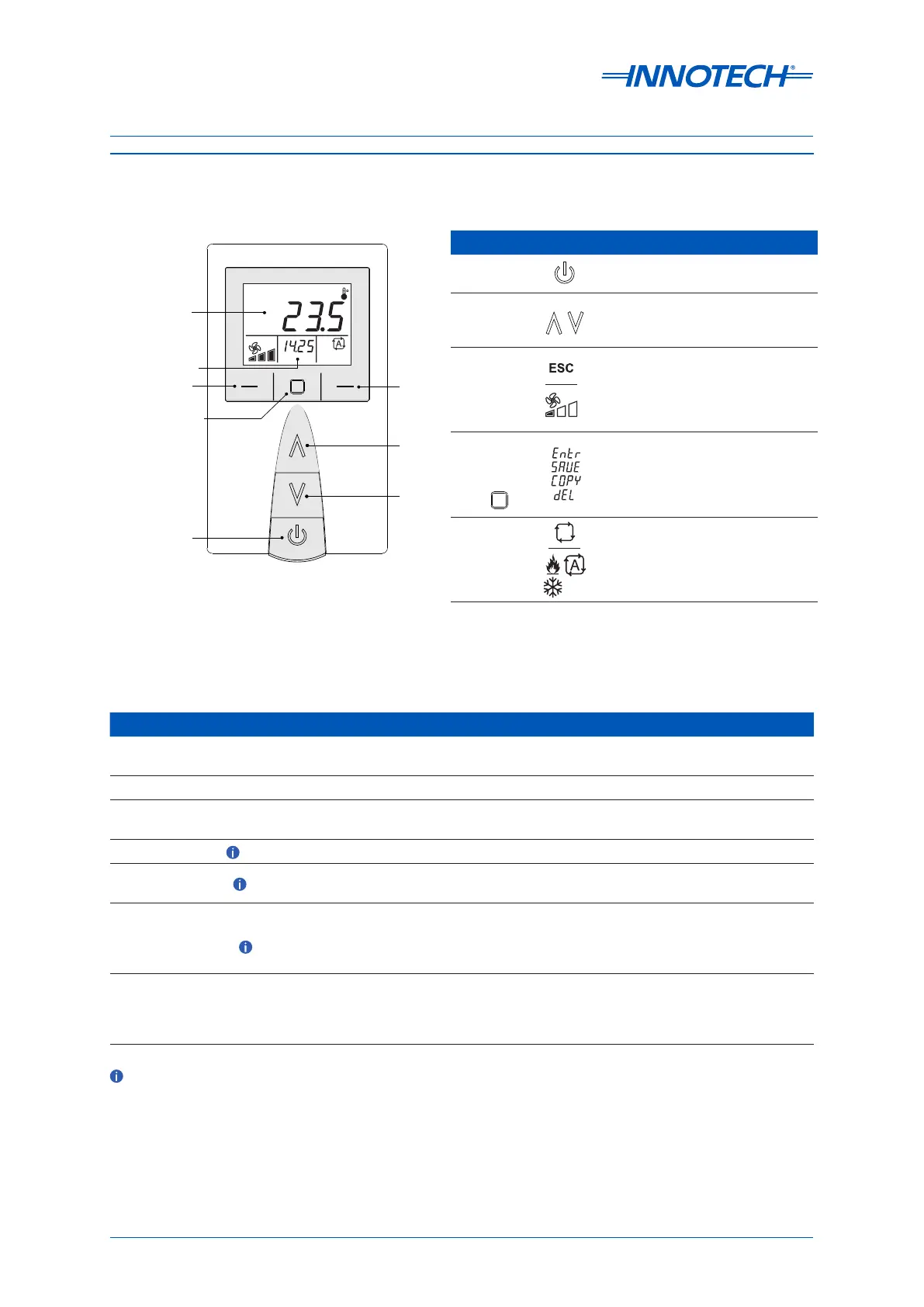
Figure 2 shows a representation of the innTOUCH interface.
Left Button
Centre Button
Enter/Save/Copy/
Delete
Right
Button
Up
Down
Power ON/OFF
Primary Display
Secondary Display
Function Procedure
Power display ON / OFF
Press the Power button to power ON the display. Press and hold the Power
button for three seconds to power OFF the display.
Run request With the device powered ON, press the Power button to cycle ON or OFF.
Adjust set point
temperature
With the device powered ON, press the UP button to increase the set point, or
DOWN button to decrease the set point.
Adjust fan speed
Press the Le Button to adjust the fan speed to the desired setting .
Mode adjustment
Press the Right Button to change the operating mode between Auto, Heat,
Cool and Vent.
View information on
Secondary Display
With the device powered ON, press the Centre Button to scroll through all of
the parameters for the secondary display. These parameters are Time, Date,
Auxiliary Value (AVAL), Set Point or Temperature. The display will return to the
default parameter aer approximately 30 seconds.
Navigate menus
Use the Right Button to scroll through the menus and sub menus. Use the
Le Button to return to the previous menu, or press it continuously to exit all
menus and return to the default screen. Use the Centre Button to perform
the action displayed on the screen.
These adjustments can only be made if programmed in the innTOUCH parameters. Contact Innotech or
your local distributor for more details.
Figure 2: innTOUCH interface
Table 1: innTOUCH buttons and functions
Table 2: innTOUCH operational basics
Button Description
Power ON/OFF -
Press to power the innTOUCH on
and o.
Up and Down -
When adjusting a setting, use the UP
button to increase the value, or the
DOWN button to decrease the value.
Le Button
Use the LEFT Button to exit and
return to the previous menu. Press
repeatedly to return to the main
menu. This button also adjusts the
fan speed (if programmed).
Centre Button -
The CENTRE Button has several
functions: Enter / Save / Copy
/ Delete. These functions are
available depending on which menu
you are in, or what you are adjusting.
Right Button -
Use the RIGHT button to scroll
through the dierent screens and
settings. Auto / Heat / Cool / Vent
settings can also be adjusted (if
programmed).


 To Next Page