Edition 1.3 dated 19.11.2013
About the Micro 3000 Control Station
The Innotech® Micro 3000 Control Station is a Human Machine Interface for the Innotech
Micro 3000 Controller.
The Control Station incorporates an attractive design and intuitive Liquid Crystal Display (LCD)
interface for viewing and adjusting various predefined variables on the Controller.
This user guide will help you to:
• Program the date and time,
• Program daylight savings time,
• Edit, copy, or delete schedules,
• View and clear accumulated aer hours time,
• View information about the Controller and Control Station.
Control Station Menu Navigation
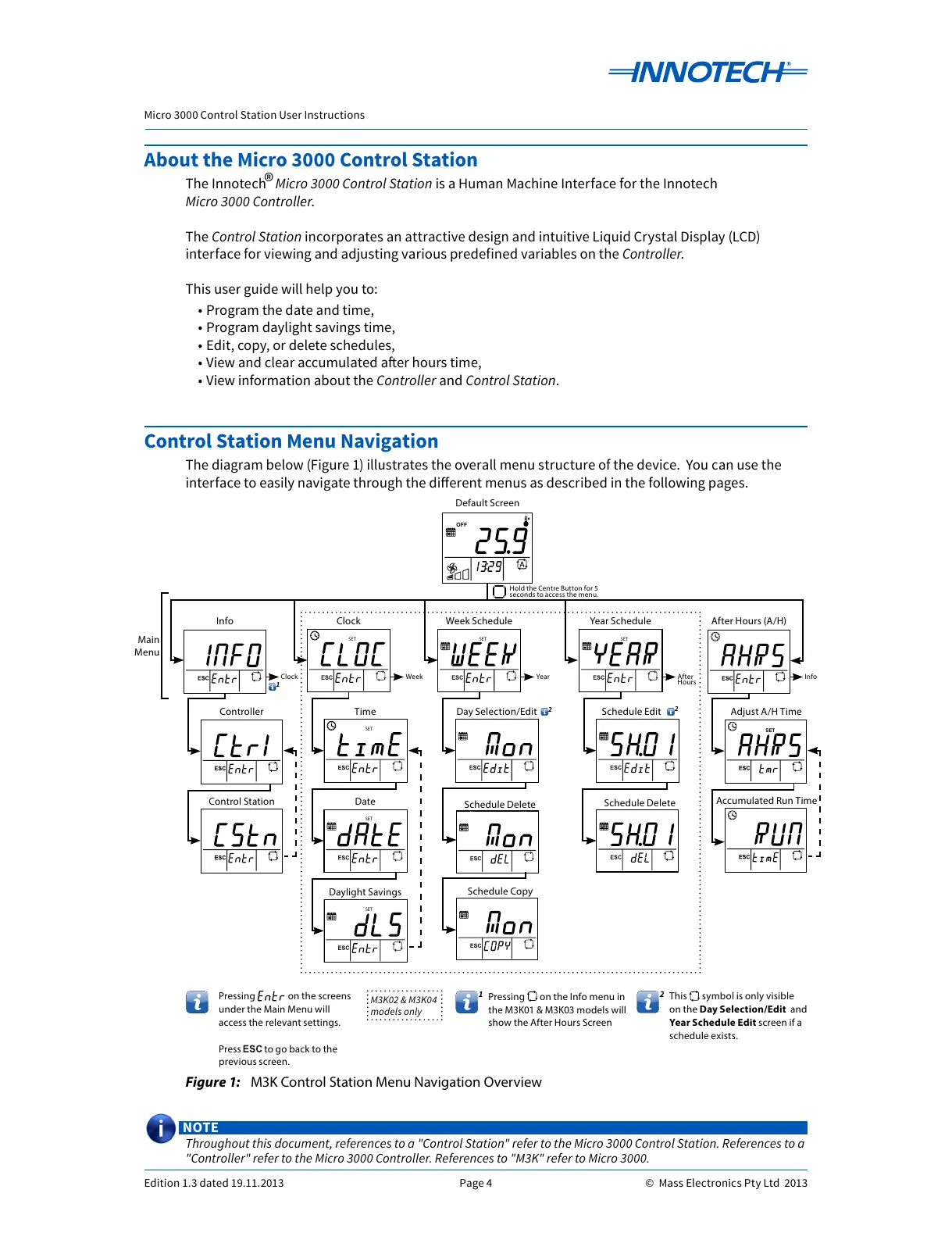
The diagram below (Figure 1) illustrates the overall menu structure of the device. You can use the
interface to easily navigate through the dierent menus as described in the following pages.
NOTE
Throughout this document, references to a "Control Station" refer to the Micro 3000 Control Station. References to a
"Controller" refer to the Micro 3000 Controller. References to "M3K" refer to Micro 3000.
Figure 1: M3K Control Station Menu Navigation Overview
OFF
DAY
MONTH
ON
SET
START STOP
Rhppm
kWh
%
Default Screen
Clock After Hours (A/H)Year Schedule
OFF
Schedule Copy
This symbol is only visible
on the Day Selection/Edit and
Year Schedule Edit screen if a
schedule exists.
M3K02 & M3K04
models only
Hold the Centre Button for 5
seconds to access the menu.
Clock Week Year After
Hours
Info
2
2
2
Pressing on the Info menu in
the M3K01 & M3K03 models will
show the After Hours Screen
1
1
Main
Menu
Pressing on the screens
under the Main Menu will
access the relevant settings.
Press to go back to the
previous screen.



 To Next Page