Edition 1.3 dated 19.11.2013
Innotech Support
Innotech provides technical information on the Web to assist you with using its products.
At www.innotech.com.au, you can find technical manuals, user instructions, and data sheets for all our
products.
For direct product support or product information, contact your local distributor, or an Innotech
representative.
You can contact us via email, fax, or postal mail:
Website: www.innotech.com.au
Email: sales@innotech.com.au
Fax: +61 7 3421 9101
Mail: Innotech Control Systems
P.O. Box 292
Sunnybank
QLD 4109
Australia
View and Reset Aer Hours Time
OFF
DAY
MONTH
ON
SET
STARTSTOP
Rhppm
kWh
%
OFF
DAY
MONTH
ON
SET
START
Rhppm
kWh
%
OFF
DAY
MONTH
ON
START
Rhppm
kWh
%
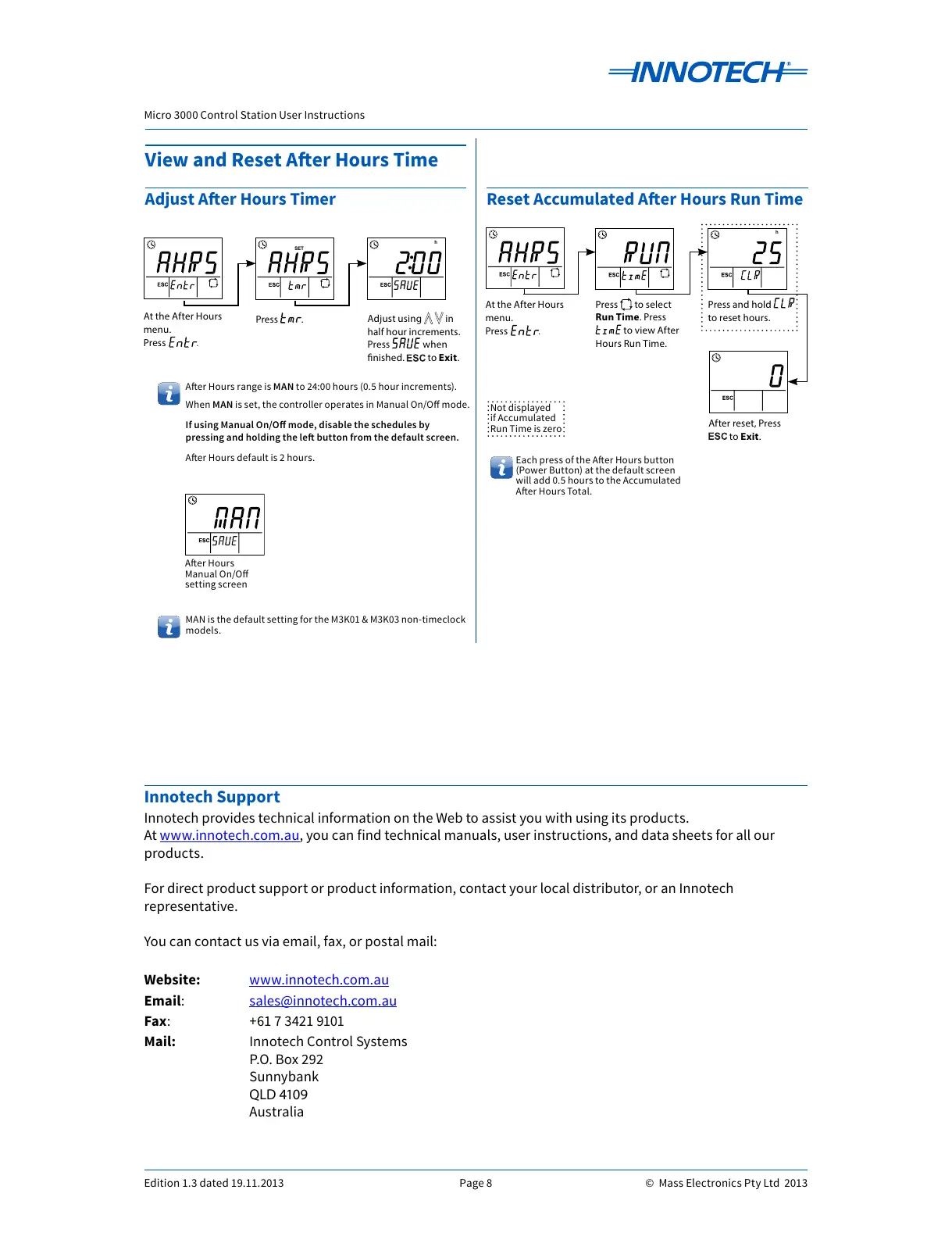
At the After Hours
menu.
Press .
Press .
Adjust using in
half hour increments.
Press when
nished. to Exit.
OFF
DAY
MONTH
ON
SET
STARTSTOP
Rhppm
kWh
%
OFF
DAY
MONTH
ON
SET
STARTSTOP
Rhppm
kWh
%
OFF
DAY
MONTH
ON
SET
STARTSTOP
Rhppm
kWh
%
At the After Hours
menu.
Press .
After reset, Press
to Exit.
Press and hold
to reset hours.
Adjust Aer Hours Timer
OFF
DAY
MONTH
ON
SET
STARTSTOP
Rhppm
kW
%
Press to select
Run Time. Press
to view After
Hours Run Time.
Not displayed
if Accumulated
Run Time is zero
Each press of the Aer Hours button
(Power Button) at the default screen
will add 0.5 hours to the Accumulated
Aer Hours Total.
Reset Accumulated Aer Hours Run Time
OFF
DAY
MONTH
ON
SET
STARTSTOP
Rhppm
kW
%
Aer Hours
Manual On/O
setting screen
Aer Hours range is MAN to 24:00 hours (0.5 hour increments).
When MAN is set, the controller operates in Manual On/O mode.
If using Manual On/O mode, disable the schedules by
pressing
and holding the le button from the default screen.
Aer Hours default is 2 hours.
MAN is the default setting for the M3K01 & M3K03 non-timeclock
models.



 To Previous Page