Micro 3000 Control Station User Instructions
© Mass Electronics Pty Ltd 2013
Edition 1.3 dated 19.11.2013
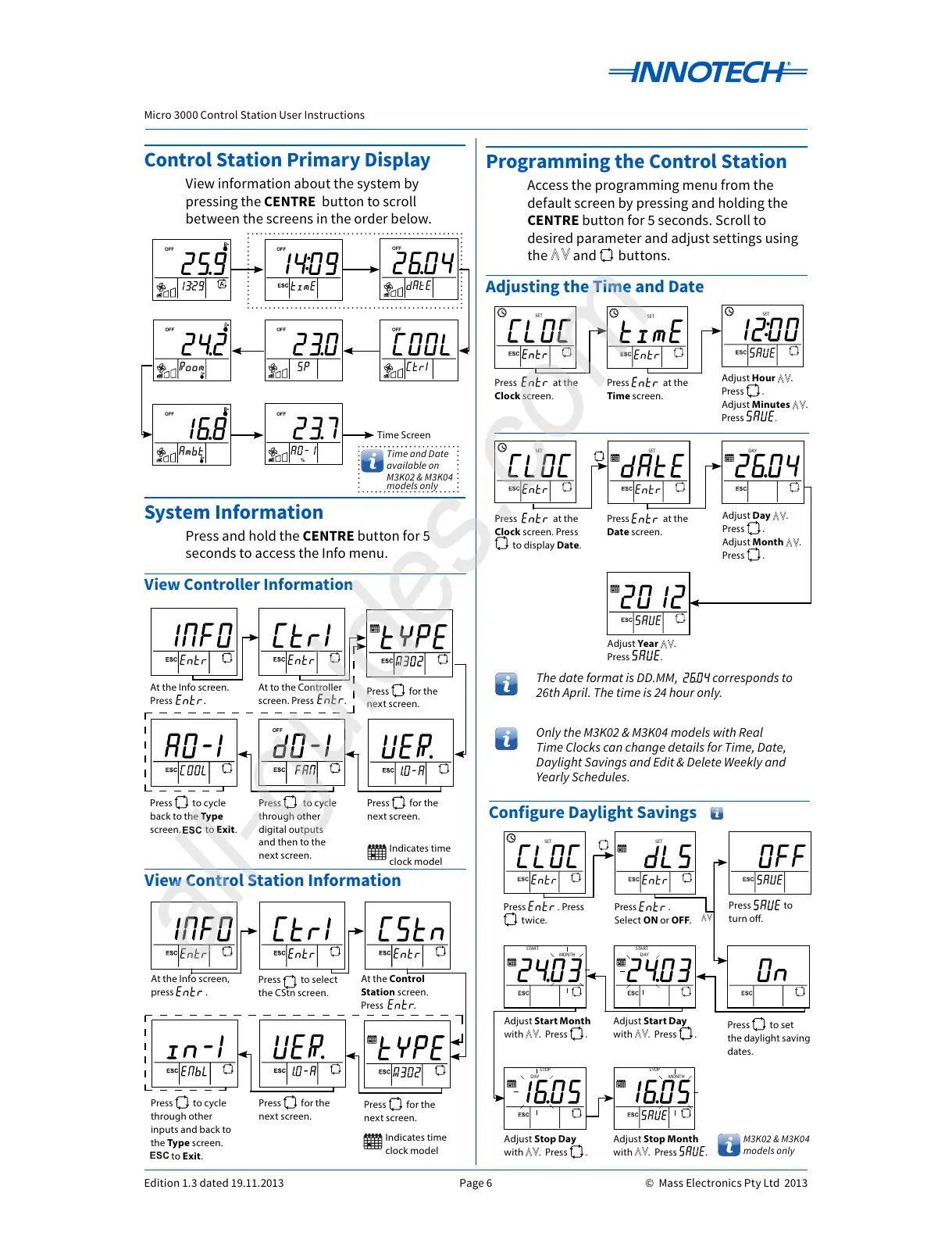
Control Station Primary Display
View information about the system by
pressing the CENTRE button to scroll
between the screens in the order below.
OFF
DAY
MONTH
ON
SET
STARTSTOP
Rhppm
kWh
%
OFF
DAY
MONTH
ON
SET
STARTSTOP
Rhppm
kWh
%
OFF
DAY
MONTH
ON
SET
STARTSTOP
Rhppm
kWh
%
OFF
DAY
MONTH
ON
SET
STARTSTOP
Rhppm
kWh
%
OFF
DAY
MONTH
ON
SET
STARTSTOP
Rhppm
kWh
%
OFF
DAY
MONTH
ON
SET
STARTSTOP
Rhppm
kWh
%
OFF
DAY
MONTH
ON
SET
STARTSTOP
Rhppm
kWh
%
Programming the Control Station
Access the programming menu from the
default screen by pressing and holding the
CENTRE button for 5 seconds. Scroll to
desired parameter and adjust settings using
the and buttons.
Adjusting the Time and Date
OFF
Press at the
Clock screen.
Adjust Hour .
Press .
Adjust Minutes .
Press .
Adjust Day .
Press .
Adjust Month .
Press .
OFF
%
Adjust Year .
Press .
Press at the
Date screen.
Press at the
Time screen.
OFF
Press at the
Clock screen. Press
to display Date.
The date format is DD.MM, corresponds to
26th April. The time is 24 hour only.
Only the M3K02 & M3K04 models with Real
Time Clocks can change details for Time, Date,
Daylight Savings and Edit & Delete Weekly and
Yearly Schedules.
Time and Date
available on
M3K02 & M3K04
models only
OFF
Rhppm%
OFF
DAY
Press .
Select ON or OFF.
OFF
%
Press to set
the daylight saving
dates.
OFF
DAY
%
Adjust Start Month
with . Press .
Configure Daylight Savings
Adjust Stop Day
with . Press .
Adjust Stop Month
with . Press .
Adjust Start Day
with . Press .
M3K02 & M3K04
models only
DAY
MONTHSET
START STOP
Rhppm
kWh
%
DAY
MONTHSET
START STOP
Rhppm
kWh
%
DAY
MONTHSET
START STOP
Rhppm
kWh
%
DAY
MONTHSET
START STOP
Rhppm
kWh
%
DAY
MONTHSET
START STOP
Rhppm
kWh
%
View Control Station Information
At the Info screen,
press .
Press for the
next screen.
At the Control
Station screen.
Press .
Press for the
next screen.
Press to cycle
through other
inputs and back to
the Type screen.
to Exit.
DAY
MONTHSET
START STOP
Rhppm
kWh
%
DAY
MONTH
ON
SET
START STOP
Rhppm
kWh
%
DAY
MONTHSET
START STOP
Rhppm
kWh
%
OFF
DAY
MONTH
ON
SET
START STOP
Rhppm
kWh
%
DAY
MONTHSET
START STOP
Rhppm
kWh
%
DAY
MONTHSET
START STOP
Rhppm
kWh
%
View Controller Information
At the Info screen.
Press .
Press for the
next screen.
At to the Controller
screen. Press .
Press for the
next screen.
Press to cycle
through other
digital outputs
and then to the
next screen.
Press to cycle
back to the Type
screen. to Exit.
Time Screen
System Information
Press and hold the CENTRE button for 5
seconds to access the Info menu.
Indicates time
clock model
Indicates time
clock model
DAY
MONTHSET
START STOP
Rhppm
kWh
%
Press to select
the CStn screen.
All manuals and user guides at all-guides.com
all-guides.com



 To Next Page