16
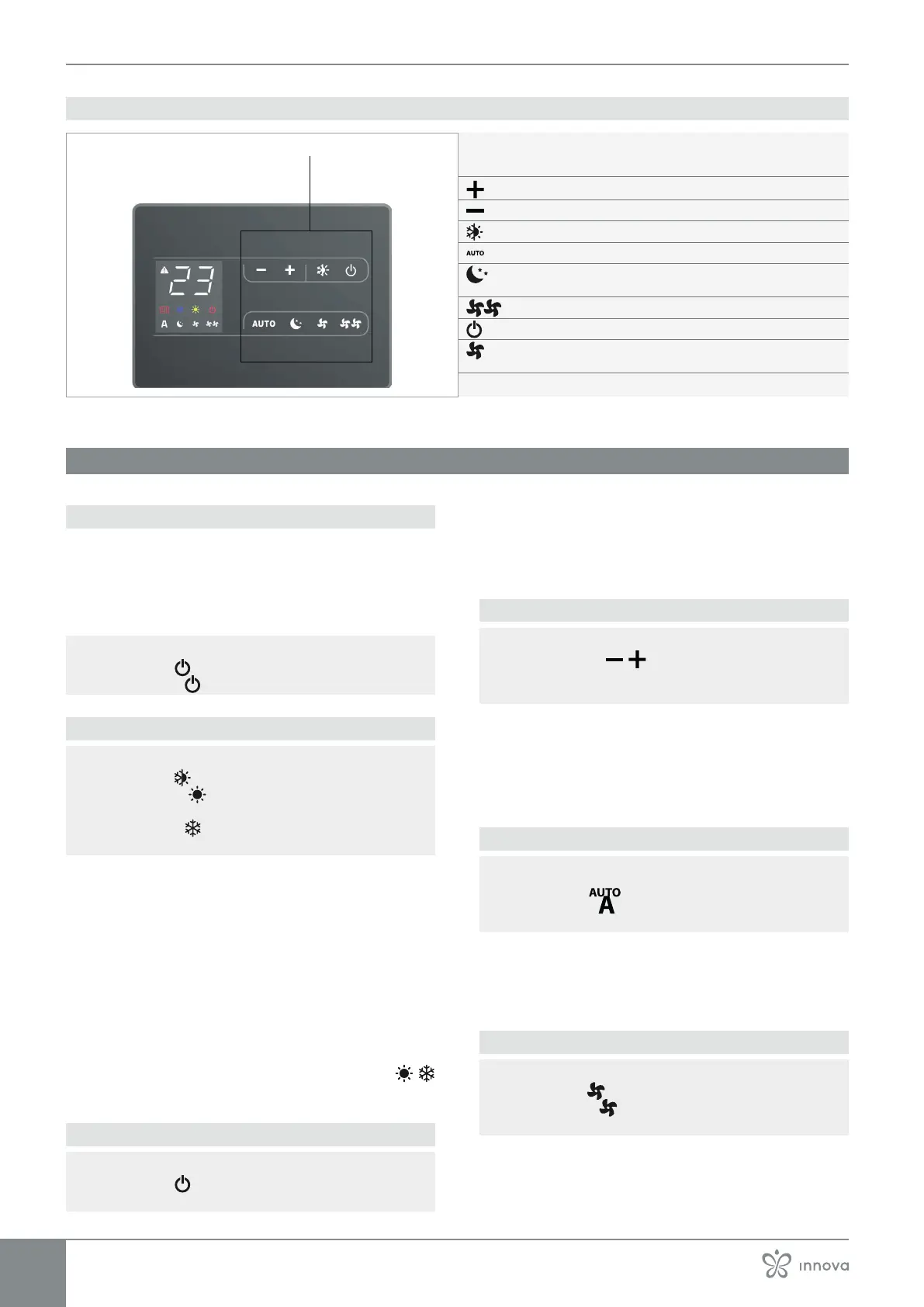
4.1.3 Keys functions
A Keys area
Up key
Down key
This can be used to select the operating mode (Cooling or Heating)
Enables Automatic function
Consente di attivare la funzione Notturno con limitazione della
velocità di ventilazione e variazione automatica della temperatura
Enables Maximum ventilation speed function
Enables the Silent function with ventilation speed limitation to a low
maximum value
4.2 Main functions
4.2.1 General start-up
Before the activation:
Make sure that the remote control is connected to the
mains.
In case of a master switch on the power supply line,
switch on the system by inserting the switch.
To activate the control
► press the
key
The symbol
lights up.
4.2.2 Operating mode set-up
to switch the operating mode
► press the
key for about 2 seconds
The symbol on indicates the Heating function
enable
The symbol on indicate the Cooling function en-
able
In heating function the symbols is alight with setpoint
higher than the room temperature.
In cooling function the symbols is alight with setpoint
lower than the room temperature.
In the case of an incorrect setpoint, the symbol of the
appropriate value is reached.
4 pipes versions
In 4-pipe versions, with automatic Cooling/Heating regu-
lation active, the simultaneous switching on of the
symbols indicates that the set-point has been reached.
4.2.3 Put in stand-by the control
► press the
key for about 2 seconds
The control goes out.
In stand-by mode the control ensures an antifreeze
safety. In case of temperature <5 °C, the hot water so-
lenoid valve outputs and boiler consent are activated
automatically.
4.2.4 Set room temperature
► operate the
keys to decrease or increase
the desired value
The displayed value change.
The adjustment range goes from 16 °C to 28 °C, with a
resolution of 0,5 °C.
Out of range values from 5 °C and 40 °C are allowed,
except in automatic mode. These value should be set
only for short periods of time.
4.2.5 Automatic operation
To select the Automatic function
► press the
key for about 2 seconds
The symbol on indicates the Automatic function
enable.
The ventilation speed is automatically adjusted between
a minimum value and a maximum value based on an al-
gorithm type PI, according to the actual distance from
the room temperature set-point.
4.2.6 Silent operation
To select the Silent operation
► press the
key for about 2 seconds
The symbol on indicates the Silent function en-
able
The ventilation speed is limited at a more reduced max-
imum value.



 To Next Page