9
SIU
E
ECA649
2.1
2.2
2.3
ECA649
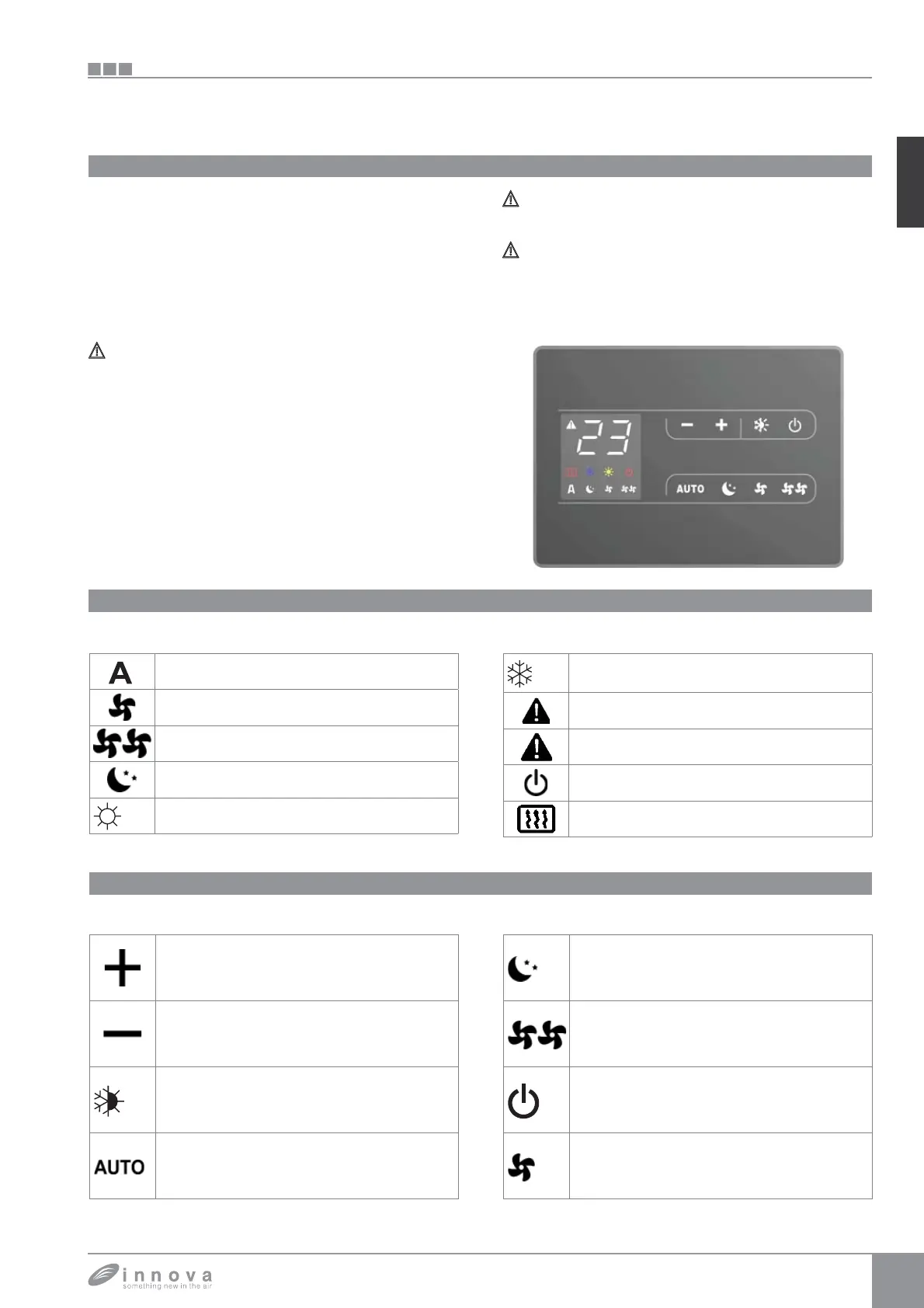
SMART TOUCH wall-mounted electronic control panel with room probe
The remote wall-mounted ECA649 is an electronic
thermostat fitted with temperature probe with the
possibility of controlling one or more (up to a maximum of
30) cooler-convector/cooler-radiators in broadcast (with
simultaneous data transmission) equipped with electronic
control for allowing remote control ESD645 or ESD648.
The control panel has its own memory therefore no settings
will be lost in case of shut-down or power outage.
Any failure of the individual terminals connected will not
be signalled by the wall-mounted panel
.
Thanks to the temperature probe it ensures anti-freeze
safety even when set to stand-by
.
After 20 seconds from the last action the panel
brightness will be reduced and on the display will
appear the room temperature. Press any key to restore
maximum brightness
.
Display
The display also offers information on the statuses and on
any active alarms through 8 specific symbols:
Automatic operation
Silent operation
Maximum ventilation speed
Night function
Heating on
Cooling on
Supervision on. Flashing with CP presence
contact closed.
Alarm indication (light on)
Panel off indication
Resistance enabled indication
Keys function
You can set the various functions through the 8 backlit
keys:
Temp + allows increasing the set temperature
Temp + allows decreasing the set temperature
Heating / Cooling: allows switching between
heating and cooling
The ventilation speed will be adjusted
automatically between a minimum and a
maximum value.
Night function: the ventilation speed is
significantly reduced and the set temperature
is changed automatically
Operation at maximum speed: allows setting
he maximum ventilation speed
ON/Stand-By: allows activating or putting the
device in stand-by mode.
Silent: allows limiting the ventilation speed by
reducing its maximum value.









 To Next Page