MODEL: ITRR- 501
PHONO CD-DA Recorder with Cassette
player and Analog Tuning AM/FM Radio
IMPORTANT SA FETY INSTRUCTIONS
FOR AUDIO PRODUCTS-READ THOROUGHLY
When using electrical products, basic precautions should always be followed including:
1. Read Instructions - All the safety and operating instructions should be read before the
product is operated.
2. Retain Instructions - The safety and operating instructions should be retained for
future reference.
3. Heed Instructions - All warnings on the product and in the operating instructions
should be adhered to.
4. Follow Instructions - All operating and user instructions should be followed.
5. Cleaning - Unplug this product from the wall outlet before cleaning. Do not use liquid
cleaners or aerosol cleaners. Use a damp cloth for cleaning.
6. Attachments - Do not use attachments not recommended by the product manufacturer
as they may cause hazards.
7. Water and Moisture - Do not use this product near water-for example, near a bath tub,
wash bowl, kitchen sink, or laundry tub, in a wet basement, or near a swimming pool,
etc.
8. Accessories - Do not place this product on an surface. The product may fall, causing
serious injury to a child or adult, and serious damage to the product. Use only with a
stand, bracket, or table recommended by the manufacturer, or sold with the product. Any
mounting of the product should follow the manufacturer's instructions, and should use a
Mounting accessory recommended by the manufacturer.
9. Transporting - This product should be moved with care to avoid damage or injury.
10. Ventilation - Slots and openings in the cabinet are provided for ventilation, to ensure
reliable operation of the product and to protect it from overheating. These openings
must not be blocked or covered. The openings should never be blocked by placing the
product on a bed, sofa, rug, or similar surface. This product should not be placed in a
built-in installation such as a bookcase or rack unless proper ventilation is provided or
the manufacturer's instructions have been adhered to.
11. Power Sources - This product should be operated only from the type of power source
indicated on the marking label. If you are not sure of the type of power supply to your
home, consult your product dealer or local power company. For products intended to
operate from battery power, or other sources, refer to the operation instructions.
12. Power - Cord Protection - Power-supply cords should be routed so that they are not
likely to be trapped in any way.
13. Lightning - For added protection for this product during a lightning storm, or when it is
left unattended and unused for long periods of time, unplug it from the wall outlet and
disconnect the antenna or cable system. This will prevent damage to the product due
to lightning and power-line surges.
14. Power Lines - An outside antenna system should not be located in the vicinity of
overhead power lines or other electric light or power circuits, or where it can fall into
such power lines or circuits. When installing an outside antenna system, extreme care
should be taken to keep from touching such power lines or circuits as contact with
them might be fatal.
1
AUX I N

 Need help?
 General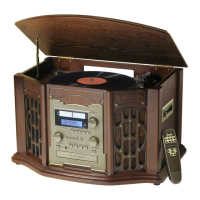

 To Next Page
