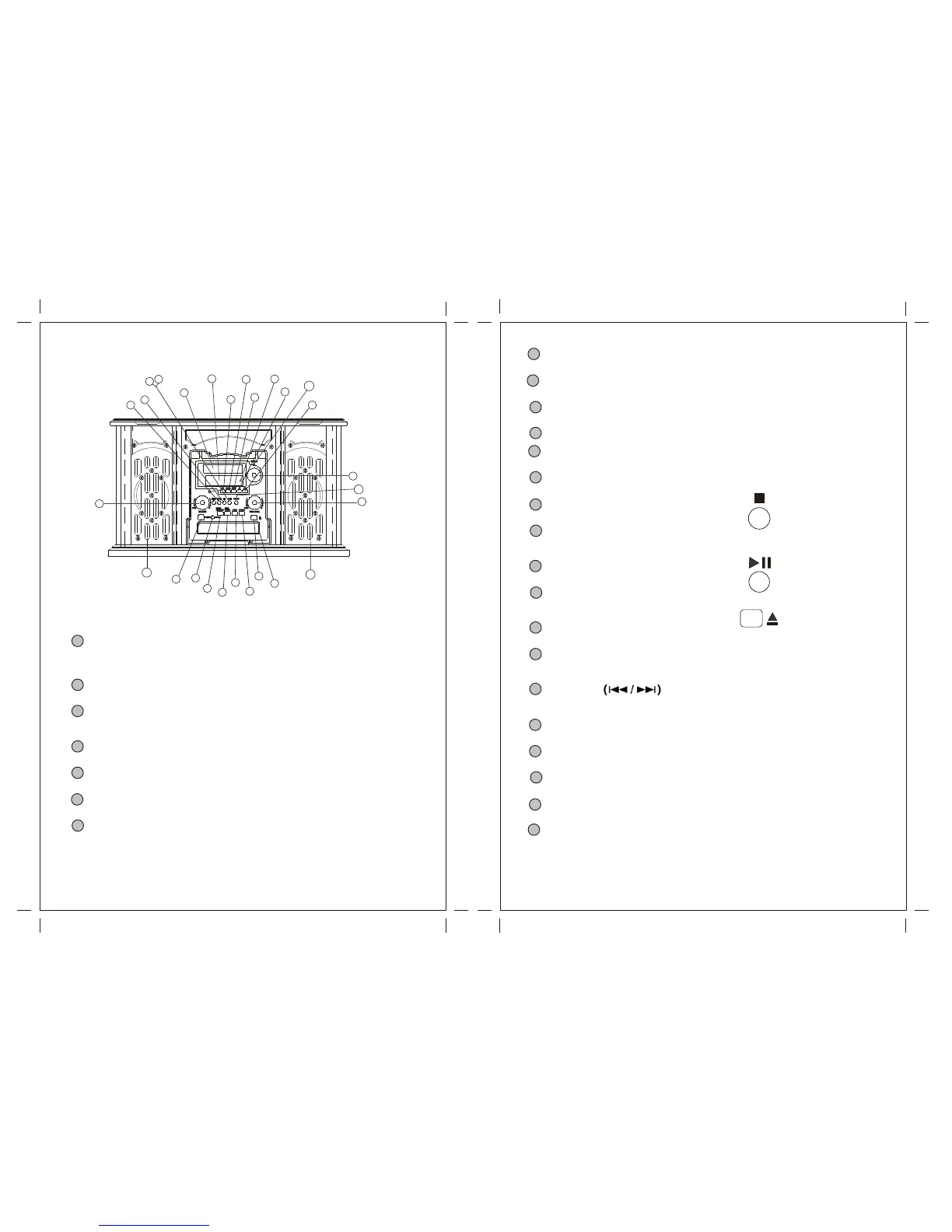
Unit Functions
8 Display panel (frequency)
When the unit is on, this display will light.
9 TRACK INCREMENT
During recording, use this button to divide tracks.
10 RECORD
Use this button to enter record pause mode.
11 Display
12 TUNED indicator
Lights when a station is correctly tuned in.
13 Speakers (stereo)
14 STOP
Use this button to stop playback or recording.
15 PLAY
Use this button to start playback, recording, finalizing and erasing.
16 PAUSE
Use this button to pause playback or recording.
17 OPEN/CLOSE
In CD,PHONO or AUX mode, use this button to open and close the disc tray.
This button don't work in FM/AM mode.
18 VOLUME
Turn this knob to adjust the volume.
19 DISC Tray
20 MUSIC SKIP
In CD mode, use these buttons to skip tracks.
Hold down these buttons to search for a part of a track.
21 REC LEVEL
In record pause mode, use this knob to adjust the recording level.
22 FINALIZE
Use this button to finalize a CD-R/CD-RW disc.
23 ERASE
Use this button to erase or unfinalize a CD-RW disc.
24 TUNING
In FM/AM mode, turn this knob to tune in a station.
Note: If the unit can't work during operation, please shut off the power and start up it again.
1 POWER
Press this button to turn the unit on or off.
The equipment draws a nominal amount of power from the AC outlet even with its
POWER switch in the OFF position.
2 PHONO
Press the PHONO button and select PHONO to play a record.
3 AUX
Press the AUX button and select AUX to listen to the external source connected to the
AUX IN jacks.
4 FM/AM
Press the FM/AM button to listen to the radio.
5 CD
Press the CD button to play a CD.
6 TAPE
Press the TAPE button to play cassette.
7 Remote Sensor
When operating the remote control unit, point it towards the REMOTE SENSOR.
10 11
9
1
2
3
4
6
7
11
12
13
15
14
16
18
19
20
21
22
23
26
25
8
10
24
17
13
5
AUX IN
PHONES
For private listening, first reduce the volume level to minimum. Then insert the plug
from your headphones into the PHONES jack, and adjust the volume by turning the
VOLUME knob. The sound from speaker will be cut off while the headphones are
Plugged in.
25


 To Next Page