
 Need help?
Do you have a question about the Insignia NS-5004BT and is the answer not in the manual?
Explains the meaning of different LED light colors and patterns during Bluetooth pairing and operation.
Details how speakers automatically search for and reconnect to the last paired Bluetooth device.
Instructions for pairing the speakers with a new Bluetooth device by holding the Input button.
How to connect external sound sources using the 3.5 mm AUX input jack.
Solutions for issues such as no power, no sound, or low volume.
Troubleshooting steps for pairing, unpairing, and connection failures with Bluetooth devices.
Answers questions about connecting to different devices and multiple audio sources.
Important safety warnings and precautions for using the speaker system to prevent damage or injury.
Includes FCC compliance, warranty information, and contact details for the product.
This document describes the Insignia NS-5004BT, a 2.1 computer speaker system with Bluetooth connectivity and color-changing LED lighting.
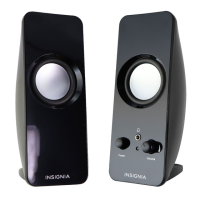
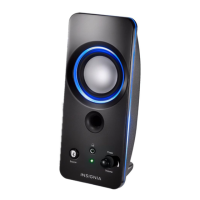
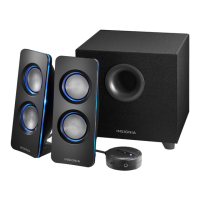
The Insignia NS-5004BT is a speaker system designed to enhance audio from computers and other devices. It consists of two satellite speakers, a subwoofer, and a control pod. The system offers both wireless Bluetooth connectivity for streaming audio from compatible devices and a wired AUX input for connecting external sound sources like MP3 players. A headphone jack on the control pod allows for private listening. The speakers feature an aesthetic element with eight color modes for LED lighting, which can be adjusted to set the mood. The system provides 25W RMS total power, with 16W RMS from the subwoofer and 9W RMS from the satellites.
To turn the speakers on or off, slide the ON/OFF switch located on the control pod. Sliding it to the left turns the speakers on, and to the right turns them off. When first turned on, the speakers automatically enter Bluetooth pairing mode, indicated by a blinking blue status LED.
After connecting your audio device (either via Bluetooth or AUX), begin playback on your device. Use the master volume control on the control pod to adjust the overall volume. You can also use the volume controls on your audio device for fine-tuning. To switch between Bluetooth and wired (AUX) connections, press the Input select button. The status LED will be blue for Bluetooth and red for AUX.
The speakers feature LED lighting with eight color modes. To cycle through the colors, repeatedly press the LIGHT button on the control pod. The sequence is: Blue -> Green -> Red -> Purple -> Yellow -> Light blue -> Repeating six colors -> Lights off. To dim the LED lighting by 50%, press and hold the LIGHT button for three seconds. To return to full brightness, press the button again for three seconds.
Clean the speaker system only with a dry cloth. Avoid using liquids or abrasive cleaners.
Do not block any ventilation openings on the speakers. Install them according to the manufacturer's instructions, ensuring adequate airflow. Avoid placing the speakers near heat sources such as radiators, heat registers, stoves, or other heat-producing apparatus (including amplifiers). The unit should be kept in a well-ventilated environment and not installed in confined spaces like bookcases.
Protect the power cord from being walked on or pinched, especially at plugs, convenience receptacles, and the point where it exits the apparatus. The wall plug serves as the disconnecting device and must remain readily operable.
 General
| Brand | Insignia |
|---|---|
| Model | NS-5004BT |
| Speaker Type | Portable Bluetooth Speaker |
| Power Output | 5W |
| Charging Time | 3 hours |
| Connectivity | Bluetooth, Aux |
| Bluetooth Version | 4.2 |
| Input | 3.5mm audio jack |






 To Next Page