EasyManua.ls Logo

Insignia NS-AC12PWH8 - User Manual

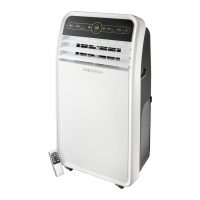
Insignia NS-AC12PWH8
28 pages
Print Icon
To Next Page IconTo Next Page
Loading...
Before using your new product, please read these instructions to prevent any damage.
USER GUIDE
10,000 or 12,000 BTU
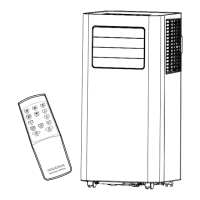
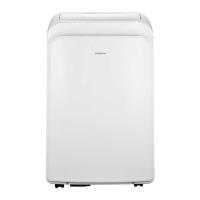
Portable Air Conditioner
NS-AC10PWH8/
NS-AC12PWH8
NS-AC10PWH8_NS-AC12PWH8_16-0982_MAN_V1_ENG.fm Page 1 Friday, December 9, 2016 3:36 PM
v1
R1

Other manuals for Insignia NS-AC12PWH8

Questions and Answers

  • C
    cannonmichelleAug 7, 2025
    Why is my Insignia Air Conditioner not cooling?
    • J
      Joshua OrozcoAug 7, 2025
      Your Insignia Air Conditioner might not be cooling due to several reasons. Check for obstructions like curtains or furniture blocking airflow. Ensure the temperature control is correctly set to a lower temperature in COOL mode. A dirty air filter can also reduce cooling efficiency, so clean it at least every two weeks. Remove any heat sources from the room and allow sufficient time for the room to cool down after turning on the unit. Finally, verify that the exhaust hose is properly connected, unobstructed, and functioning correctly.
  • J
    Jason JonesAug 12, 2025
    What to do if my Insignia Air Conditioner does not start?
    • E
      elliottchristopherAug 12, 2025
      Several factors can prevent your Insignia Air Conditioner from starting. First, ensure the unit is properly plugged into the outlet. Check your house's fuse or circuit breaker box, replacing the fuse or resetting the breaker if necessary. If a power failure occurred, allow three minutes after power is restored before restarting the unit. Also, check the power cord for a current interrupter device; if tripped, press the RESET button. Note that if 'FL' appears on the display, the water collection tank is full and needs draining. Finally, the air conditioner will not start if the room temperature is less than the set temperature; this is normal, but you can adjust the temperature setting as needed.
  • J
    Jennifer FullerAug 17, 2025
    Why does my Insignia NS-AC12PWH8 Air Conditioner run too often or too long?
    • T
      Thomas PachecoAug 17, 2025
      If your Insignia Air Conditioner runs too often or for too long, it might be due to the area being cooled being too large for the unit's capacity. You may need to consult an Insignia technician to determine the appropriate air conditioner size for your space. Also, ensure that all doors and windows are closed to prevent the unit from overworking.
  • S
    Sara KaneAug 22, 2025
    What to do if my Insignia NS-AC12PWH8 Air Conditioner is freezing up?
    • L
      Lisa VaughnAug 22, 2025
      If your Insignia Air Conditioner is freezing up, it's likely due to iced-over cooling coils. To resolve this, set the mode control to High Fan or High Cool.
  • P
    Patricia YorkAug 27, 2025
    Why is the venting hose on my Insignia NS-AC12PWH8 Air Conditioner hot?
    • C
      Carmen BarnettAug 27, 2025
      If your Insignia Air Conditioner's venting hose becomes hot, it is likely because the air conditioner has been running continuously for an extended period. This is considered normal.
  • M
    middletonsusanSep 1, 2025
    Why is my Insignia NS-AC12PWH8 Air Conditioner too loud?
    • D
      Dr. Randy SmithSep 1, 2025
      Your Insignia Air Conditioner might seem loud during the first few minutes of operation; this is the normal sound of the compressor starting up. Additionally, a soft, swishing noise heard when turning the unit on or off, or during operation, is the normal sound of liquid refrigerant flowing within the unit.

Summary

Important Safety Instructions

General Safety Warnings

Key warnings and guidelines to ensure safe operation and prevent damage.

Electrical Safety

Integrated Circuit Breaker

Details the function, testing, and importance of the power cord's circuit breaker.

Grounding Methods

Explains correct grounding procedures and precautions for safe electrical connection.

Product Overview

Features and Package Contents

Lists product features and all items included in the packaging for initial setup.

Main Components and Controls

Identifies key components and explains the functions of the control panel and remote.

Setup and Installation

Setting Up and Placing the Unit

Guides on unpacking, preparing, and positioning the unit for optimal performance.

Installing the Exhaust System

Step-by-step instructions for connecting the exhaust hose and window sealing plate.

Using Your Air Conditioner

Inserting Remote Batteries

Instructions for correctly inserting batteries into the remote control.

Operating Modes and Features

Details on cooling, fan, dry modes, auto swing, and timer functions.

Running in DRY Mode

Specific instructions for continuous operation in DRY mode and draining condensation.

Troubleshooting and Maintenance

Troubleshooting Common Problems

Lists common issues, their possible causes, and solutions for the air conditioner.

Intelligent Error Indications

Explains error codes displayed on the unit and recommended actions.

Cleaning and Maintenance

Procedures for cleaning the unit's case, air filter, and water collection tank.

Storage and Warranty

Storing Your Air Conditioner

Instructions for preparing the unit for extended periods of non-use.

One-Year Limited Warranty

Details the terms, coverage, and limitations of the product's warranty.

Insignia NS-AC12PWH8 Specifications

General IconGeneral
BrandInsignia
ModelNS-AC12PWH8
CategoryAir Conditioner
LanguageEnglish

Related product manuals