EasyManua.ls Logo

Insignia NS-HDRAD2 - User Manual

Insignia NS-HDRAD2
17 pages
Print Icon
To Next Page IconTo Next Page
Loading...
Before using your new product, please read these instructions to prevent any damage.
USER GUIDE
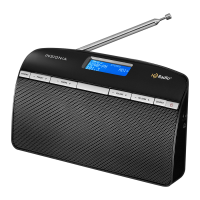
Tabletop HD Radio
Receiver
NS-HDRAD2
NS-HDRAD2_15-0849_MAN_V1_ENG.fm Page 1 Monday, December 7, 2015 5:56 PM

Questions and Answers

  • A
    Amber JacksonJul 27, 2025
    What to do if my Insignia NS-HDRAD2 Radio has no sound?
    • A
      amberandersonJul 27, 2025
      If your Insignia Radio has no sound, ensure that the power is connected and the radio is turned on. Also, verify that the volume isn't set too low. If you're using an external device, confirm that it's powered on, playing, and its volume is turned up, not muted.
  • J
    Jonathan HerreraJul 31, 2025
    How to fix Insignia Radio that won’t turn on?
    • J
      Jerry PetersonJul 31, 2025
      If your Insignia Radio isn’t turning on, ensure the power cord is fully inserted into the power outlet and firmly connected to the DC IN jack on the back. If you're using batteries, check that they aren't dead.
  • R
    russellcarolAug 4, 2025
    Why won't my Insignia NS-HDRAD2 play in FM mode?
    • S
      Stephanie StokesAug 4, 2025
      If your Insignia Radio isn't playing in FM mode, first, make sure that your radio is set to FM. Then, ensure that the radio is correctly tuned to an FM station. Finally, check that the FM antenna is extended.
  • R
    Regina JohnsonAug 8, 2025
    What to do if FM reception on Insignia Radio sounds distorted?
    • M
      Marc PerezAug 8, 2025
      If the FM radio reception on your Insignia Radio sounds distorted or fuzzy, try extending the antenna or moving your radio closer to a window to improve reception.
  • B
    burnsandrewAug 13, 2025
    Why does my Insignia NS-HDRAD2 Radio HD Radio sound switch between Digital and Analog?
    • S
      Shari RussellAug 13, 2025
      If your Insignia Radio's HD Radio sound keeps switching between digital and analog audio, and the HD Radio indicator turns on and off, you may be out of range of the HD Radio station’s area. Try extending your antenna or moving your radio closer to a window to improve reception.
  • A
    Amy GregoryAug 17, 2025
    How to control MP3 player with Insignia Radio?
    • C
      Christopher SchwartzAug 17, 2025
      To control your MP3 player while it's connected to your Insignia Radio, you need to use the controls on your MP3 player itself.
  • M
    Mr. Todd HenryAug 21, 2025
    How do I clear presets on Insignia NS-HDRAD2 Radio?
    • O
      Omar HarrisAug 21, 2025
      To clear your presets on the Insignia Radio, press and hold the MEMORY and SOURCE buttons at the same time.

Summary

Safety Information

Features

Understanding Radio Modes

HD Radio Mode

Explains the digital FM radio reception and multicast channel features.

Setting Up Your Radio

Powering the Radio

Explains how to power the radio using AC adapter or batteries.

Installing Batteries

Provides step-by-step instructions for inserting AA batteries.

Connecting the AC Adapter

Guides the user on connecting the AC adapter to power the device.

Using Your Radio

Using HD Radio Technology

Troubleshooting

Maintaining Your Radio

Specifications

Details the technical specifications including power, dimensions, and audio output.

One-Year Limited Warranty

Insignia NS-HDRAD2 Specifications

General IconGeneral
BrandInsignia
ModelNS-HDRAD2
CategoryRadio
LanguageEnglish

Related product manuals