EasyManua.ls Logo

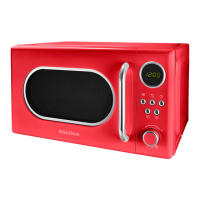
Insignia NS-MWR07R2 - User Manual

Insignia NS-MWR07R2
23 pages
Print Icon
To Next Page IconTo Next Page
Loading...
Before using your new product, please read these instructions to prevent any damage.
USER GUIDE
.7 Cu. Ft.
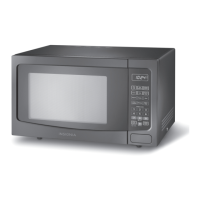
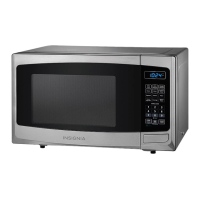
Retro Microwave Oven
NS-MWR07R2 / NS-MWR07M2

Questions and Answers

  • F
    Frank MyersAug 2, 2025
    Why won't my Insignia Microwave Oven start?
    • R
      Randall RussoAug 2, 2025
      If your Insignia Microwave Oven won’t start, make sure the power cord is properly plugged into a power outlet. Also, ensure that the door is completely closed. If the issue persists, double-check the operation settings against the instructions.
  • J
    Jennifer AcostaAug 6, 2025
    What to do if there is arching or sparking in my Insignia Microwave Oven?
    • L
      Laura JenkinsAug 6, 2025
      If you notice arching or sparking in your Insignia Microwave Oven, it could be due to using incorrect materials. Ensure you are only using microwave-safe materials. Also, avoid operating the microwave when it's empty. Finally, clean any spilled food with a wet towel to prevent further issues.
  • M
    Matthew MendozaAug 10, 2025
    Why are foods unevenly cooked in my Insignia Microwave Oven?
    • M
      Miss Jessica NewmanAug 11, 2025
      Unevenly cooked food in your Insignia Microwave Oven can occur if you're using incorrect materials. Ensure you are using only microwave-safe materials. Also, make sure the food is fully defrosted before cooking. Verify that you are using the correct cooking time and power level, and remember to turn or stir the food during cooking.
  • W
    William SalinasAug 14, 2025
    Why is my Insignia Microwave Oven undercooking food?
    • R
      rrossAug 14, 2025
      If your Insignia Microwave Oven is undercooking food, ensure that you are using microwave-safe materials. Also, make sure the food is fully defrosted before cooking. Verify that you are using the correct cooking time and power level. Check that the air vents are not blocked or restricted.
  • M
    Marcus KingAug 19, 2025
    Why does my Insignia Microwave Oven overcook food?
    • M
      Michael WelchAug 19, 2025
      If food is overcooked in your Insignia Microwave Oven, it may be due to incorrect cooking time or power level settings. Adjust the cooking time and power level to suit the food you are preparing.
  • J
    Jon SmithAug 25, 2025
    Why is my Insignia Microwave Oven defrosting incorrectly?
    • G
      garciakaylaAug 25, 2025
      If you're experiencing incorrect defrosting with your Insignia Microwave Oven, ensure you are using microwave-safe materials. Verify that you are using the correct cooking time and power level. Turn or stir the food during the defrosting process for even results.
  • M
    Mark DeanAug 27, 2025
    What to do if sensor cooked foods are not cooked correctly in my Insignia Microwave Oven?
    • S
      Summer FoxAug 28, 2025
      If sensor-cooked foods are not cooked correctly in your Insignia Microwave Oven, make sure that the cover or lid on the food has a vent hole for escaping steam. Also, avoid opening the door before the sensor-detected cooking time appears on the display, and don’t open the door to stir or turn the food.

Summary

SAFETY INFORMATION

Precautions for Microwave Energy Exposure

Instructions to prevent harmful exposure to microwave energy.

Important Safety Instructions

Essential safety precautions for safe operation, covering fire, shock, and injury risks.

GROUNDING AND RADIO INTERFERENCE

Electrical Grounding Requirements

Proper grounding procedures for electrical safety and shock prevention.

Minimizing Radio and TV Interference

Tips to reduce interference with radios and televisions.

COOKWARE AND MATERIALS GUIDE

Recommended Microwave-Safe Materials

List of approved materials for use in the microwave.

Materials to Avoid in Microwave Use

List of items that can cause sparks, fire, or damage.

MICROWAVE COMPONENTS AND FEATURES

Identification of Microwave Parts

Description of the main components of the microwave oven.

Product Feature Highlights

Overview of the microwave's main capabilities and design.

CONTROL PANEL AND SETUP

Understanding the Control Panel

Explanation of buttons, display, and adjustment knob functions.

Initial Setup Procedures

Steps for unpacking, inspecting, and preparing the microwave.

Microwave Placement and Ventilation

Guidelines for proper positioning and airflow for safe operation.

TURNTABLE AND BASIC USAGE

Turntable Installation Guide

Instructions for correctly installing the glass tray and turntable ring.

Setting the Clock and Timer

Guide to setting the internal clock and kitchen timer.

COOKING OPERATIONS

Basic Cooking with Power Levels

Instructions for selecting power levels and cooking times.

Quick Cooking Functions

Methods for rapid cooking or adding time to a cycle.

Utilizing Auto Menu Programs

Instructions for selecting pre-programmed cooking modes.

SPECIALIZED COOKING MODES

Cooking Popcorn

Specific tips for cooking popcorn bags in the microwave.

Defrosting Food Methods

Procedures for defrosting by weight or time.

Multi-Stage Cooking Setup

How to program sequential cooking stages.

ADVANCED FEATURES AND SETTINGS

Energy Saving (Eco) Mode

How to activate and deactivate the power-saving display mode.

Child-Lock and Buzzer Control

Instructions for child safety lock and disabling audible alerts.

Turntable Reset Functionality

Explanation of the automatic turntable reset feature.

TROUBLESHOOTING AND MAINTENANCE

Common Microwave Problems and Solutions

Guide to diagnosing and resolving typical microwave issues.

Microwave Cleaning and Care

Instructions for keeping the microwave clean and in good condition.

Obtaining Replacement Parts

How to contact for ordering spare parts.

SPECIFICATIONS AND WARRANTY

Technical Specifications Overview

Details on electrical ratings, dimensions, and certifications.

Warranty Coverage and Service

Explains what the warranty covers, its duration, and how to get service.

Warranty Exclusions and Limitations

List of conditions and damages not covered by the warranty.

Insignia NS-MWR07R2 Specifications

General IconGeneral
BrandInsignia
ModelNS-MWR07R2
CategoryMicrowave Oven
LanguageEnglish

Related product manuals