11
12
Double click the “hypertrm” and input a name for the connection
as following picture, then click “OK”.
3
Select the interface code of the USB cable.
4
Set the parameters as following picture then click “OK”.
5
Enter the function menu and select the tab “Send data to PC”,then
press key.
6
The screen will display the data saved before, now you can edit,
save, print the data.
7
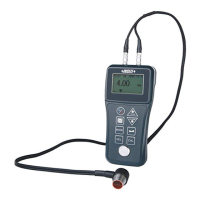
Standard delivery
1pc
1pc
1pc
1bottle
1pc of each
Main unit
Transducer ISU-PT12
AC/DC adapter
Couplant
USB cable and software disc
ISU-PT08
Transducer
Optional Accessory


 To Next Page