5
FOR USE BY QUALIFIED PERSONNEL ONLY
Configuring Your Machine
Once you have correctly installed
will want to configure the settings of your machine
to match your needs.
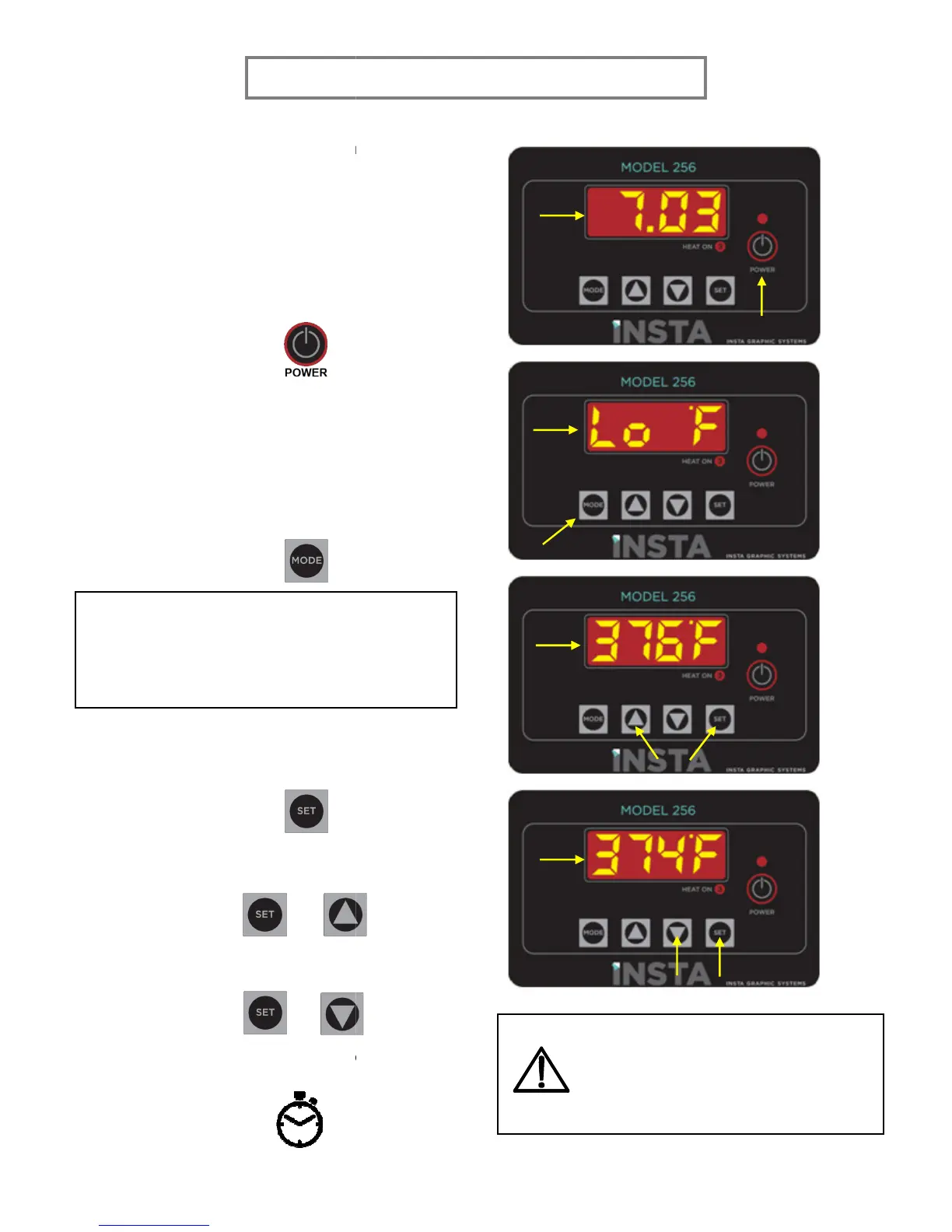
power switch on,
button on the control panel
The display will briefly show the
c
ontroller program revision number.
If the temperature is not shown, press
MODE
to cycle to the temperature
display.
If the platen temperature is BELOW 2
°C, the controller will display “Lo F
depending on the units the controller is set to.
to display the current set
temperature.
To raise the temperature, hold
UP.
+
To decrease the temperature, hold
and DOWN.
+
Give the machine time to heat
FOR USE BY QUALIFIED PERSONNEL ONLY
, you
will want to configure the settings of your machine
POWER
The display will briefly show the
ontroller program revision number.
If the temperature is not shown, press
to cycle to the temperature
°F OR 107
“Lo C”
depending on the units the controller is set to.
to display the current set
To raise the temperature, hold
SET and
To decrease the temperature, hold
SET
Give the machine time to heat
Heating may take between 20
minutes depending on the set
temperature. Do not leave the
machine unattended during this time!
Heating may take between 20
to 45
minutes depending on the set
temperature. Do not leave the
machine unattended during this time!


 To Next Page