www.urcsupport.com
16
3. Press the key containing the learned function
to be deleted twice. The active MODE key will
blink twice.
Deleting All Learned Keys in a Specific Mode
NOTE: If more than 15 seconds pass between key
presses, the remote exits programming.
PROGRAMMING CHANNEL CONTROL LOCK
By default, the remote control’s channel-control
capabilities are locked to the set-top box. The affected
keys
*
are 1 through 0, CH+, CH-, and LAST. This will
guarantee that you do not inadvertently change a
channel on your TV or VCR. However, you can de-
activate this feature to allow full access to these keys in
the TV and VCR modes.
*
NOTE: This feature does not affect the AUD mode.
4. Repeat steps 2 through 3 for another key or
press and hold SETUP to exit programming.
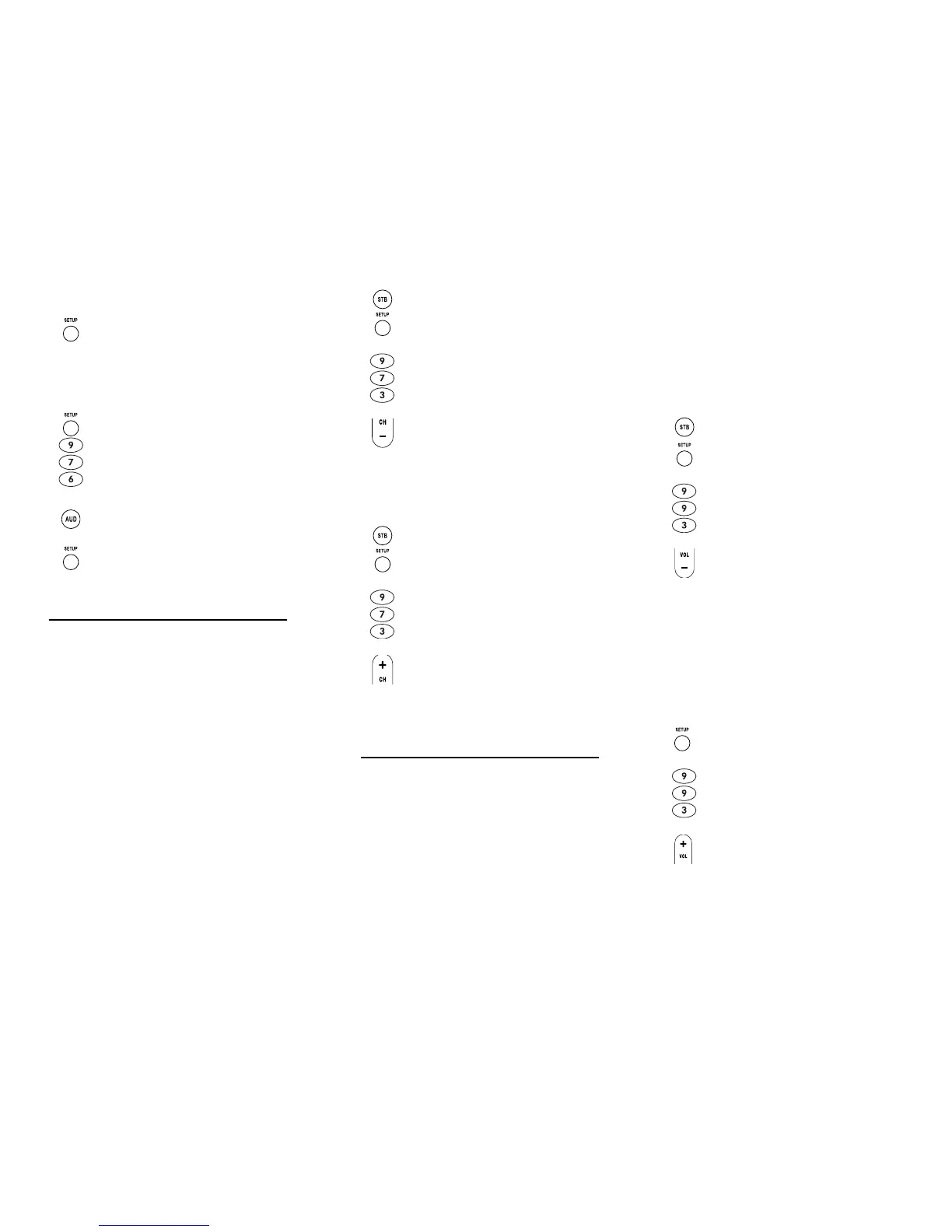
1. Press and hold SETUP until the last-selected
mode key blinks twice, then press 9 7 6.
2. Press a mode key twice (i.e., VCR, DVD, AUD,
TV, or STB) to clear all the learned keys for that
mode. The mode key LED blinks twice.
3. Repeat step 2 for another mode or press and
hold SETUP to exit programming.
Nebula Potenza ST.fm Page 16 Monday, October 15, 2007 4:55 PM
www.urcsupport.com
17
Unlocking Channel Control
Now the remote control will provide TV and VCR
channel-control capabilities while in the TV or VCR
mode.
Locking Channel Control to STB
Now, regardless of what mode you select (except AUD),
the channel keys will only change channels on your set-
top box.
CHANGING VOLUME LOCK
Volume Lock allows you to control the volume through
the device identified as having your primary speaker(s),
regardless of which mode you are using. On the Potenza
ST Remote Control, Global Volume Lock is set to TV, so
you can control TV volume while in the VCR, DVD, TV or
STB mode. You can perform Individual Volume Unlock
on a selected device to set its volume control for
independent operation.
1. On the remote control, press STB once; it will
blink once. Press and hold SETUP until the
STB key blinks twice.
2. Enter 9 7 3. The STB key will blink twice.
3. Press CH- once. The STB key will blink four
times.
1. On the remote control, press STB once; it will
blink once. Press and hold SETUP until the
STB key blinks twice.
2. Enter 9 7 3.The STB key will blink twice.
3. Press CH+ once. The STB key will blink twice.
Nebula Potenza ST.fm Page 17 Monday, October 15, 2007 4:55 PM
www.urcsupport.com
18
NOTE: The audio mode’s (AUD) volume controls are
active regardless of Volume Lock settings.
However, if you lock the volume controls to
the AUD mode, you will have control of the
audio device’s volume in all other modes (i.e.,
VCR, DVD, TV, and STB). This can be an advan-
tage if, for example, you always listen to home
entertainment devices through your receiver’s
speakers.
Unlocking Volume Control for a Single Device
(Individual Volume Unlock)
4. Repeat steps 1 through 3 for each device you
want volume to be unlocked.
Now, after you select a device that has volume unlocked
(e.g., STB), pressing VOL+, VOL-,or MUTE, will control
only that device’s volume.
Unlocking All Volume Control (Global Volume Unlock)
NOTE: Performing these instructions will set inde-
pendent volume control for all programmed
devices.
1. Assuming Global Volume Lock is active, select
a mode on the remote control that you want to
unlock (e.g., STB) and press it once. Next,
press and hold SETUP until the device key
blinks twice.
2. Enter 9 9 3. The last-selected device key will
blink twice.
3. Press VOL- once. The last-selected device key
will blink four times.
1. On the remote control, press and hold SETUP
until the last-selected device key blinks twice.
2. Enter 9 9 3. The last-selected device key will
blink twice.
3. Press VOL+ once. The last-selected device key
will blink four times.
Nebula Potenza ST.fm Page 18 Monday, October 15, 2007 4:55 PM


 To Next Page