29
Basic Playback—Continued
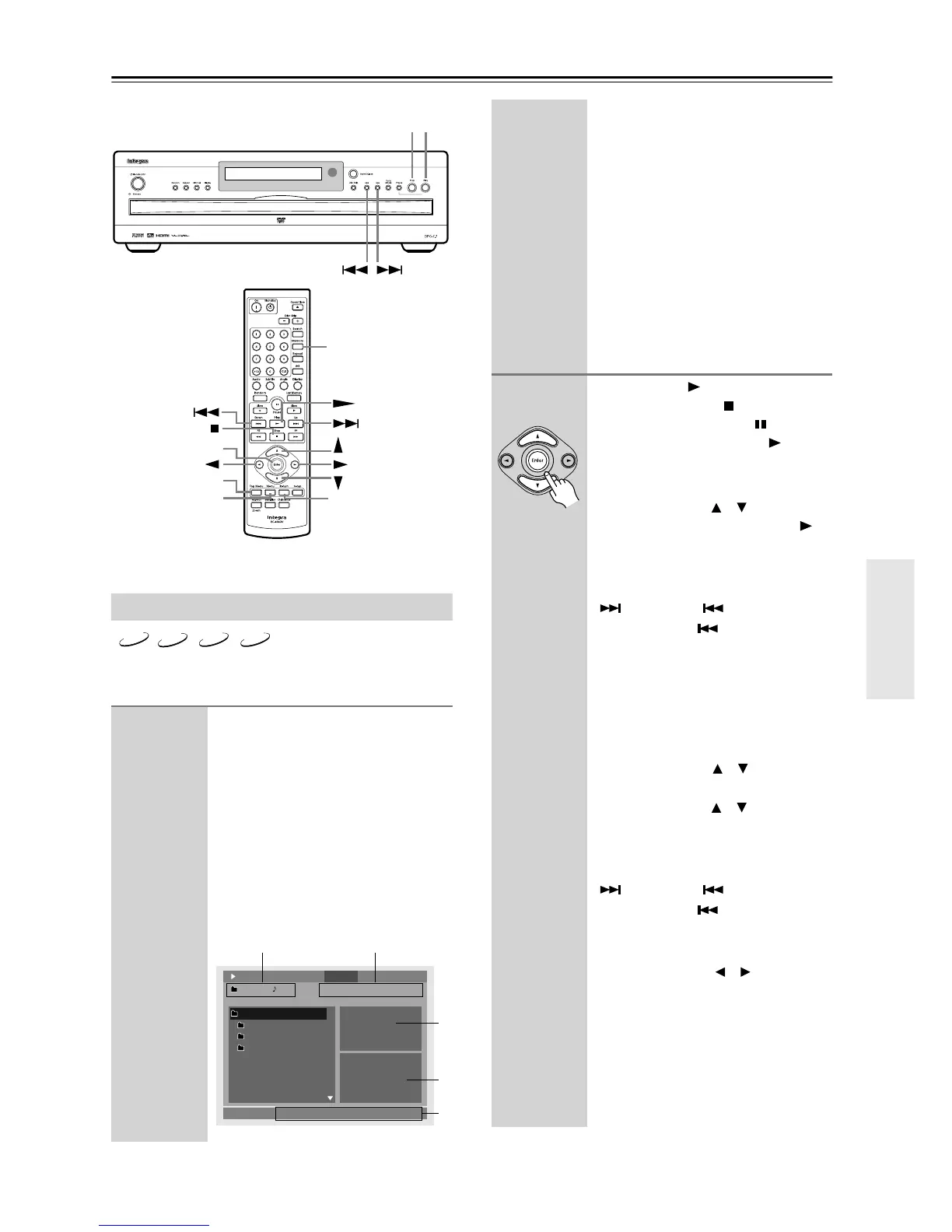
On the disc navigation window, you can select CD tracks
or MP3, WMA, or JPEG files.
Using the Disc Navigation Window
1
Load and select an audio CD or
MP3, WMA, or JPEG disc.
See page 25 and page 26.
The disc navigation window appears.
It may take a while to read the contents
of discs that contain many files and
folders.
For JPEG discs, a slideshow starts auto-
matically. To open the disc navigation
window, press the [Menu] button.
This is the display for an MP3 disc.
Enter
PlayStop
Return
Enter
Memory
Top Menu
Menu
MP3 WMA
JPEG
CD
Repeat
001. ROOT
00:00:24 00:05:06 00:05:30
/MP3 music
002. MP3 music
003. Integra 1
004. Integra 2
001. Track01
002. Track02
003. Track03
004. Track04
Ramdom
Name: Integra Title Artist Name: Integra Artist
: Off
: Off
M
P
3
M
P
3
M
P
3
M
P
3
1/10 1/8
Play 4: DATADisc
12
3
4
5
A Folder number and file number.
B Elapsed time, remaining time, and
total time of currently playing
song. (Only elapsed time is shown
for WMA files.) (See also page 43.)
C Repeat function and Random
function status.
D For JPEG files, a preview and the
file size are displayed here.
E Information about the song
currently playing (e.g., song title,
artist name, album name) is
displayed here, if available.
2
Press the Play [ ] button to start play-
back. Press the Stop [ ] button to stop
playback. Press the Pause [ ] button to
pause playback and the Play [ ] button
to resume it.
For audio CDs:
Use the Up/Down [ ]/[ ] buttons to
select a track, and press the Play [ ]
button (or [Enter]) to start playback.
You can select the next or previous
track during playback by using the Up
[] and Down [ ] buttons.
Press the Down [ ] button to restart
the current track. Press it again to select
earlier tracks.
Alternatively, the number button is
used to select a track.
For MP3, WMA, and JPEG discs:
To open a folder, use the remote con-
troller’s Up/Down [ ]/[ ] buttons to
select it, and then press [Enter].
Use the Up/Down [ ]/[ ] buttons to
select tracks in the open folder.
You can select the next or previous
track during playback by using the Up
[] and Down [ ] buttons.
Press the Down [ ] button to restart
the current track. Press it again to select
earlier tracks.
Use the Left/Right [ ]/[ ] buttons to
select other folders.
To close a folder (i.e., move back up the
directory tree), press the [Return] but-
ton.
When all the tracks in that folder have
been played, tracks in the next folder
are played.
Remote controller



 To Next Page