21
Connecting the DPS-6.5
—Continued
Connecting the Multichannel Analog
Outputs
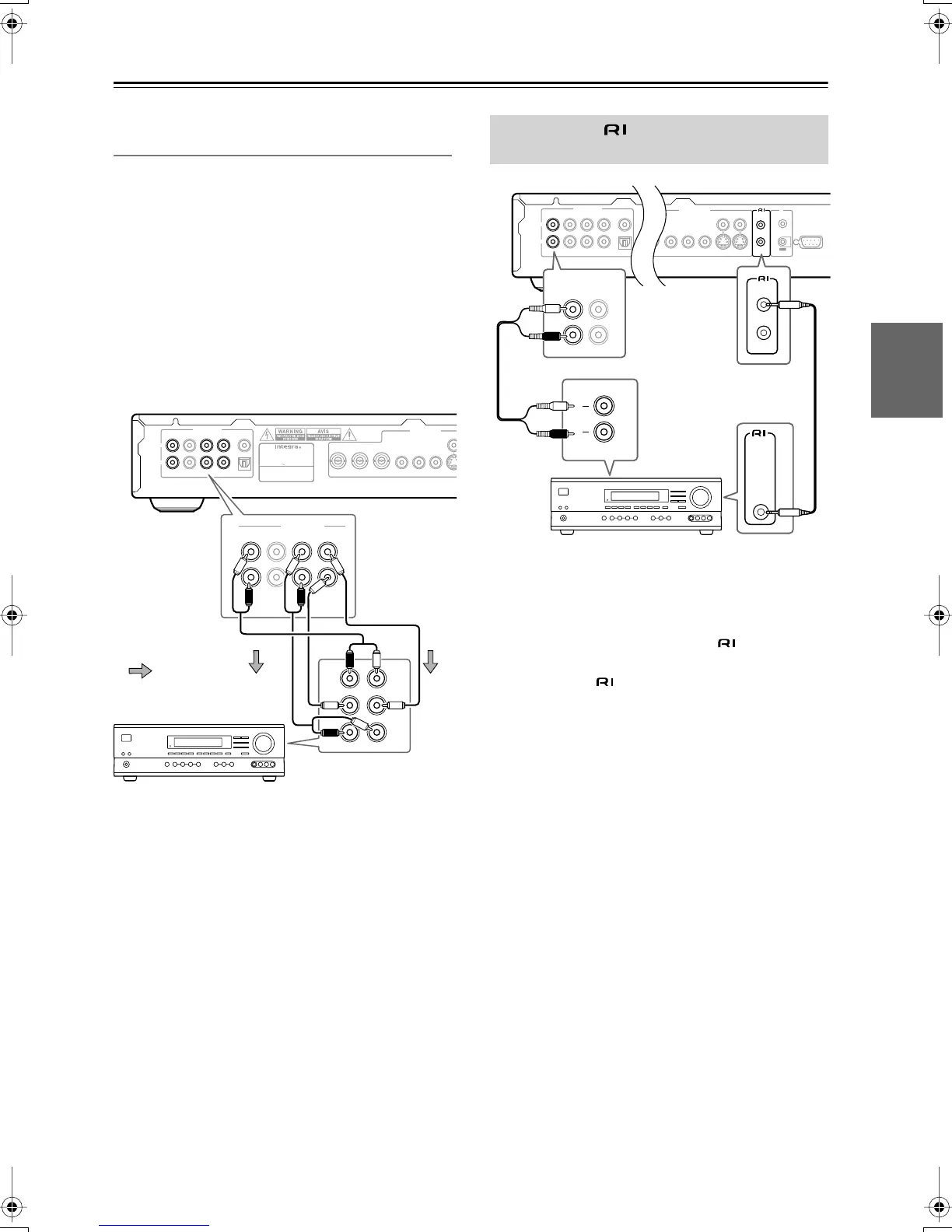
If your AV receiver has 5.1 channel analog inputs, we
recommend connecting this player to it using the multi-
channel analog outputs. Doing this will ensure that you
can enjoy all kinds of disc, including Dolby Digital and
DTS DVD-Video discs, as well as high sampling rate
and multichannel DVD-Audio and SACD discs.
1. Connect the FRONT/D.MIX, SURR, CENTER,
SUBWOOFER outputs on this player to the
multi-channel audio inputs on your AV receiver.
It’s convenient to use three stereo audio cables; one
for the FRONT/D.MIX 1 or 2, one for the SURR and
one for the CENTER and SUBWOOFER channels.
You can use the S video or component video jacks to
connect to the AV receiver if you prefer.
Tip:
• After connecting up and switching on, you should
change the Audio Output Mode setting in the Initial
Setup menu from the default 2 Channel to 5.1 Chan-
nel. See also Audio Output Mode on page 45, 49.
• The remote controller supplied with Integra AV
receiver or amplifiers can be used to control the DPS-
6.5.
• The function of the upper and lower connectors are
the same. Connect to either one.
• Connecting an cable only does not make the sys-
tem operational. You must also connect the audio
cables as well.
•For remote control operation, you must make an ana-
log RCA connection between your DPS-6.5 and the
other AV component, even if they are connected digi-
tally.
VIDEO
OUTPUT
PBY
P
R
PBY
P
R
COMPONENT 2 COMPONENT 1
MODEL NO.
DPS
-
6.5
RATING
:
AC 120
V 60Hz 11
W
SUPER AUDIO CD & DVD AUDIO/
VIDEO PLAYER
R
L
SURR CENTER
1 2
FRONT/D. MIX
AUDIO OUTPUT
DIGITAL
SUB
WOOFER
OPTICAL
COAXIAL
SURR CENTER
1 2
FRONT/D. MIX
AUDIO OUTPUT
SUB
WOOFER
R
L
FRONT
SUB
SURR
CENTER
AV receiver
Signal flow
Connecting -compatible
Components
VIDEO
OUTPUT
RS232
VIDEO
S VIDEO
P
R
PBY
P
R
COMPONENT 1
REMOTE
CONTROL
IR
OUT
IN
R
L
SURR CENTER
1 2
FRONT/D. MIX
AUDIO OUTPUT
DIGITAL
SUB
WOOFER
OPTICAL
COAXIAL
REMOTE
CONTROL
REMOTE
CONTROL
L
R
IN
1 2
FRONT/D. MIX
AV receiver
DPS-6.5.book Page 21 Thursday, August 5, 2004 3:27 PM


 To Next Page