25
Getting Started
—Continued
This sets the language of this system’s on-screen dis-
plays.
The basic playback controls for playing DVD, CD,
SACD, Video CD and MP3/WMA discs are covered
here. Further functions are detailed in the next chapter.
For details on playing JPEG picture discs, see “Viewing
a JPEG slideshow” on page 29.
Important:
• Throughout this manual, the term “DVD” means DVD-
Video, DVD-Audio and DVD-R/ RW. If a function is
specific to a particular kind of DVD disc, it is specified.
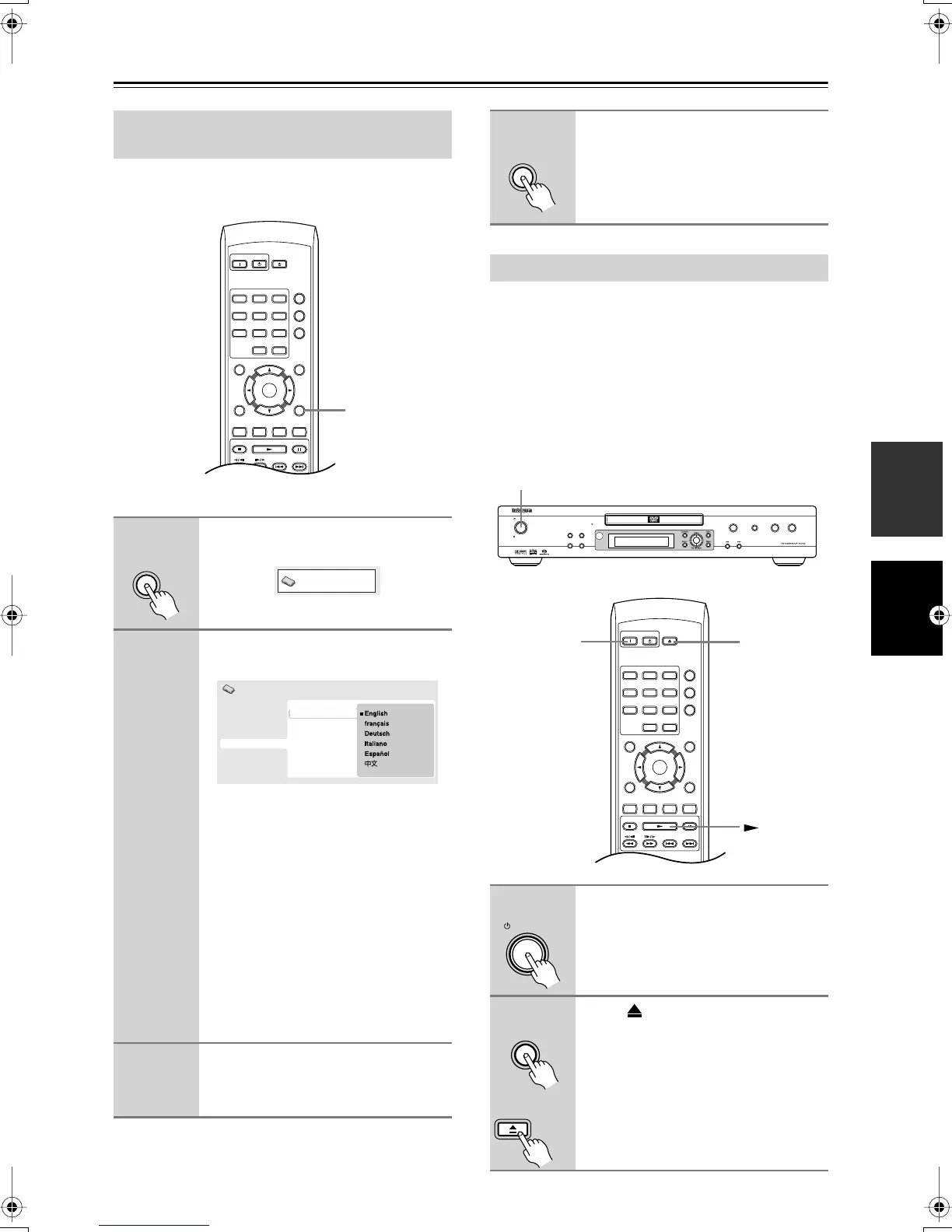
Setting the language of this player’s
on-screen displays
1
Press Setup and select “Initial Set-
tings”.
2
Select “OSD Language” from the
“Display” settings.
The available languages vary between
models.
• North American model: English, French,
Spanish, German, Italian, Other Language.
• Australian model: English, French, Span-
ish, Chinese, Other Language.
• Note that the language you choose
here may not be available on all discs.
• If you want to select a language other
than those listed, select “Other Lan-
guage.” See “Selecting languages
using the language code list” on
page 52 for detailed information.
3
Select a language.
The on-screen language will change
according to your selection.
On
Standby
Open/
Close
Play Mode
Display
123
456
789
0
Clear
Dimmer
Top Menu Menu
Return Setup
Audio Angle Subtitle Zoom
Stop Play Pause
Down Up
T
V Control
T
V/
Video Channel
On/
Enter
Setup
Setup
Initial Settings
Digital Audio Out
Video Output
Language
Display
Options
Speakers
OSD Language
Angle Indicator
Initial Settings
4
Press Setup to exit the menu
screen.
Playing discs
1
If the player isn’t already on, press
Standby/On to switch it on.
If you’re playing a DVD or Video CD,
also turn on your TV and make sure that
it is set to the correct video input.
2
Press Open/Close to open the
disc tray.
Setup
On
Standby
Open/
Close
Play Mode
Display
123
456
789
0
Clear
Dimmer
Top Menu Menu
Return Setup
Audio Angle Subtitle Zoom
Stop Play Pause
Down Up
T
V Control
T
V/
Video Channel
Enter
DPS
-
6.5
Open
/Close
Pause
Stop Play
Standby/On
Standby
Progressive
Play Mode
Clear
Display
Dimmer
Standby/On
On
Open/
Close
Standby/On
Open/
Close
Open
/Close
Remote
controller
DPS-6.5.book Page 25 Thursday, August 5, 2004 3:27 PM


 To Next Page