11
> Before start > Hookup >Setup >Playback >Part Names
+−+− +− +−
LRLR
FRONT HEIGHT
1
For high-
frequency
For low-
frequency
Power amplifier
1 Analog audio cable
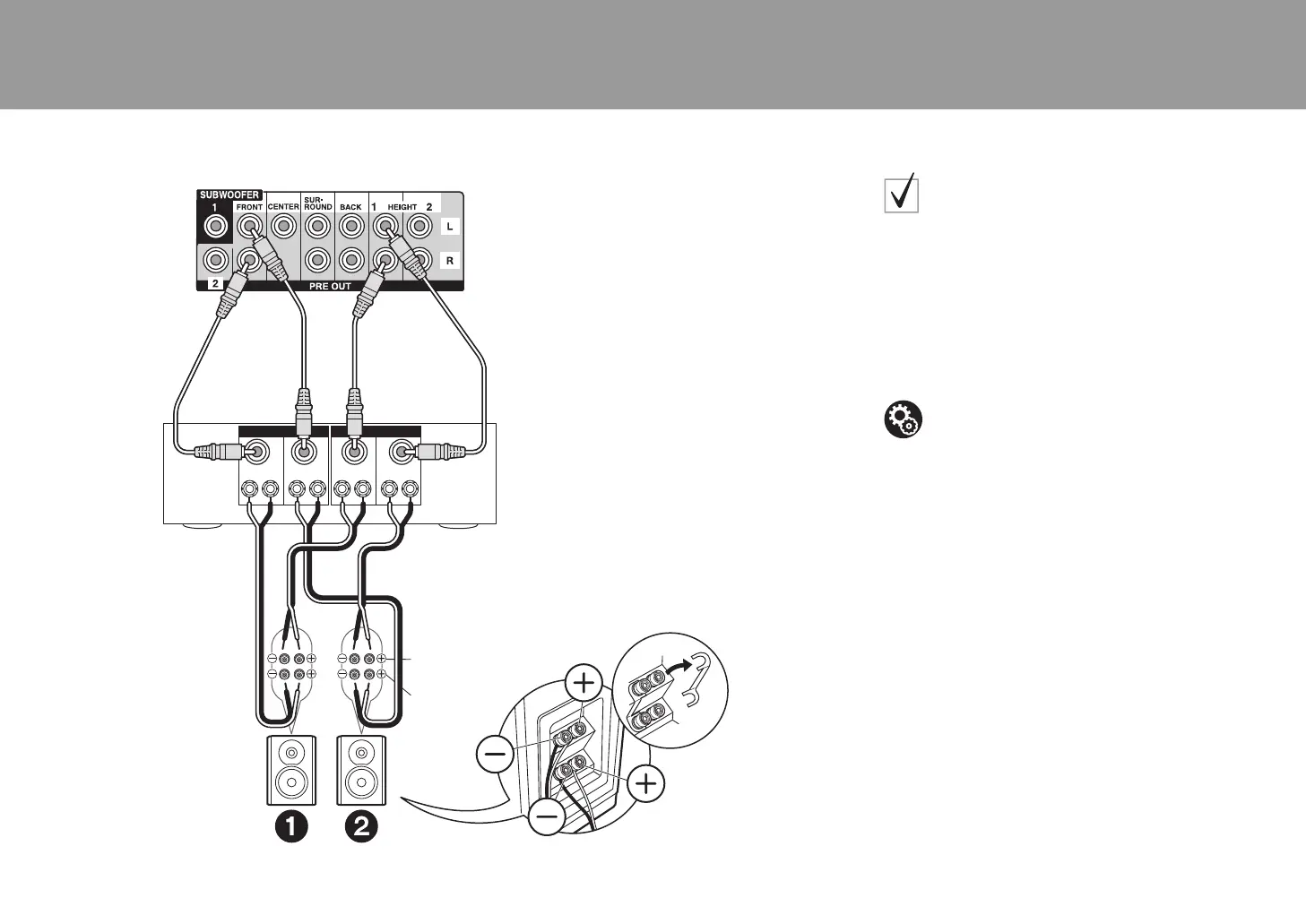
Connections with Bi-
Amping speakers
The illustration at left shows an example of connection
using the PRE OUT (RCA) jacks. Refer to the illustration
at left also when connecting using the PRE OUT (XLR)
jacks. Both connections use the FRONT jacks and
HEIGHT 1 jacks. Make sure you remove the jumper bar
fitted between the woofer jacks and tweeter jacks of the
front speakers. In case of Bi-Amping connection, refer to
the instruction manual of your speakers.
Setup
0 Bi-Amping connection requires you to change
some settings. Select "Yes" in "Bi-Amp" in "1.
AccuEQ Room Calibration" (
Ä
P22) in the Initial
Setup.
SN29402434A_DRC-R1_BAS_En_1703XX.book 11 ページ 2017年3月14日 火曜日 午後7時26分



 To Next Page