21
Front Panel≫ Rear Panel≫ Remote≫
Contents
≫
Connections
≫
Playback
≫
Setup
≫
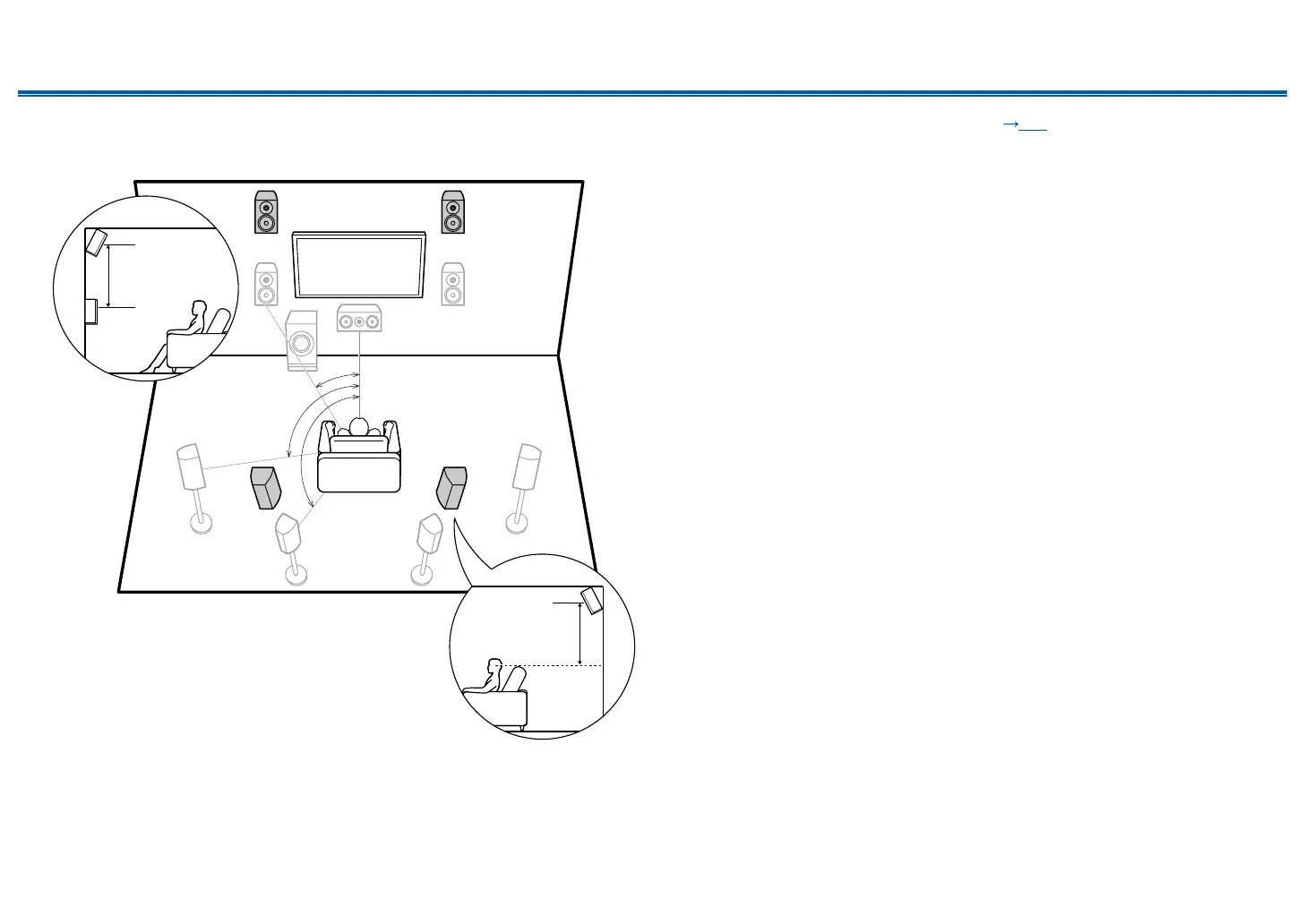
❏ Front High Speakers/Rear High Speakers
Installation Example
*1
*2
*3
9bk
9bk
*1: 22° to 30°, *2: 90° to 110°, *3: 135° to 150°
3´ (0.9 m)
or more
3´ (0.9 m)
or more
This is a system with the 7.1 channel system ( p15) consisting of front
speakers, a center speaker, surround speakers, surround back speakers and
a powered subwoofer, and added front high speakers or rear high speakers
combined. By installing such height speakers, when the input format is Dolby
Atmos, you can select the Dolby Atmos listening mode which realizes the most
up-to-date 3D sound including overhead sound. Front high speakers or rear high
speakers should be installed at least 3´/0.9 m higher than the front speakers.
Front high speakers should be installed directly above the front speakers, and the
distance between the rear high speakers should match the distance between the
front speakers. In both cases, the speakers should be set up facing the listening
position at an angle.
9,10 Height Speakers
Choose one of the following:
• Front High Speakers
• Rear High Speakers



 To Next Page