23
Programming Using IMC (Integra Music Center)—Continued
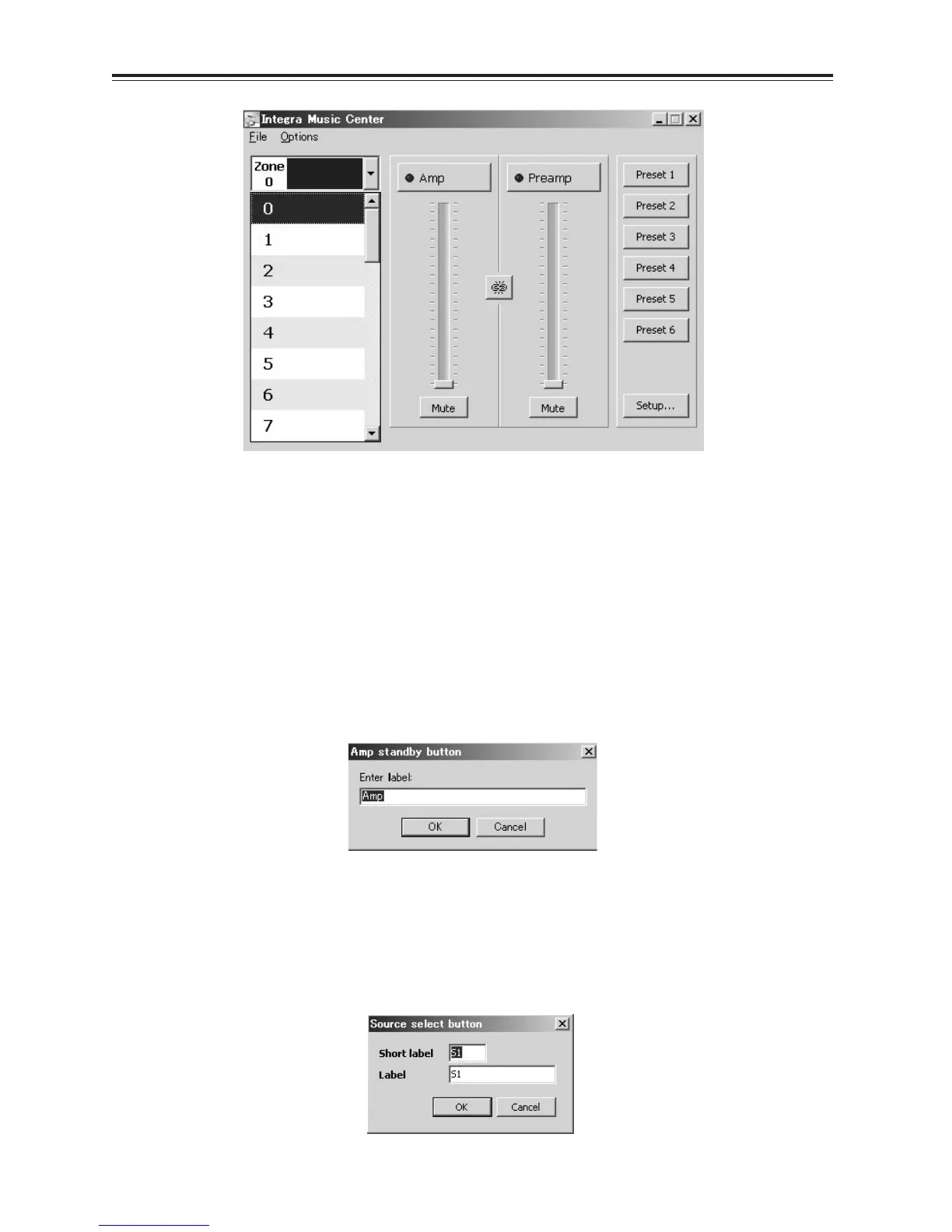
■ Zone Select
To select the zone move the cursor over the zone tab’s down arrow and left click. A zone list window appears – make
the selection with a left mouse click.
Placing the cursor over the zone tab’s room description displays information about the amplifier’s device ID/serial
number.
■ Zoned Functions
• Standby
On, Off control of the amplifier or preamplifier is achieved by a left click over the standby buttons. The blue LED
and the button shading indicate “On” status.
A name edit window is opened by a right click above the standby Button, enter the new text and click OK to save
and exit.
The room name is transferred to the amplifier.
• Mute
A left mouse click above the mute button mutes the amplifier or preamplifier, a further life click un-mutes it.
• Source Selects
One of eight sources (S1 - S8) may be selected – the button shading indicates the selection. A source’s name may be
changed with a right click over the source select button: A name edit window appears and new text entered.
The short label (limited to 3 characters) appears on the amplifiers front panel, while the Label is displayed in IMC.



 To Next Page