22
Programming Using IMC (Integra Music Center)
IMC is an amplifier setup program.
Full control and tracking of any MZA-4.7 zone is provided.
The program runs on PC’s running Win 2000 - Win XP operating systems, and communicates via either RS232 or USB.
When a MZA-4.7 is first attached to a PC running IMC the clock is automatically set to the PC’s current time and date.
A Keypad controller connected to the amplifier may also be controlled by IMC.
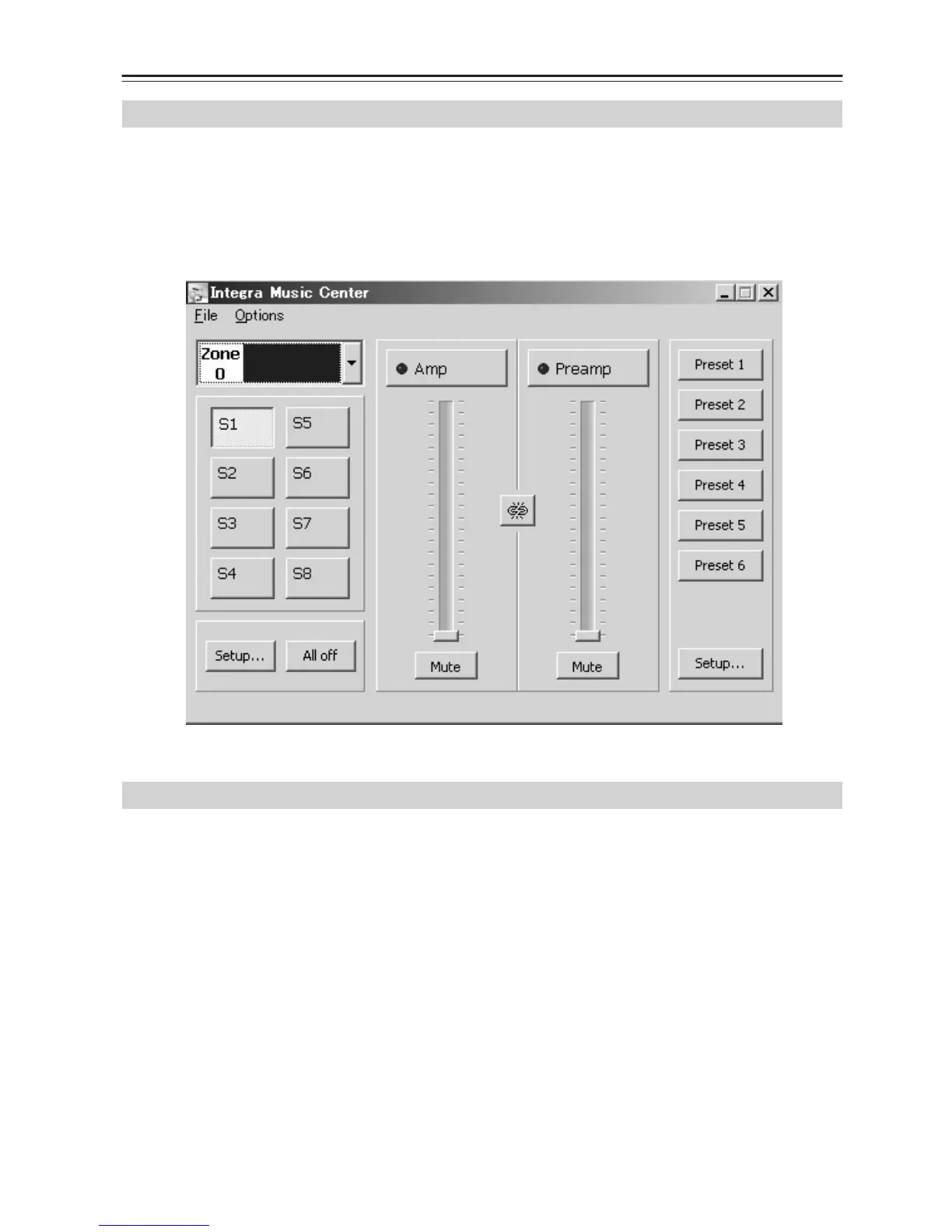
IMC’s main window provides most of the user functionality required for real-time access and control of any Integra
MZA-4.7 amplifier zone.
The file menu contains the “New Window,” “Keypad Window,” “View Amplifier Log,” “Import Keypad File” and “Exit”
commands.
• New Window: Opens another instance of IMC’s main window. This is useful for displaying and controlling multiple
zones simultaneously.
•Keypad Window: A keypad window is displayed, and a user can cause the selected keypad on the network to emit
its stored IR strings.
•View Amplifier Log: Displays all historical over temperature events and the date and time they occurred.
• Upload Sound: Direct IMC to the file location of suitable “wav” files. Click Open to upload the file to the amplifier.
• Exit: Shuts down IMC.
The option menu contains the port assignments. The program lists the ports on the PC/laptop.
Select either USB or a suitable COM port for RS232.
Overview
Main Window



 To Next Page