Intel® RAID Controller RS2WC080 Hardware User’s Guide 7
2 Intel
®
RAID Controller RS2WC080
Hardware Installation
Requirements
• An Intel
®
RAID Controller RS2WC080 with the provided cables
• A host system with an available x8 or x16 PCI-Express* slot
• The Resource CD, which contains drivers and documentation
• SAS or SATA 3.0 hard drives
Note: SATA II is the only type of SATA supported by this RAID Controller.
In addition, Intel Corporation strongly recommends using an uninterruptible power supply
(UPS).
Installing the RAID Controller
To install the RAID Controller, follow these steps:
1. Turn off the power to the system, all drives, enclosures, and system components.
Remove the power cord(s).
2. Remove the server system cover. For instructions, see the server system
documentation.
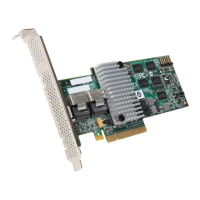
3. If necessary, change the bracket on the RAID controller to fit the height of the
server system (see
Figure 1).






 To Next Page