7
3. Installation
The following scenario describes the product installation for use in
Router
mode.
Step 1
Step 2
Step 3
Installation in
Router
mode
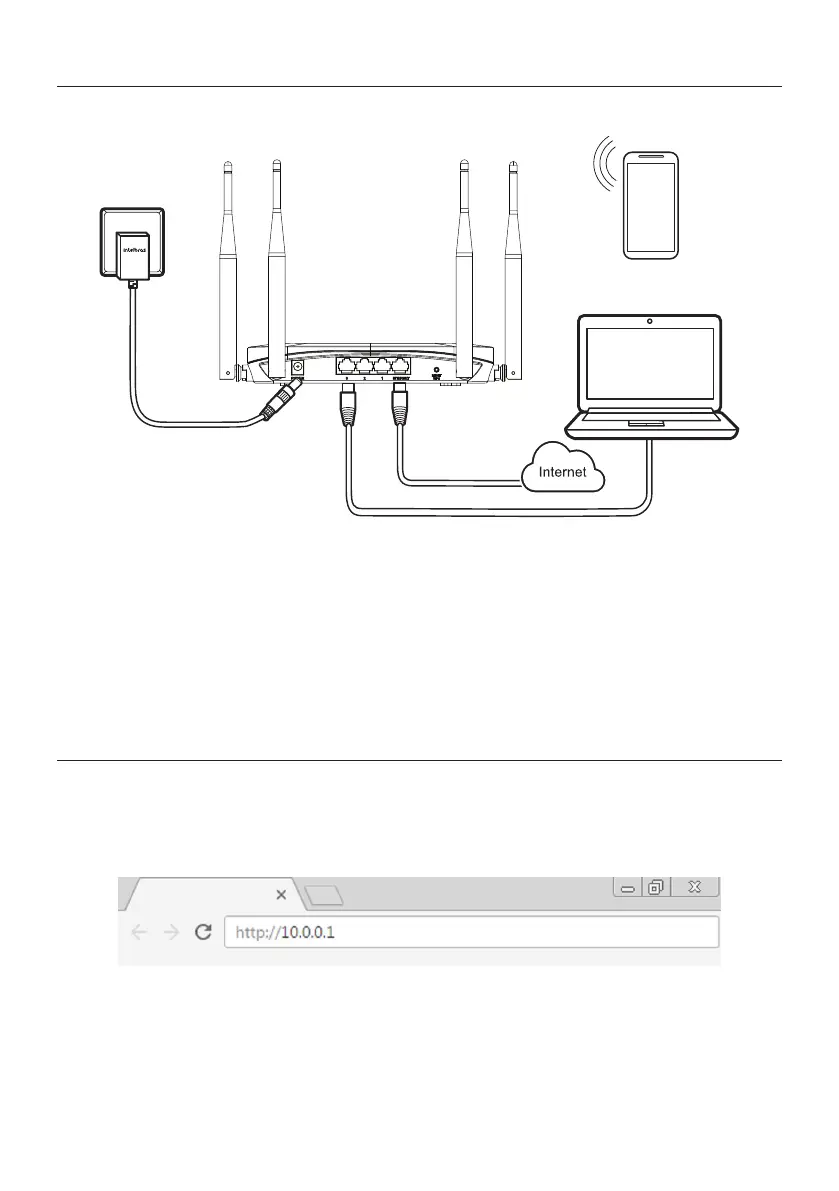
1. Connect the power supply to the router and then plug it into the electrical outlet. The LEDs will light up.
2. Connect the Internet network cable (for example, from your modem or other device) to the router’s Internet port;
3. Connect the computer to one of the LAN ports on the router using a network cable;
Note:
if you wish to access your router via Wi-Fi, access the wireless network named INTELBRAS or INTELBRAS_5G.
If you wish to perform this conguration using a smartphone, disable the mobile data network before proceeding with
the router settings.
4. Conguration
4.1. Conguration via web interface
On your computer, open your web browser (we recommend using the most current versions of Google Chrome
®
, Mozil-
la Firefox
®
or Microsoft Edge
®
) and go to
http://10.0.0.1
or
http://meuintelbras.local/
as shown in the following image.
This procedure should be performed whenever you need to change any conguration of your router.
Accessing the router conguration page



 To Next Page