10
» Step 4: wait while the conguration is restored. The restoration process will have nished when the product LED stops ashing and will
then turn red.
5. Firmware update
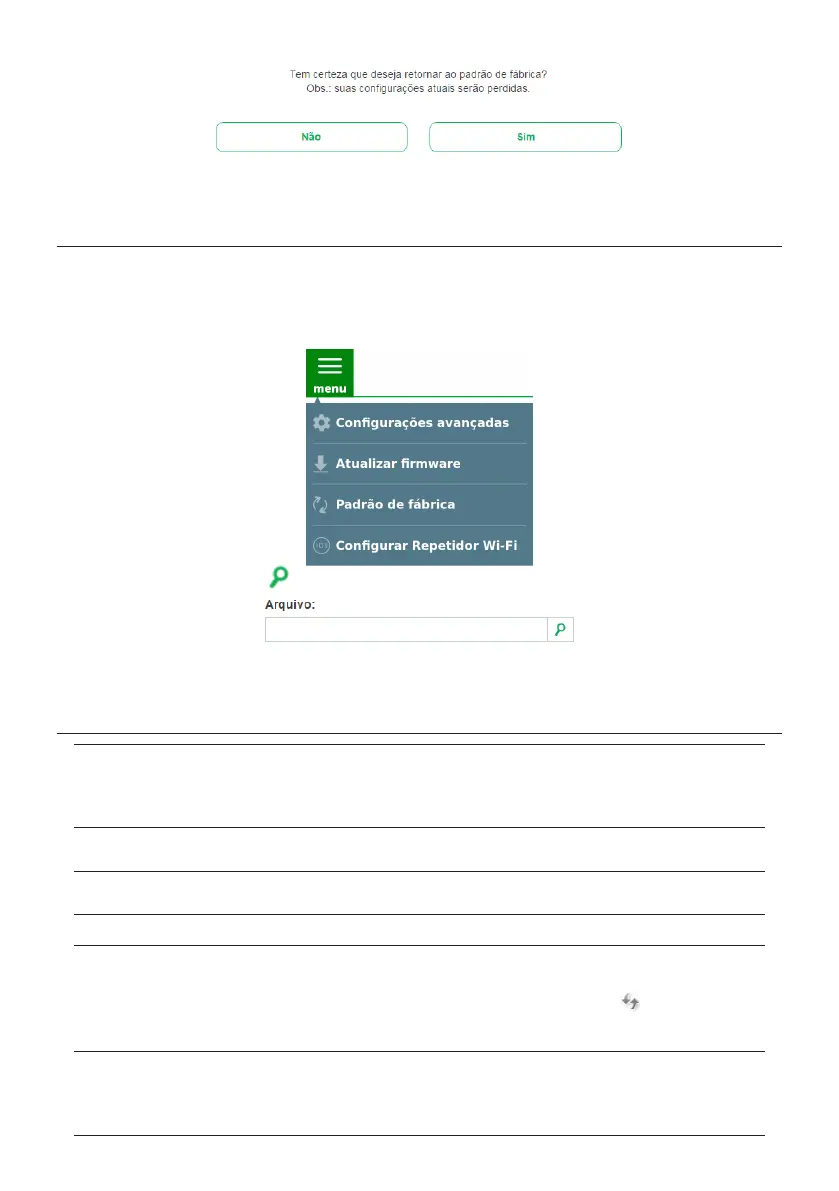
To update the rmware of your IWE 3001, it is necessary to:
» Step 1: download the latest rmware version available from Intelbras website:
www.intelbras.com.br/downloads
;
» Step 2: connect to the IWE 3001 network.
» Step 3: access the IWE 3001 conguration interface;
» Step 4: click on the menu and select the option
Update rmware
;
» Step 5: click on the search button
and then select the rmware le you downloaded from Intelbras’ website;
» Step 6: click on the
Update
button and wait for the process to nish, which can take up to 5 minutes. Follow the directions displayed by
the product interface.
6. Frequently Asked Questions
What can I do if I cannot
congure IWE 3001 either via
WPS or web browser?
Option 1: restart the equipment of your main network (router, modem, etc.) turning off and on again the electrical power. Then, congure
IWE 3001 again by performing the procedures described in item
3.2. Instalando e congurando como Repetidor Wi-Fi via navegador web.
Option 2: check if your router or modem allows your wireless signal to be repeated. If in doubt, contact the manufacturer or supplier of
the equipment (your operator, for example).
If you are not successful even performing the above procedures, please contact our support.
What can I do to access the
repeater after conguration?
Option 1: connect to the repeater’s Wi-Fi network and then access it via IP address
169.254.0.10
.
Option 2: check the repeater’s IP address on your main router’s client list. The repeater should appear in the list under the name IWE
3001. You can also search the repeater in the list for the MAC address found on the product label.
What to do when the IWE
3001 network disappears after
conguration?
After conguration, the repeater will change its network name to the same as your current network, so the IWE 3001 Wi-Fi network will
not actually appear. If you wish to change the repeater’s Wi-Fi setting, at the end of the wizard, click on
Advanced settings
and change the
local network name and password.
What to do when the
connection gets slow?
The repeater needs to be installed in a location where it receives a good signal from your router; try changing the repeater’s installation
location and test the connection again.
What to do when IWE 3001
Wi-Fi network is not found?
Option 1: if the product LED is green and not ashing, the IWE 3001 network will not appear because the product is already congured.
If you need to congure IWE 3001 again, you must refer to item
4. Restaurando as congurações de fábrica
. After restoring, you must
congure the product again.
Option 2: try updating the Wi-Fi network list of your device; you can do this, for example, by the button
on the network list of
Windows
®
7, or try disabling and enabling Wi-Fi again on your device. If you do not nd this option, you can restart your device and try
again.
Option 3: try accessing from another device, for example, computer, smartphone or tablet.
I changed the Wi-Fi network
name and/or password of
my main router. Do I need to
recongure the IWE 3001 as
a repeater?
Yes. Whenever you change the Wi-Fi network name or password on your main router, you will need to congure the new values on IWE
3001. To do so, you can:
Option 1: restore IWE 3001 to factory default settings and then congure it again
Option 2: connect to the IWE 3001 network and then access the product web interface at
http://meurepetidor.local
or
http://169.254.0.10
. You will then have to select the option
Congure Wi-Fi Repeater
from the menu and perform the conguration
following the interface guidelines.



 To Next Page