7
That’s it! You have nished conguring the IWE 3001 in
Wi-Fi Repeater
mode, via
WPS
button
(
).
3.2. Installing and conguring as
Wi-Fi Repeater
via web browser
This is another way to congure IWE 3001. If you have already performed the conguration procedure via
WPS
, you do
not need to follow the steps below, as your product should already be congured and working.
If you have not yet congured, follow these steps:
» Step 1: plug the IWE 3001 into the outlet and wait for it to start (red LED stops ashing). This will take about 1 minute;
» Step 2: connect to the Wi-Fi network under the name IWE 3001; if you are already connected to a network under
another name, disconnect and connect to the Wi-Fi network under the name IWE 3001;
Note: if you wish to perform the conguration using a mobile device (smartphone, for example), we recommend dis-
abling the mobile data network (3G/4G, etc.) before following the next steps.
» Step 3: open your web browser (we recommend using the most current versions of Google Chrome
®
, Mozilla Firefox
®
or Microsoft Edge
®
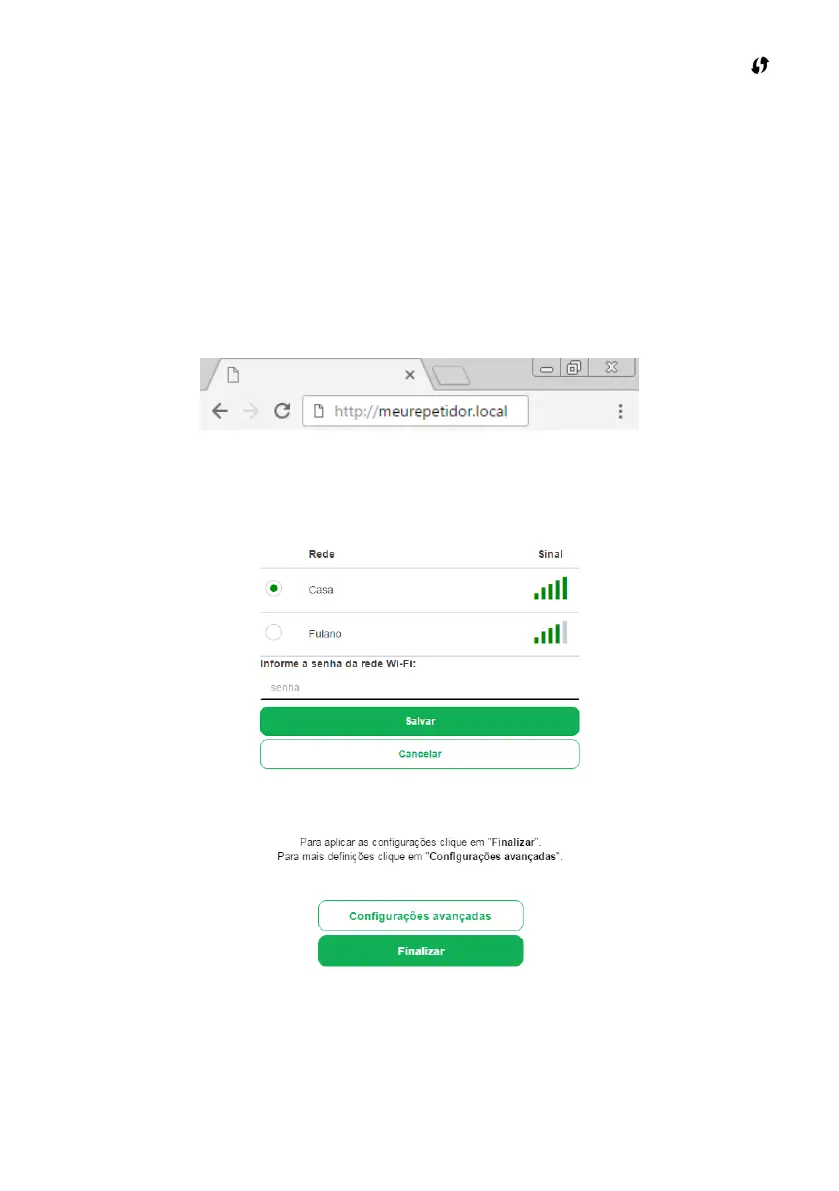
), and access the address
http://meurepetidor.local
, as shown in the following image. If the page does
not open, access it through
http://10.0.0.1
or
http://169.254.0.10
.
Access via web browser
Welcome to the installation wizard! To congure your repeater, choose the network you want to repeat and, if your
network uses a password, enter it in the eld
Enter the Wi-Fi network password
.
After entering your password, click on the
Save
button.
A few moments later, the following message will appear:
In this message, click on
Finish
. Then check the product LED; it indicates if the conguration status. If it ashes green
and some time later it lights up in that same color, the setting was successfully performed. However, if the LED ashes
green and then turns red again, there was some problem with the setting. If this occurs, connect to the IWE 3001 Wi-Fi
network and congure the repeater again. If the difculty persists, please refer to item
6. Dúvidas frequentes
. For more
information about the product LED, see item
1.1. Meaning of the LED.
Note: » After conguration, the repeater will use the same name and password as the Wi-Fi network of your main
router, therefore, the IWE 3001 Wi-Fi network will no longer be displayed on your devices.



 To Next Page