9
Space ! “ # $ % & ‘ ( ) * + , - . / 0 1 2 3 4 5 6 7 8 9
: ; < = > ? @ A B C D E F G H I J K L M N O P Q R S
T U V W X Y Z [ \ ] ^ _ ` a b c d e f g h i j k l m
n o p q r s t u v w x y z { | } ~
4. Restoring factory settings
Attention: at the end of this procedure, all settings will be lost and the IWE 3001 will be restored to factory defaults.
To restore the settings you have two options:
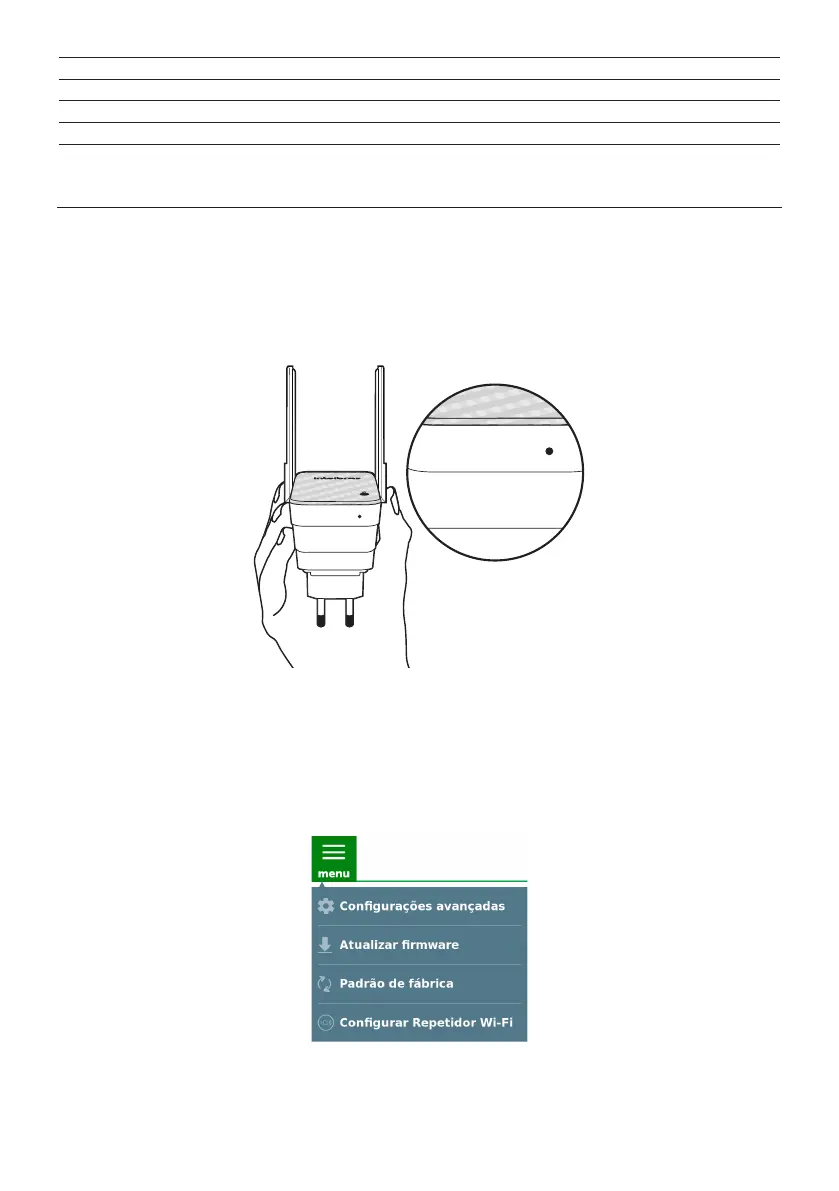
4.1. Restore settings via physical button
» Step 1: plug the IWE 3001 into the outlet and wait for it to start (red LED stops ashing). This will take about 1 minute;
» Step 2: press the
RST
button for about 6 seconds When the reset time is reached, the product LED will turn off and then
it will start ashing in red. When this occurs, you can stop pressing the button.
RST
RST
RST
RST
Using the
RST
button to reset the product
After releasing the button, wait while the conguration is restored. The restoration process will have nished when the
product LED stops ashing and will then turn red.
4.2. Restore settings via web browser
» Step 1: access the IWE 3001 conguration interface;
» Step 2: click on the menu and select the option
Factory default
;
» Step 3: on the page that opens, click on the
Yes
button to restore the settings.



 To Next Page