8
»
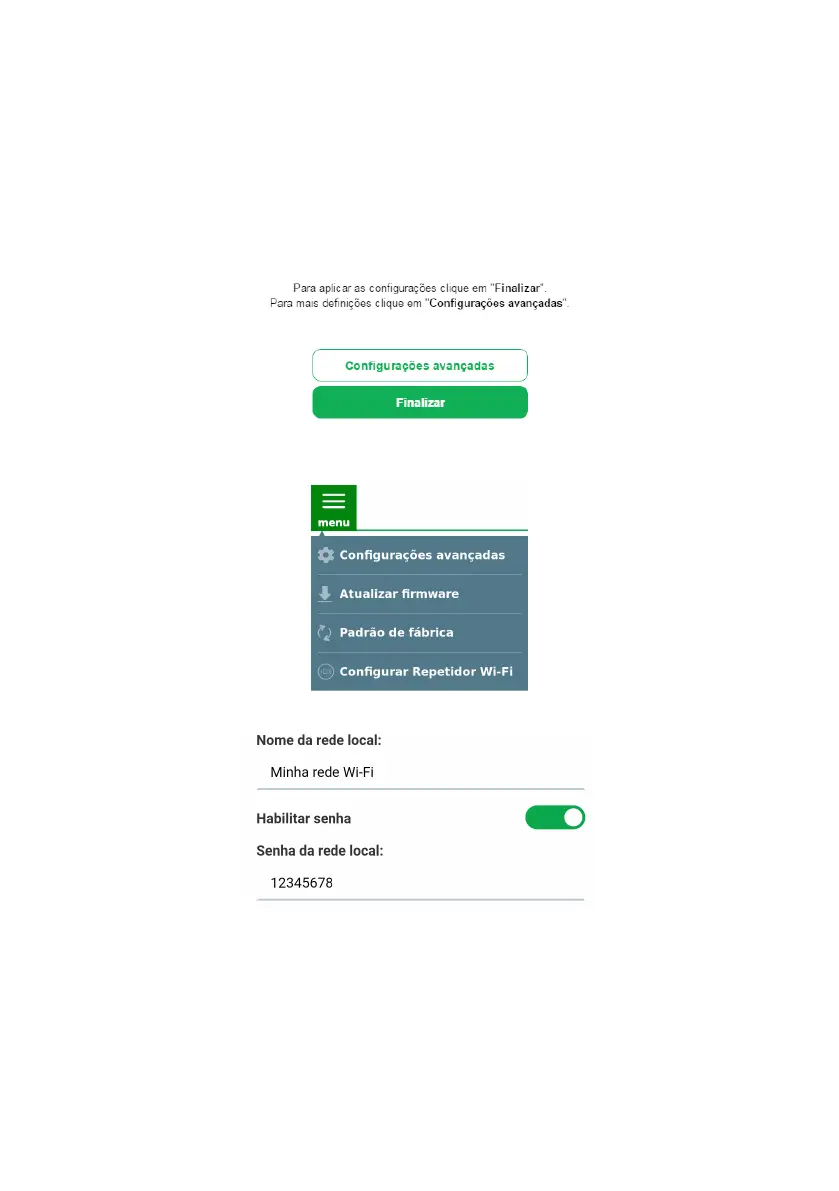
If you wish, you can change the advanced settings before nishing the conguration process. For further
details, please refer to item
Congurações avançadas do repetidor Wi-Fi.
»
Once congured, IWE 3001 will change the access address to the web interface, which can no longer be
accessed via http://10.0.0.1. To nd out how to perform access after conguration, please refer to item 6.
Dúvidas frequentes of this document.
That’s it! You have nished conguring the IWE 3001 in
Wi-Fi Repeater
mode, via web browser.
Wi-Fi RepeaterAdvanced settings
The advanced settings in
Wi-Fi Repeater
mode can be accessed in two ways:
Option 1: by clicking the
Advanced settings
button at the end of the
Wi-Fi Repeater
mode conguration wizard.
Option 2: by accessing the option
Advanced settings
in the menu of the web interface after conguring the IWE 3001
as
Wi-Fi Repeater
:
In the advanced settings in the
Wi-Fi Repeater
mode the following settings can be changed:
» Local network name: name of the IWE 3001 Wi-Fi network. By default, when conguring the product via the instal-
lation wizard it uses the same name as the main network, but if you wish you can change it, The Wi-Fi network name
can be up to 32 characters long.
» Enable password: by disabling this option, your Wi-Fi network will be open (without password), that is, anyone can
access it. By keeping it enabled, your Wi-Fi network will be protected by the password entered in the eld
Local Network
Password
.
» Local network password: password that will be used to access the Wi-Fi network generated by IWE 3001. It must
contain between 8 and 63 characters.
Note: in the elds Local Area Network Name and Local Area Network Password , only the following characters are
allowed:



 To Next Page