6
Note that the router’s coverage area does not cover the entire residence, so a IWE 3001 is used as a Wi-Fi repeater to
solve this problem. It is important to note that in this scenario, depending on the room you are in, when connecting a
device (a laptop or smartphone, for example) to the Wi-Fi network it may connect either to the router or the repeater.
Examples:
» If you are in the living room (C) and connect to Wi-Fi, you are connecting to your main router’s Wi-Fi network.
» If you are in the kitchen (D) and connect to the Wi-Fi network, you are connecting to the repeater Wi-Fi network.
» If you connect to the Wi-Fi network while in the dining room (A) and then you move to the bedroom (B), and the main
signal network still reaches it, even if weak, your device will still be connected to the main router, not automatically
switching to Wi-Fi on the repeater. If you want your device to connect to the repeater and thus get a stronger signal,
disable and enable your device’s Wi-Fi network again (if you don’t know how to do this, you can try restarting it so that
the Wi-Fi connection with the stronger signal network occurs). The same goes for the move in the direction area covered
by the repeater > area covered by the router (from the bedroom to the dining room, for example). In short: when moving
between the rooms, disconnect and reconnect your device to the Wi-Fi network so that it connects to the network with
the best signal.
Note: To congure the product in Wi-Fi Repeater mode, you should follow only one of the ways presented: either via
WPS button or via web browser.
3.1. Installation and conguring as
Wi-Fi Repeater
via
WPS
button
WPS is a simplied conguration option: with just two touches (one on the IWE 3001 and one on your main router) you
can congure the repeater to extend the range of your Wi-Fi network.
Note: the following process congures the repeater via the WPS function. Make sure
that
your router
has
this feature
congured and
that it is working properly.
If your router does not have the WPS function or you do not know how to
check if it is working,
refer to item
3.2. Installing and conguring as a Wi-Fi Repeater via web browser.
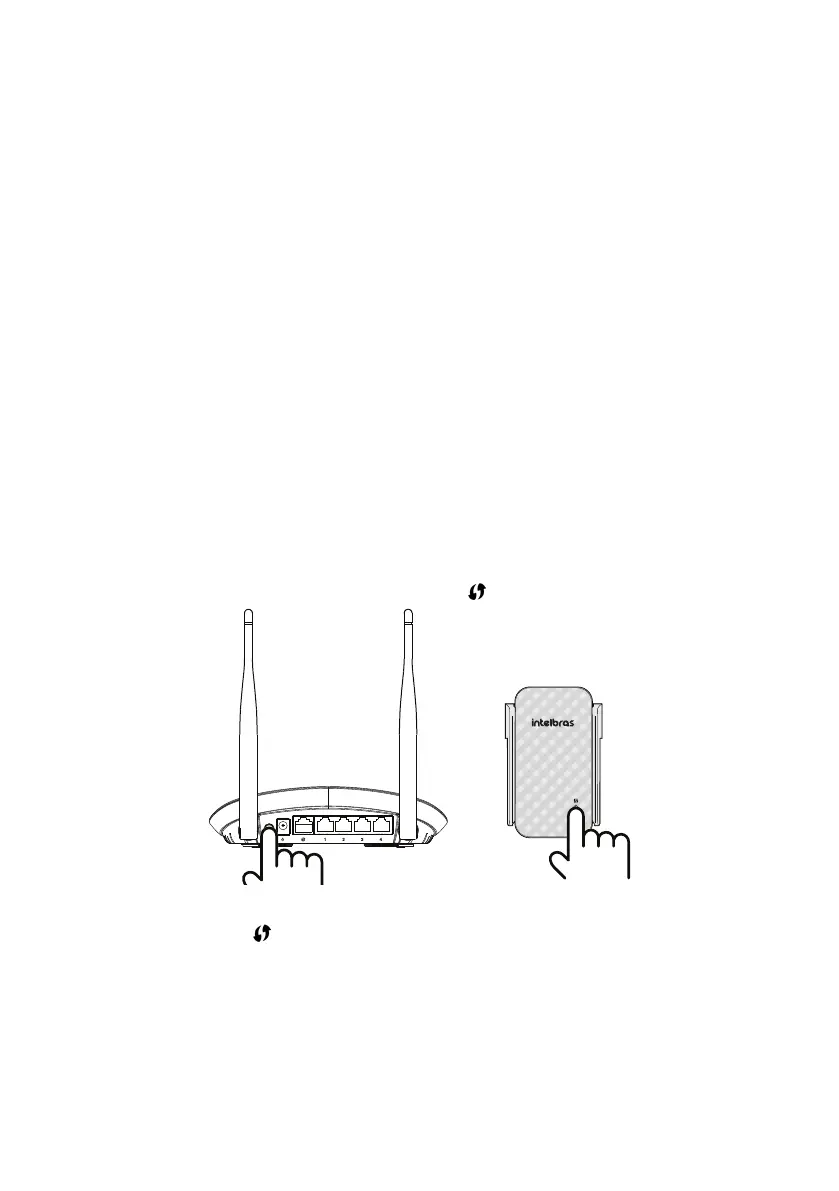
» Step 1: plug the repeater into the outlet and wait for it to start (red LED stops ashing). This will take about 1 minute;
» Step 2: press the
WPS
button on your router (one click only);
» Step 3: within 1 minute after pressing it, press the
WPS
button
(
) on the IWE 3001 (one click only).
Using the
WPS
button
After pressing the
WPS
button
(
) on the IWE 3001, check the product LED; it indicates the status of the congura-
tion. If it ashes green, and within 5 minutes it lights up in this same color, the conguration was successfully perfor-
med. However, if it ashes green and some time later it turns red, there was some problem in the conguration. In that
case, it is necessary to redo the process. If you redo it and again you do not succeed, follow the instructions in the item
3.2. c.
For more information about the product LED, see item
1.1. Signicado do LED
.
Note: »
After the conguration, the repeater will use the same name and password of the Wi-Fi network of your main
router.
.
»
Once congured, IWE 3001 will change the access address to the web interface, which can no longer be
accessed via http://10.0.0.1. To nd out how to perform access after conguration, see the item 6. Frequently
asked questions of this document.



 To Next Page