5
English Svenska Suomi Norsk
Start Box
Check that the following items
are in the Start Box:
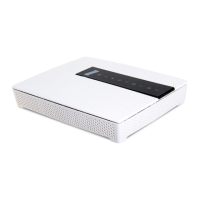
• Inteno VG50
• Power adapter
• RJ45 Network cable (White)
(large contact)
• RJ11 DSL cable (Grey) (small contact)
• DSL splitter (only included for
DSL customers)
Connecting the
DSL/telephone jack
It’s important to connect the broadband
service to the rst telephone jack in your
home. Otherwise you may get trouble with
your telephony service, as well as your
data service. In an apartment you’ll usually
nd the rst telephone jack close to the
entrance door. In a villa, the location of the
jack may be harder to detect, as you need
to nd out where the telephone cable
connects to the house. If you previously
have had a broadband service and it has
worked without troubles you’ll know that
you should install the modem in the same
telephone jack as before. If you haven’t
had a broadband service you’ll need to
localize the rst telephone jack.
Do as follows:
1. Shut down your computer.
2. Connect the DSL splitter adapter to the
rst telephone jack inside the house.
3. Connect the grey telephone cable
between the DSL splitter and the VG50
(DSL port).
Connecting the WAN/
broadband connection
Do as follows:
1. Shut down your computer.
2. Connect a RJ45 network cable
between your broadband outlet
and the VG50 WAN port (WAN).
Connecting the LAN
1. Connect a RJ45 network cable
between the VG50 network ports (LAN
1-3, GbE) and the network port on
the back or side of your computer. If


 To Next Page