EN - Page 4 of 8
b) Charging devices with the Powerbank
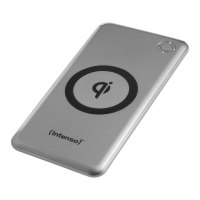
Wireless charging:
Acvate the wireless charging funcon by pressing the On/O buon on the Powerbank. Now
place your Qi-capable device centrally across the wireless charging area. The charging process
starts automacally. If this is not the case, please check whether
the Powerbank is adequately charged. For this purpose, at least one of the status LEDs
must be permanently lit.
a foreign body is located between the devices.
your device is Qi-capable.
where the correct posion for wireless charging is located on your device. You may
possibly have to place it in another posion.
The acvated wireless charging process will be displayed by an orange LED.
The posioned device will be charged with a maximum of 10 was. The amount of wa which
are actually transferred depends on the charged device. If another device is charged through
a cable, the maximum power will be reduced to 5 was.
In order to end the charging process, you just have to remove your device from the Power-
bank.
The ambient temperature level inuences the charging speed, since the charging control of
most mobile devices reduces the power consumpon when reaching higher temperatures.
Wired charging:
This Powerbank is equipped with two USB A ports (USB 1 Out/USB 2 Out) and a port Type C
(Type C Out/In).
The two USB A ports support the Qualcomm Quick Charge (QC) 3.0 standard (normal output:
5V-3A max.; Output QC: 5V-3A, 9V-2A, 12V-1.5A = max. 18 Wa). The connecon Type C
supports the Power Delivery (PD) standard (normal output: 5V 3A max.; PD output: 5V-3A,
9V-2A, 12V-1.5A = max. 18 Wa) as well a the above-described QC standard.
You can charge several devices at the same me with the Powerbank as well, for example
a tablet on the out port USB 1 and a smartphone on the Out/in port of Type C or without
wire through the Qi area. In this case, please note that neither the QC nor the PD standard
are available, but a maximum of 5V with a total of maximum 15 was (maximum 5 was
wireless) can be reached.
To charge your device, just connect the supplied cable to the connecon Type C (Out/In Type
C) of the Powerbank and the other end to the connecon Type C of the device to be charged.
Normal charging:
Use a standard USB power supply or a port with USB on a computer to charge the Powerbank via
the Type C Out/In port (maximum 5V-3A = maximum 15 was).
Fast charging:
To charge the Powerbank with a maximum power (18 was), please use a power supply unit sup-
porng the Power Delivery Standard (PD). The fast charging is indicated by an LED as well which
now lights up blue. If the LED does not change from white to blue, your power supply unit or the
cable used are incompable with the PD standard and the Powerbank will be charged normally.


 To Next Page
 Loading...