EN - Page 2 of 8 EN - Page 3 of 8
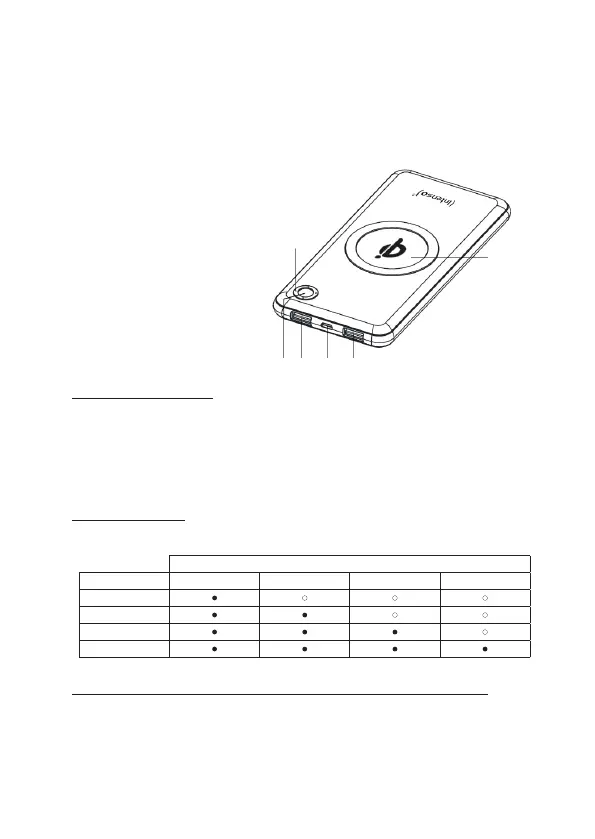
Device overview
USE
1. Funcon key (ON/OFF)
By briey pressing, the current baery status is displayed through the LED lights and the wireless
charging funcon of the Powerbank is acvated.
If there is no device connected to the Powerbank, or the connected device signals to the power
bank that it is enrely charged, the power bank will automacally switch to the standby mode aer
a me interval of approximately 40 seconds.
Operating
LED light
% - energy LED 1 LED 2 LED 3 LED 4
1 % - 25 %
26 % - 50 %
51 % - 75%
76 % - 100 %
3. Commissioning / Charging the Powerbank / Charging connected devices
a) Charging the Powerbank
Please connect the supplied cable Type C to the port Type C (Type C Out/In) of the Powerbank;
then connect the other end of the USB cable to a power supply Type C or to a port Type C on your
computer. The charging process and current charging status will be indicated by the LED status
lights. If the Powerbank is enrely charged, the LED status lights remain illuminated. The required
charging me of the Powerbank depends on the selected charging source and the output power.
2. LED status display
The individual LEDs display the remaining energy of the Powerbank:
2
1 - Function key (ON/OFF)
2 - USB 1 OUT (Quick Charge)
3 - Type C OUT (PD/Quick Charge) / IN (PD)
4 - USB 2 Out (Quick Charge)
5 - Status LEDs
6 - Wireless Charging Area
1 3 4
5
6
Any other use or use beyond what is specied is deemed as not intended use and can lead to
damages and injuries. This product is not intended for commercial use or for medical and spe-
cial applicaons, where the failure of the product can cause injuries, mortalies or considerable
material damages. Claims of any type for damages resulng from use other than for the intended
purpose or non-observance of the safety instrucons are excluded.


 To Next Page
 Loading...