PROGRAM TIMER
8
PW-642
Operation
Operation
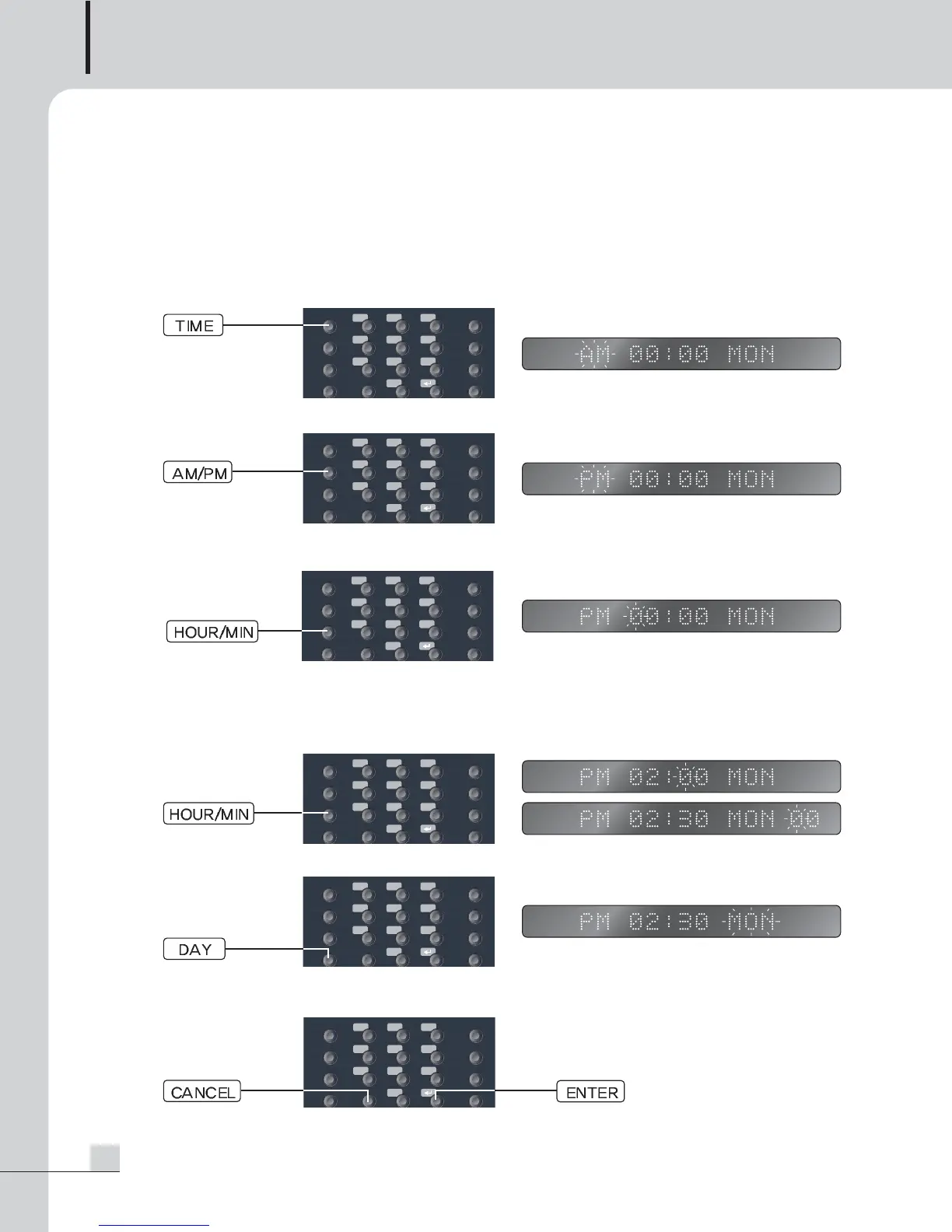
1. Time and Date Setting
Function to set current time.
1) If pressing the TIME button from STANDBY mode, setting starts and AM or PM flashes on a display
window.
2) You can select AM/PM using the AM/PM button, and AM and PM toggle whenever pressing it once.
3) “TIME” flashes on the display window if pressing the HOUR/MIN button, and you can enter time using the
NUMERIC button.
4) “MINUTE” flashes on the display window if pressing the HOUR/MIN button again, and you can enter
minute with the NUMERIC button.
HOUR and MIN setting status toggle whenever pressing it once. If pressing the relevant button lengthily,
you can set “SECOND”.
5) If pressing the DAY button, “WEEKDAY” flashes on the display window, you can select weekday to enter.
6) If pressing the ENTER button, setting is saved and ended.
To cancel setting, pressing the CANCEL button enables to convert STANDBY mode.
HOUR/MIN.
HOUR/MIN.
HOUR/MIN.
HOUR/MIN.


 To Next Page