D-0123234-D – 2020/05
Affinity Compact - Instructions for Use - EN Page 47
3.4 The HIT440 screen
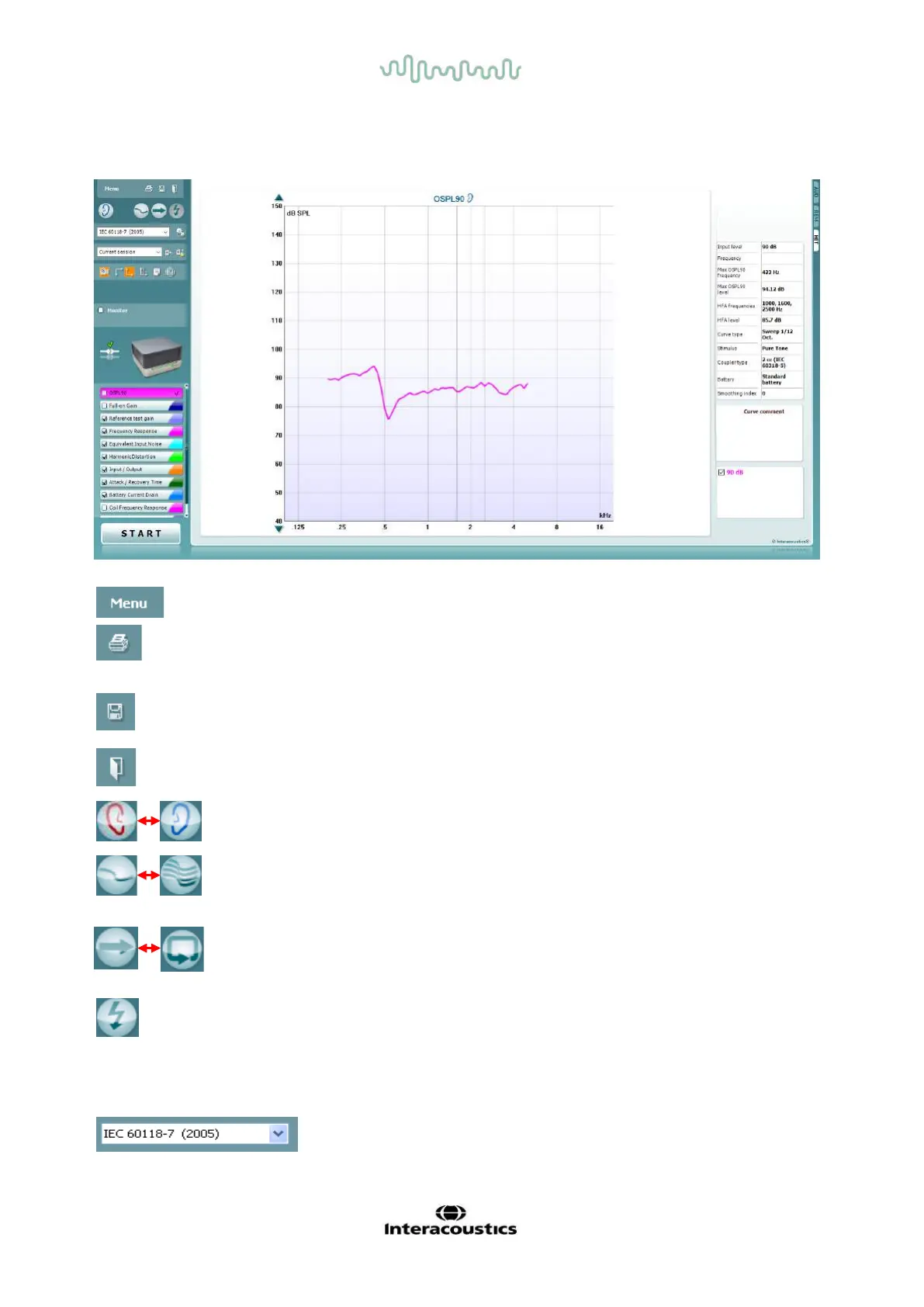
The following section describes the elements of the HIT screen
Menu provides access to Print, Edit, View, Mode, Setup, and Help.
Print button allows you to print only the test results currently
displayed on the screen. To print multiple tests on one page, select
Print then Print Layout
Save & New Session button saves the current session in Noah or
OtoAccess® and opens a new one.
Save & Exit button saves the current session in Noah or
OtoAccess® and exits the Suite.
Change Ear button allows you to toggle between right and left ear.
Right click on the ear icon to view both ears.
Toggle between single and combined screen button toggles
between viewing one or multiple measurements in the same HIT
graph.
Toggle between single and continuous measurement button
toggles between running a single sweep or having a test signal
running continuously until pressing STOP.
Freeze curve allows for taking a snapshot of a HIT curve when
testing with broadband signals. In other words the curve freezes at a
particular moment while the test continues.
NOTE: The Freeze Curve option onlyl works in a enduser-created
protocol, for broadband (ex: ISTS) signals in the continuous mode.
List of Protocols allows you to select a test protocol (default or
user defined) to use in the current test session.



 To Next Page