D-0118113-C – 2019/03 Page 2 of 2
RUN TEST
Press the Test button
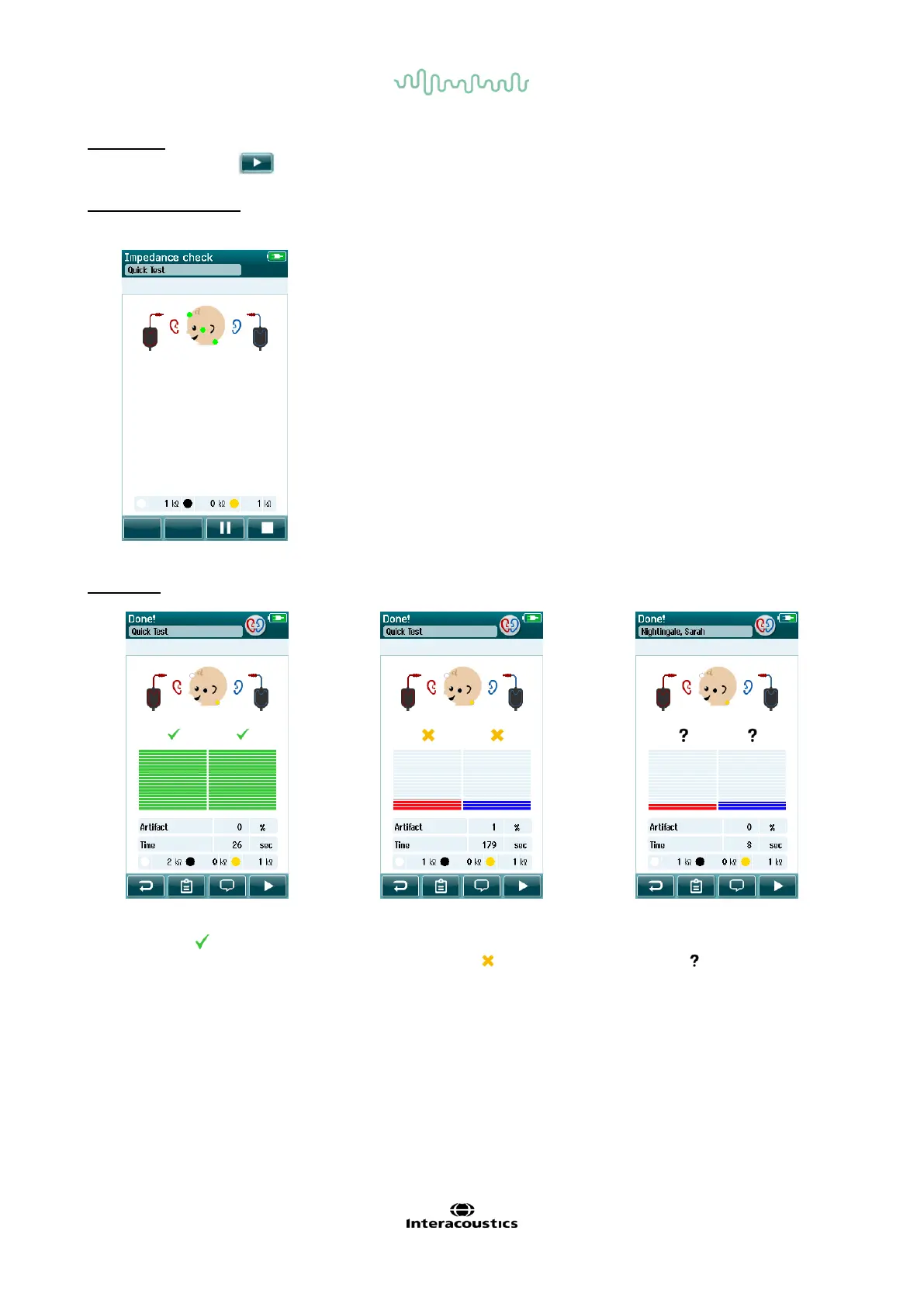
IMPEDANCE CHECK
RESULTS
When the pass criteria for the test
is reached, a is displayed in
green above the measurement,
indicating the test has PASSED.
When the pass criteria for the test
is not reached within the
measurement time, is displayed
in amber above the measurement,
indicating the test is a REFER.
If the test is stopped before a
PASS or REFER is generated by
the system, is displayed above
the measurement indicating that
the test is INCOMPLETE.
An impedance check will begin. Impedances are indicated by the green/amber dots on the montage picture
as well as in numerical format on the screen.
When a dot is amber, it means the impedance is poor (> 50kΩ) for the
indicated electrode. Check that the surface electrode and cables are
connected correctly. It may be necessary to re-clean the skin or use a
conductive gel with the surface electrodes to achieve an acceptable
impedance. Testing cannot begin until impedance indictors are green
(< 50kΩ).














 To Previous Page