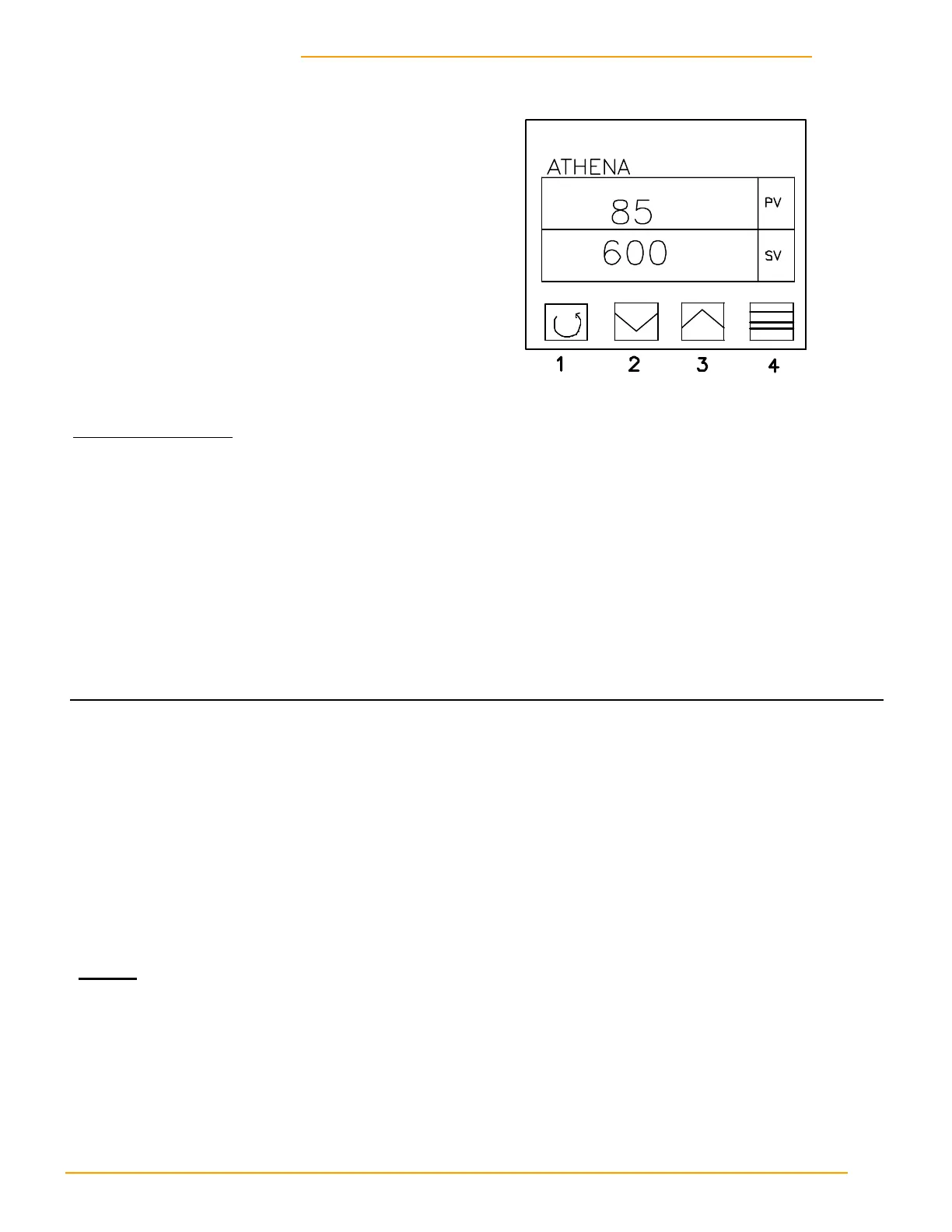
AUTO TUNING—I/R SECTION
IF APPLICABLE
Setting Parameters
1. Push button #1 to Access Menu (Ac.Cd will flash, then menu # will flash).
2. Use arrow buttons to get to correct menu.
3. Once in correct menu, use button #1 to scroll through menu to view parameters.
4. Use arrow buttons to change parameters.
MENU 03 MENU 05
CY.t1 15 SnSr K (cA)
SP.tt off OUt1 Ht.P
LSP.L 0 OUt2 ALr
USP.L 1000 Unlt F
1. Main burner must have flame on.
2. Set IR selector switch to OFF.
3. Push button #4 and hold until “STBY” flashes—then release.
4. Push arrow buttons to set SV to 600° F.
5. Push Button #4 and hold it until “TUNE” flashes—then release.
6. Turn selector switch to ON—Auto Tune will begin.
5. When tune stops flashing, procedure is complete.
NOTE:
! Dryer must be ambient temperature before auto tune.
! When all is set and working correctly, put controller into Menu 01. This allows only the chang-
ing of SV. Once in menu 01, button #1 must be depressed for a full 30 seconds to access
other menus.
AIRJET INTERCHANGE EQUIPMENT, INC.
Temperature Control
Infared Autotuning


 To Next Page