EasyManua.ls Logo

Interflex IF-800/W02 - User Manual

Default Icon
7 pages
Print Icon
To Next Page IconTo Next Page
Loading...
Interflex Datensysteme GmbH 1/7
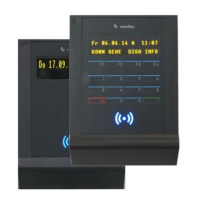
1 IF-800/W02 Terminal (Slave)
Thank you for choosing an Interflex system. With this slave terminal, you
have purchased a reliable device for access control.
Scope of delivery:
The following is included in the package:
W02 housing cover
Reader housing with encapsulated RFID electronics and 5 m connecting
cable
I/O controller board with address switch
Mounting plate for fastening
Material for wall mounting
Please check the completeness and condition of the shipment upon
receipt.
2 Function
Slave terminals of series IF-800 W02 are used for:
1. controlling the access of people who identify themselves via an RFID credential before entering a
security zone.
2. controlling and monitoring locking devices that prevent uncontrolled (physical) access to security zones.
3. writing NetworkOnCard access rights. The data is used for identification at offline devices, e.g. PegaSys
terminals.
A higher-ranking device, such as a terminal controller or a master terminal, is required for operation.
95-10327_ V2016-10-20 IF800_W02
IF-800/W02
Question and Answer IconNeed help?

Do you have a question about the Interflex IF-800/W02 and is the answer not in the manual?

Summary

IF-800;W02 Terminal (Slave)

Function

Hardware Components

Shielded Cables

How to Proceed During Installation

Electrical Connections

Installation

Installation of the I;O Controller Board

Details the mounting and connection of the I/O controller board.

Setting the Address

Connections on the I;O Controller Board

Technical Specifications

Disposal

Overview

The Interflex IF-800/W02 is a slave terminal designed for access control systems, functioning as a reliable device for managing entry into security zones. It requires a higher-ranking device, such as a terminal controller or a master terminal, for operation.

Function Description:

The IF-800/W02 slave terminals serve several key functions:

  • Access Control: They control the access of individuals who identify themselves using an RFID credential before entering a security zone.
  • Locking Device Control and Monitoring: The terminals control and monitor locking devices, preventing uncontrolled physical access to security zones.
  • NetworkOnCard Access Rights: They are capable of writing NetworkOnCard access rights. This data is then used for identification at offline devices, such as PegaSys terminals.

Hardware Components:

The slave terminal comprises the following components:

  • W02 housing cover
  • Reader housing with encapsulated RFID electronics and a 5-meter connecting cable
  • I/O controller board with an address switch
  • Mounting plate for fastening
  • Material for wall mounting

Important Technical Specifications:

Power Supply:

  • Low-voltage: 12-24 VAC/DC
  • Power consumption: Max. 4 VA
  • Protection: Self-resetting fuse

Interface to Parent Devices:

  • Interface: RS485, 9600/19200 baud (automatic configuration)
  • RFID reader: Mifare, LEGIC, or Proxif reading technology (according to order)
  • Read range: Up to 50 mm, depending on the size of the identification medium used

Inputs and Outputs:

  • Inputs for floating sensors: 4 (2 per each I/O controller board)
  • Output relays: 2 relays with max. 30V 2A (1 per each I/O controller board)
  • Switching power: Up to 30V, 2A

User Information:

  • Indicators: Buzzer; blue, red, and green LEDs

Device Protection:

  • Protection category: III
  • Degree of protection: Reader IP65, encapsulated electronics; I/O board IP 00

General Data:

  • Ambient temperature: -25°C to +55°C
  • Humidity: Max. 95%, non-condensing
  • Product safety: EN 60950-1
  • Compatibility (EMC): EN 300330-1/-2, EN 301489-1/-3
  • Dimensions (H x W x D): 119 x 77 x 23 mm (reader), 52 x 30 x 16 mm (I/O board)
  • Weight: Approx. 0.4 kg
  • Installation type: Surface-mounted
  • Color: Anthracite or light gray

Usage Features:

Installation Procedure:

The recommended installation procedure includes:

  1. Installing the necessary electrical cables.
  2. Installing the power supply.
  3. Fastening the reader housing and the I/O controller board.
  4. Setting the address using the address switch.
  5. Connecting the electrical cables.
  6. Checking the functions.
  7. Closing the W02 housing cover.

Cable Recommendations:

  • Shielded Cables: The use of shielded cables is recommended to ensure trouble-free operation and to maintain required EMC values. Operation with unshielded cables is possible, but data transfer problems may necessitate shielded cables.
  • Cable Lengths: The 5-meter reader cable can be extended up to 100 meters. RS485 BUS cables to higher-ranking devices can be up to 1200 meters, with spur lines up to 100 meters. Excessive cable lengths can cause malfunctions.
  • Cable Separation: A recommended distance of 10 cm between cables and power lines should be maintained.

Mounting:

  • The reader (IP 65) can be installed on a flat wall or pillar, both indoors and outdoors.
  • The mounting plate is designed for screw fastening to flat walls and DIN appliance cases.
  • Snap-in elements in the housing cover lock into place when pressed onto the mounting plate, preventing loosening.
  • When mounting on a metal surface, the reading distance may be reduced. A distance of at least 20 cm from other RFID readers is recommended.
  • The I/O controller board can be installed up to 100 meters away from the reader housing. It must be installed in a secured area, such as a DIN appliance case or a housing with the power supply.

Address Setting:

  • An address must be set for identification.
  • For connection to a terminal controller or access manager, the first slave terminal on each RS485 BUS is typically assigned address 1, the second address 2, and so on.
  • For connection to a master terminal, the first slave terminal is typically assigned address 2, the second address 3, and so on.
  • Before setting the address, verify the BUS address section of the higher-ranking device and ensure no identical addresses exist on the RS485 BUS.
  • The power supply must be switched off before changing an address.

Electrical Connections:

  • All cables must be laid to the I/O controller board.
  • Installations without door monitoring do not require sensors or opening push-buttons.
  • The power supply must have separate fuse protection.
  • The power supply for the access control element must be provided separately.
  • If the locking device is monitored, a handle contact or door opening switch must be installed to allow opening without triggering an alarm when exiting the security zone.

Maintenance Features:

Disposal:

  • At the end of its service life, the device must be disposed of properly as electronic waste. The owner can dispose of the device themselves or return it to the supplier.

Interflex IF-800/W02 Specifications

General IconGeneral
BrandInterflex
ModelIF-800/W02
CategoryRfid Systems
LanguageEnglish