TruVision 11/31 Series IP Camera Configuration Manual 25
Tab Description
Profile: Different profile indicates different tools and technologies used in
compression. Options include: Main Profile.
I Frame Interval: A video compression method. It is strongly recommended
not to change the default value 50.
2.
Audio Encoding: G.722.1, G.711ulaw, G.711alaw, MP2L2 and G.726 are
optional.
Audio Input: “MicIn” is selectable for the built-in microphone.
Input Volume: Specifies the volume from 0 to 100.
Environmental Noise Filter: Set it as OFF or ON. When you set the function
on the noise detected can be filtered.
3.
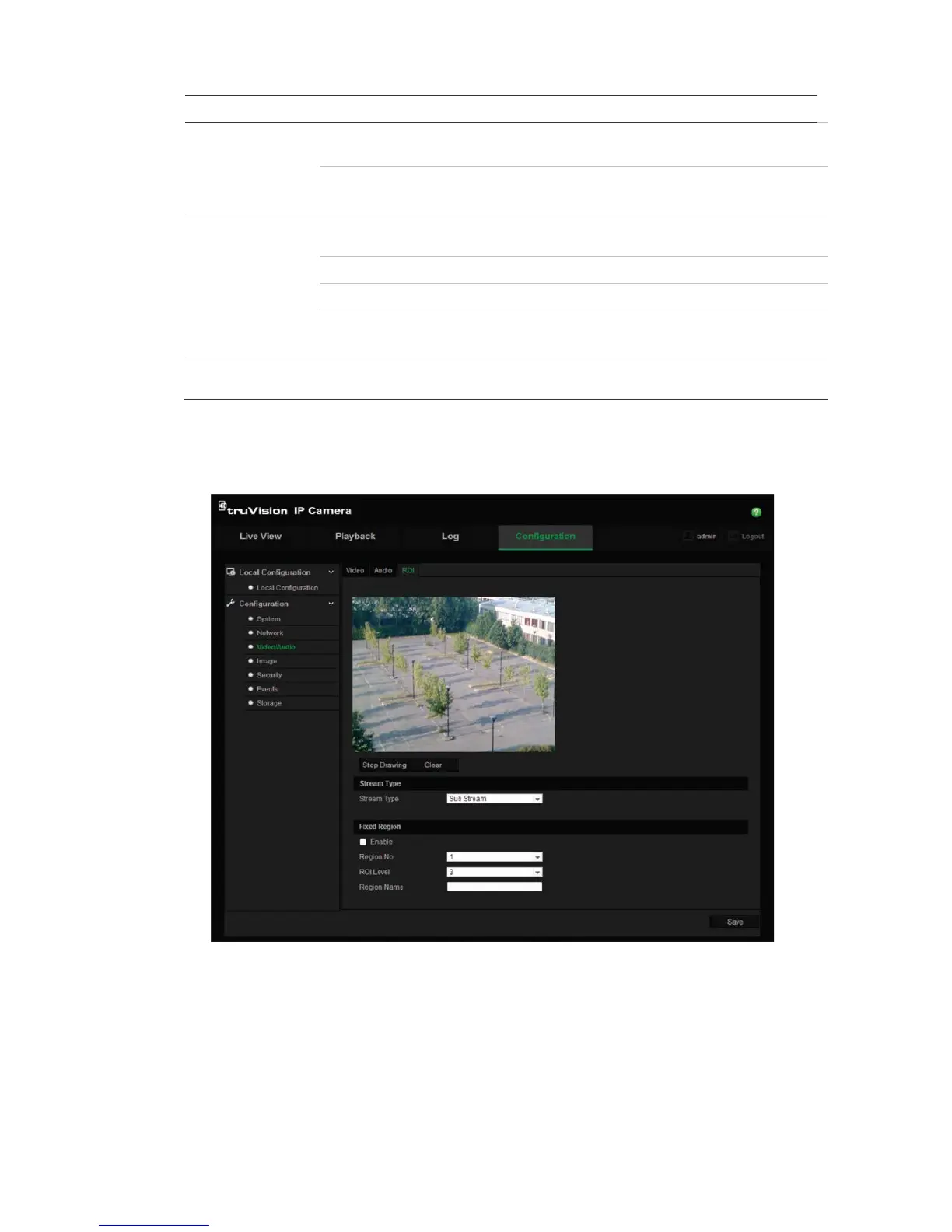
Enable to assign more encoding resource to the region of interest to increase
the quality of the ROI whereas the background information is less focused.
To define ROI parameters:
1. Click Configuration > Video/Audio > ROI.
2. Draw the region of interest on the image. It supports only one region.
3. Choose the stream type to set the ROI encoding.
4. Check the Fixed Region to manually configure the area. You can choose the
Image Quality Enhancing level for ROI encoding, and you can also name the
ROI area.
5. Click Save to save changes.




 To Next Page