EasyManua.ls Logo

Intermatic IOS-CMP-LV - User Manual

Intermatic IOS-CMP-LV
2 pages
Print Icon
To Next Page IconTo Next Page
Loading...
Low Voltage Occupancy Sensor
Input: +24VDC
Model#:
For Indoor Use Only
IOS-CMP-LV
DESCRIPTION:
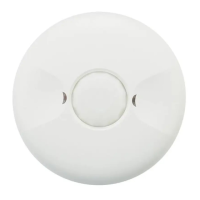
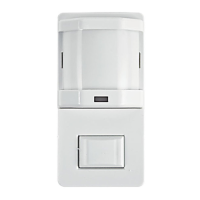
The IOS-CMP-LV 360° Passive Infrared (PIR) Low Voltage Occupancy Sensors control lighting systems
based on occupancy and ambient light levels. When movement is detected, the sensor turns the lights
ON. If no movement is detected for a user-specified or Autoset time of 15 seconds to 30 minutes, the
lights are turned OFF. The occupancy sensor provides a 360° coverage pattern, up to 1200 square feet.
MOUNTING THE SENSOR
NOTE: A junction box and Phillips screwdriver are needed to complete this procedure.
1. Make sure power is turned off at the main disconnect.
2. Remove the screws on the occupancy sensor cover and remove the cover from the sensor.
3. Observe these guidelines when mounting the sensor:
The occupancy coverage area may be more or less than the sensing distances shown in Figure 1
due to potential coverage area obstacles, such as furniture or partitions.
Place the sensor 4 to 6 feet away from air supply ducts to prevent false activations.
If you mount the sensor outside of 8 to 11 feet from the floor, it affects the coverage pattern.
Decreasing the mounting height decreases the sensor range and increases the sensitivity to
smaller motions. Mounting the sensor at heights more than 12 to 14 feet reduces sensitivity
Each occupant should be able to clearly view the sensor to guarantee no obstruction in the area
Avoid placing the sensor directly in line with an open door through which it has a clear view out.
This may cause the sensor to detect people walking by the door.
To obtain complete coverage in large areas, install multiple sensors to create an overlap with each
adjacent sensor’s coverage area.
4. Punch knockout on the junction box and insert the IOS-PP24 power pack nipple into the knockout.
5. Pull the low voltage wires from the power pack into the junction box, through the conduit knockout.
6. Connect the low voltage wires from the power pack to the appropriate terminals on the occupancy
sensor. See table below for wire designations. Refer to FIgure 2.
Wire from power pack To Terminal on Occupancy Sensor
Red wire (+24 VDC) +24 VDC terminal
Black wire (Common) Common terminal
Blue wire Control Out terminal
IOS-CMP-LV INSTALLATION
1. If you want to connect multiple single loads for the sensor to control, connect the blue wire from the
power pack to the Control Out terminals on the sensor.
2. If you want to add a manual switch to the above application, connect a wire from one side of the
switch to the common terminal on sensor and connect another wire from the other side of the switch
to the Manual ON terminal on sensor.
3. Loosen the mounting screws attached to the junction box.
4. Align the sensor in the junction box so that the mounting screws in the box match the keyholes on
the sensor’s rear housing.
5. Push the sensor into the junction box and align the mounting screws on the junction box with the
keyhole slots on the sensor so that the screws are seated in the keyhole slots. Tighten mounting
screws.
ADJUST THE LIGHT LEVEL
The Light Level feature enables the user to adjust the level of light needed to be detected before
the sensor turns lighting ON. Remove the cover from the sensor and adjust the lighting from
the light level dial on the sensor (see Figure 5). You can set the dial anywhere between + or – to
obtain the optimal brightness configuration for the room (see Figure 3).
SENSOR ADJUSTMENT
Follow this procedure to verify the sensor coverage and customize the settings.
1. Remove the screws on the front cover and remove the cover.
2. Make sure all the furniture in the sensing area is installed, the lighting circuits are turned on and the
HVAC systems are in the Override position.
3. If there is a V AV system, set it to the highest airflow.
360˚ Passive Infrared
Low Voltage Occupancy Sensor
With Light Level Feature
MODEL: IOS-CMP-LV
Specifications:
Voltage - 24 VDC
Current Consumption - 9mA
Power Supply - IOS-PP24 Power Packs
Adjustable Light Level - 10FC-150FC
Adjustable Time Delay - 15 sec.-30 min (DIP switch)
Walk-Through Mode - 3 minutes if no activity after 30 sec.
Test Mode - 15 sec. upon initial power-up or DIP switch reset
PIR Coverage:
Sensitivity Adjustment - Automatic or Low (DIP switch)
Coverage - Up to 1200 ft
2
Figure 3
Figure 2
Figure 4
Figure 5
IOS-CMP-LV
terminals
Wiring
Common
+24VDC
Manual ON
Low Voltage Occupancy Sensor
Input: +24VDC
Model#:
For Indoor Use Only
IOS-CMP-LV
Control Out
Common
+24VDC
Manual ON
Control Out
- +
Light
- +
Light
- +
Light
- +
Light
- +
Light
- +
Light
Risk of Fire, Electrical Shock or Personal Injury
Turn OFF power at circuit breaker or fuse and test that the power is OFF before wiring.
To be installed and/or used in accordance with appropriate electrical codes and regulations.
If you are not sure about any part of these instructions, consult a qualified electrician.
Use this device only with copper or copper clad wire.
INDOOR USE ONLY
WARNING
44 ft
13.4m
8 ft
tf 22tf 22 tf 31tf 31 7 ft 7 ft3 ft 0 3 ft
Typical
desk-top
level
Figure 1
J-Box Mount
Front Cover
Rear Housing
Wire
Screws
4" Octagonal
box 2-1/2"
Deep mounting
Drop
Ceiling
PIR lens
PIR Activity LED(Red)
Light level Adjustment
Double gang mudring
mounting holes
DIP switches
Keyhole slots
Keyhole slots(for mounting to
4" octagonal box)
Load LED(Green)
Buzzer
(for mounting to 4" octagonal box)
INSTALLATION AND CONFIGURATION INSTRUCTIONS

Question and Answer IconNeed help?

Do you have a question about the Intermatic IOS-CMP-LV and is the answer not in the manual?

Summary

Specifications

Power and Time Delay Specs

Covers current consumption, power supply, and time delay settings.

PIR Sensitivity and Coverage

Details PIR sensitivity adjustment and the sensor's coverage area.

Product Description

IOS-CMP-LV Sensor Overview

Description of the 360° Passive Infrared Low Voltage Occupancy Sensor.

Mounting Instructions

Steps for mounting the sensor and removing its cover.

Safety Warnings

Electrical and Personal Safety

Covers risks of fire, electrical shock, and personal injury during installation.

DIP Switch Configuration

Adjusting DIP Switch Settings

Guide on how to configure DIP switch settings for various functions.

Sensitivity Level Settings

Settings for sensitivity levels: 50% and 100% via DIP Switch 1.

Time Delay Settings

Details time delay options based on DIP switches 2-4.

Other DIP Switch Functions

Description of functions for DIP switches 5 through 9.

Installation Guide

Connecting Wires and Mounting

Steps for connecting wires and physically installing the sensor.

Troubleshooting

PIR Activity LED Issues

Diagnosing problems with the PIR activity LED not flashing correctly.

Improper PIR Activation

Addressing scenarios of improper PIR activity or LED flashes.

Light Activation Problems

Troubleshooting why lights do not turn on automatically.

False Sensor Activation

Resolving issues where the sensor activates without detecting movement.

Overview

The Intermatic IOS-CMP-LV is a 360° Passive Infrared (PIR) Low Voltage Occupancy Sensor designed to control lighting systems based on occupancy and ambient light levels. When movement is detected, the sensor turns lights ON. If no movement is detected for a user-specified or Autoset time (ranging from 15 seconds to 30 minutes), the lights are turned OFF. The sensor provides a 360° coverage pattern, up to 1200 square feet. It also features a light level adjustment to optimize brightness configuration for the room.

Important Technical Specifications:

  • Voltage: 24 VDC
  • Current Consumption: 9mA
  • Power Supply: IOS-PP24 Power Packs
  • Adjustable Light Level: 10FC-150FC
  • Adjustable Time Delay: 15 seconds - 30 minutes (via DIP switch)
  • Walk-Through Mode: 3 minutes if no activity after 30 seconds
  • Test Mode: 15 seconds upon initial power-up or DIP switch reset
  • PIR Coverage: Up to 1200 ft²
  • Sensitivity Adjustment: Automatic or Low (via DIP switch)
  • Installation: For indoor use only, requires a junction box and Phillips screwdriver.

Usage Features:

Mounting Guidelines:

  • Ensure power is turned OFF at the main disconnect before installation.
  • The occupancy coverage area may vary from the sensing distances shown in Figure 1 due to obstacles like furniture or partitions.
  • Place the sensor 4 to 6 feet away from air supply ducts to prevent false activations.
  • Mounting the sensor outside of 8 to 11 feet from the floor affects the coverage pattern. Decreasing mounting height decreases sensor range and increases sensitivity to smaller motions. Mounting at heights more than 12 to 14 feet reduces sensitivity.
  • Each occupant should have a clear view of the sensor to guarantee no obstruction.
  • Avoid placing the sensor directly in line with an open door through which it has a clear view out, as this may cause detection of people walking by the door.
  • For complete coverage in large areas, install multiple sensors to create an overlap with each adjacent sensor's coverage area.
  • Punch knockout on the junction box and insert the IOS-PP24 power pack nipple into the knockout.
  • Pull low voltage wires from the power pack into the junction box, through the conduit knockout.
  • Connect the low voltage wires from the power pack to the appropriate terminals on the occupancy sensor: Red wire (+24 VDC) to +24 VDC terminal, Black wire (Common) to Common terminal, Blue wire to Control Out terminal.

Wiring for Control:

  • Multiple Single Loads: Connect the blue wire from the power pack to the Control Out terminals on the sensor.
  • Manual Switch: Connect a wire from one side of the switch to the Common terminal on the sensor, and another wire from the other side of the switch to the Manual ON terminal on the sensor.

Sensor Installation:

  • Loosen the mounting screws attached to the junction box.
  • Align the sensor in the junction box so that the mounting screws match the keyholes on the sensor's rear housing.
  • Push the sensor into the junction box and align the mounting screws with the keyhole slots so that the screws are seated. Tighten mounting screws.

Light Level Adjustment:

  • The Light Level feature allows adjustment of the light level needed to be detected before the sensor turns lighting ON.
  • Remove the cover from the sensor and adjust the lighting from the light level dial on the sensor.
  • The dial can be set anywhere between + or - to obtain the optimal brightness configuration for the room.

DIP Switch Settings:

The sensor features 9 DIP switches, each configurable to an up or down position for specific requirements.

  • DIP Switch 1 (Sensitivity Level): Up position sets sensitivity to 100%; Down position sets sensitivity to 50%.
  • DIP Switches 2-4 (Time Delay): Configure the time delay after no motion is detected before lights turn off. Options range from 15 seconds/Autoset to 30 minutes.
    • 15 Sec/Autoset: All Down
    • 30 Seconds: Switch 4 Up, Switches 2,3 Down
    • 5 Minutes: Switch 3 Up, Switches 2,4 Down
    • 10 Minutes: Switches 3,4 Up, Switch 2 Down
    • 15 Minutes: Switch 2 Up, Switches 3,4 Down
    • 20 Minutes: Switches 2,4 Up, Switch 3 Down
    • 25 Minutes: Switches 2,3 Up, Switch 4 Down
    • 30 Minutes: All Up
  • DIP Switch 5 (Walk Through): Up position enables, Down position disables. Turns lights off for three minutes after the area is initially occupied if no motion is detected.
  • DIP Switch 6 (Vacancy): Up position enables, Down position disables. Turn ON if you have a momentary switch. This enables overrides.
  • DIP Switch 7 (Audible Alert): Up position enables, Down position disables. An alarm (sounds like a tick) indicates that the time delay has expired.
  • DIP Switch 8 (Visible Alert): Up position enables, Down position disables. An alarm (load LED flashes once) indicates the time delay has expired.
  • DIP Switch 9 (Hold ON): Up position enables, Down position disables. Set this to ON to override all sensor functions.

Maintenance Features:

Sensor Adjustment and Testing:

  1. Remove the screws on the front cover and remove the cover.
  2. Ensure all furniture in the sensing area is installed, lighting circuits are turned on, and HVAC systems are in the Override position. If there is a VAV system, set it to the highest airflow.
  3. For Testing:
    • Ensure PIR Activity (Red LED flashes) is enabled, Hold ON mode is OFF (DIP 9 switch OFF), and PIR Sensitivity is set to MAX (DIP switch 1 ON).
    • Set DIP Switches 2, 3, and 4 to the down (disable) position for TEST MODE with the 15 seconds/AUTOSÉT setting.
    • Ensure the Light Level is at default (maximum).
    • Do not move so the sensor doesn't detect movement. The green LED and Load should be ON, and the lights should turn off after 15 seconds.
    • Move about the coverage area; the lights will illuminate.
    • Once testing and adjustment are complete, reset DIP Switches and Light Level to the desired settings and replace the cover on the sensor.
    • Note: To invoke Test Mode when DIP switches are already set for 15 seconds/Autoset, toggle DIP switch #3 ON then OFF. This provides a 5-minute test period, during which the Time Delay is only 15 seconds.

Troubleshooting:

  • PIR activity LED does not flash properly:
    • Warm-up period may not be completed.
    • Check circuit breaker.
    • Set PIR sensitivity to Max/Autoset (DIP switch 1 ON).
    • Check all sensor and power pack connections.
    • Verify 24V input to the sensor. If 24V is present, replace the sensor. If not, check for high voltage to power pack; if present, replace the power pack.
  • Improper PIR activity, LED flashes:
    • Light level adjustment may be incorrect. Cover PIR lens and PIR activity LED to verify lights turn on. If lights still turn on, adjust light level.
    • Check all sensor and power pack wire connections.
    • While sensor is activated, check for 24 V DC at the blue wire connection at the sensor. If no voltage, replace the sensor. If voltage is present, replace the power pack.
  • Lights do not turn on automatically:
    • Sensor may be experiencing activations from outside the controlled area.
    • Check all sensor and power pack wire connections.
    • Disconnect the blue wire. If lights do not turn off, replace power pack. If lights turn off, check the sensor.
    • Turn sensitivity and time delay to minimum and allow sensor to time out.
  • Sensor activates without detecting movement:
    • Set DIP switch 1 to OFF.
    • Relocate the sensor.

Warranty:

Warranty service is available by returning the product to the dealer or by completing a warranty claim online at www.intermatic.com. The warranty is made by Intermatic Incorporated, 1950 Innovation Way, Suite 300, Libertyville, IL 60048. For additional product or warranty information, visit http://www.Intermatic.com or call 815-675-7000.

Intermatic IOS-CMP-LV Specifications

General IconGeneral
BrandIntermatic
ModelIOS-CMP-LV
CategoryAccessories
LanguageEnglish

Related product manuals