21
STC ADJUSTMENT
The STC Adjustment can be used to help minimize surface
clutter problems. Typically, most depthsounders show a
band of noise near the surface caused by ringing in the
transducer, surface turbulence in the water and other
factors. Where there is severe surface clutter, the digital
depth display can get confused between showing the true
bottom or the surface clutter. In addition, severe surface
clutter can cause the alarms to sound.
To minimize these types of problems, the Color Twinscope
includes an STC Adjustment. STC stands for Surface
Time Constant and you can use it to force the Color
Twinscope to ignore surface clutter. By default, the STC
is set to 5 feet - meaning that the digital depth and alarms
will ignore anything closer than 5’ to the transducer. The
clutter will still be displayed, just not used to calculate the
digital depth or sound an alarm.
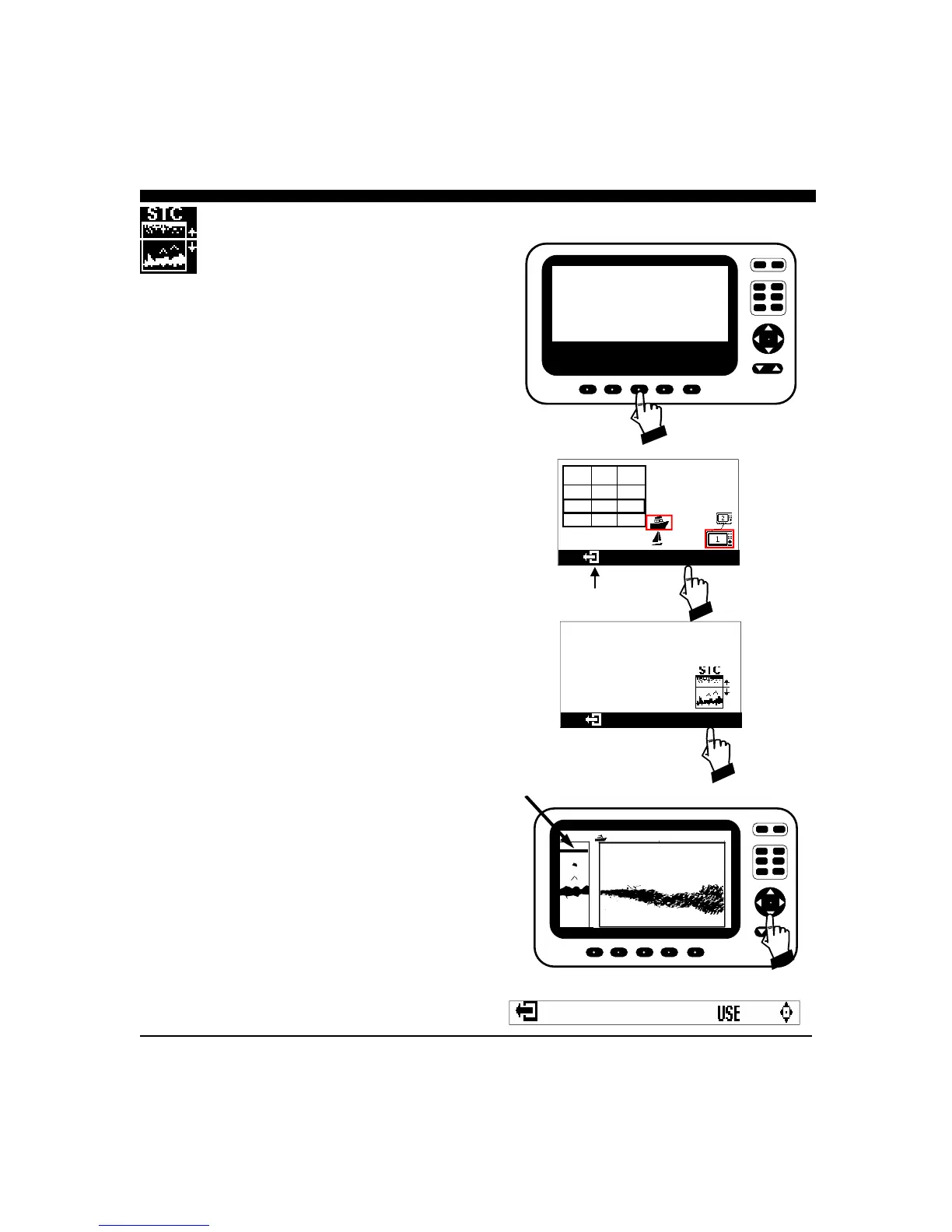
If you are having problems with the digital depth or alarms
because of excessive surface clutter, you can increase or
decrease the exclusion range as shown at right.
From the SET-UP menu, choose MORE and from that
menu choose MORE again. Then press the button below
the STC Symbol as shown at right. That will bring up a
display showing the STC adjustment line as shown. Use
the NAV key to adjust up or down to ignore the clutter area
and then press the EXIT symbol to save and return to a
normal display.
After making this adjustment, the surface clutter will still
remain on the display but will be ignored by the alarm and
digital depth functions.
CURSR
VERT
HORIZ
DOWN
DATA
RANGE
GAIN
PWR
FORWARD LOOKING SONAR
EXIT LANGUAGE MORE DEMO TRANSDUCER
UNITS
Interphase Color Twinscope
Version 2.03
MORE
RANGE DEFAU
LT
MAX G
100 FT 11 11
200 12 12
400 14 14
CURSR
VERT
HORIZ
DOWN
DATA
RANGE
GAIN
PWR
FORWARD LOOKING SONAR
13.2 Ft
18
37
25
12.5
STC ADJUSTMENT LINE
EXIT SYMBOL



 To Next Page