36
Remote Display
The Color Twinscope can operate with two displays: one
being designated as the Master (#1) and the other as the
Remote (#2). The transducer cables connect to the Master
(#1) unit and the signal is automatically switched between
the Master (#1) and the Remote(#2) during operation.
The normal Color Twinscope will operate as a stand-alone
unit or as a Remote unit in a two display installation, but
can not operate as a Master unit.
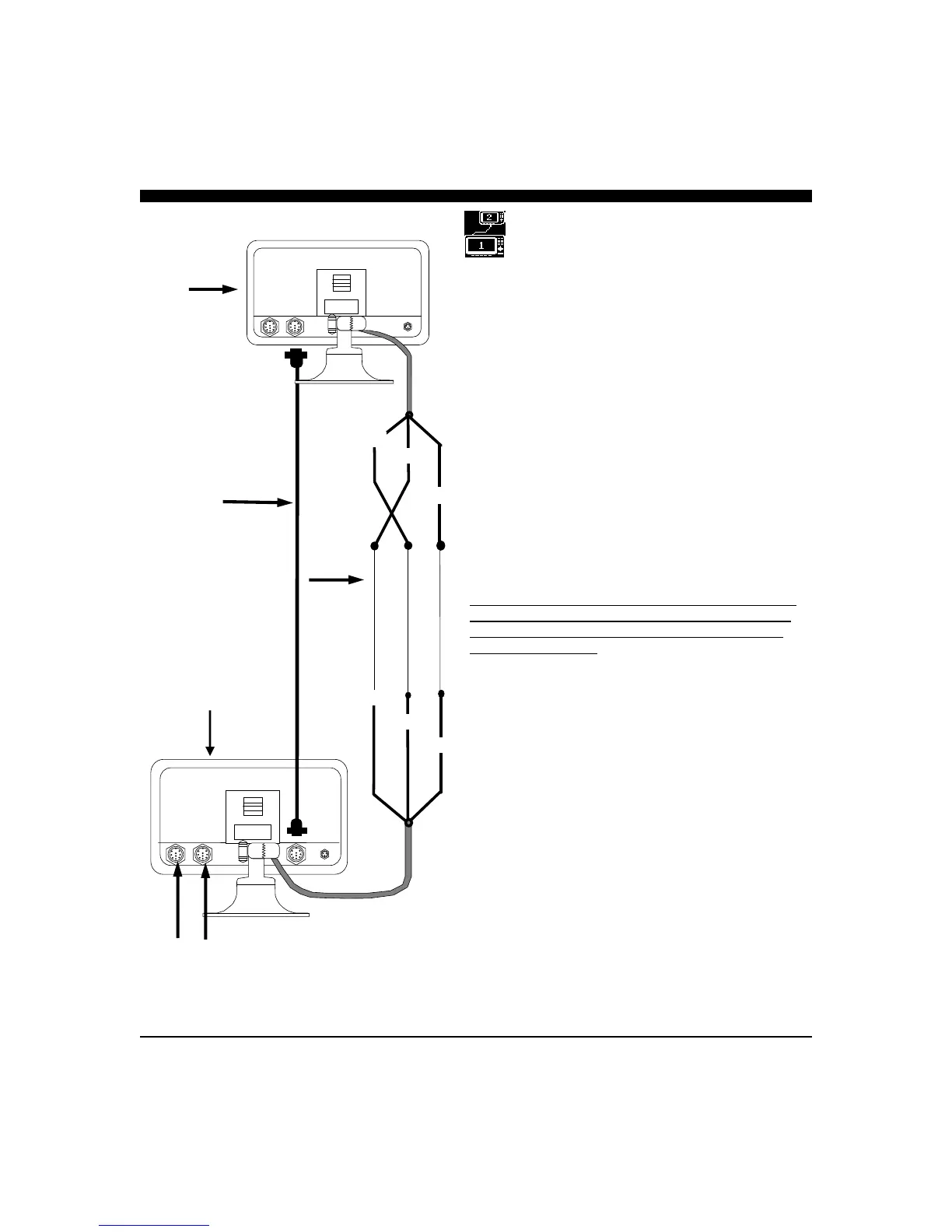
The Color Twinscope Remote Kit includes A 30’ Remote
Cable (P/N 04-0014-009) that carries the sonar information
from the transducer between the two displays.
It should be connected between the extra (third) 9-pin
connector on the rear of the Master(#1) unit and the 9-pin
GREEN or Vertical input connector on the Remote (#2)
unit. In addition, the two units need to be connected via
their serial ports with a three wire cable as shown on the
sketch on the left.
Note that the Orange wire from the Master (#1) connects
to the Yellow wire from the Remote (#2) and the Yellow
wire from the Master (#1) connects to the Orange wire
from the Remote (#2). The Green wires from both units
are tied together.
Once connected, you will need to go into the SETUP menu
of each unit and set the standard unit up as a REMOTE(#2)
and the other unit unit (the once included with the
REMOTE STATION KIT with three 9-pin connectors on
the rear) as the MASTER(#1) unit. See page 16 for
details.
In a two-station system, the Master (#1) must always be
turned on. Then, if the Remote PWR button is pressed, the
Master (#1) display will go into a standby mode while the
Remote (#2) is being used. To re-activate the Master
(#1) station, the Master Display PWR button needs to be
briefly pressed. (pressing for more than a few seconds will
turn the Master off).
If the Master (#1) is turned off, for any reason, both
displays will not function.
Remote (2nd Station) Connections
#2
30’ Remote Cable
# 04-0014-009
TRANSDUCERS
(connects to
Master Unit)
#1
GREEN
GREEN
YELLOW
ORANGE
ORANGE
YELLOW
Length of
3-Conductor Wire
REMOTE
UNIT
MASTER UNIT



 To Next Page