36
choose to manually adjust the sensitivity, the Twinscope
turns off the AUTO sensitivity mode and it will remain
off until the AUTO soft key is again selected. Note:
when AUTO mode is turned on the word will be
displayed in reverse video (white letters on a black
background). To exit the sensitivity menu and save your
adjustments simply press the soft key labeled “LAST” to
return to the main forward looking menu.
Hardness (White-Line)
If the softkey labeled “HARD” is pressed, the display
will show the bottom as a thin line separated by a shaded
area. This mode can be used to find detail close to the
bottom or to indicate the bottom composition. The
thinner the shaded area the softer the bottom. A thick
shaded area indicates a hard or rocky bottom.
Alarm Adjustment
In the forward looking display or view, alarms may be set
for targets which are shallower than, deeper than, or
within a specific zone of adjustable depth settings.
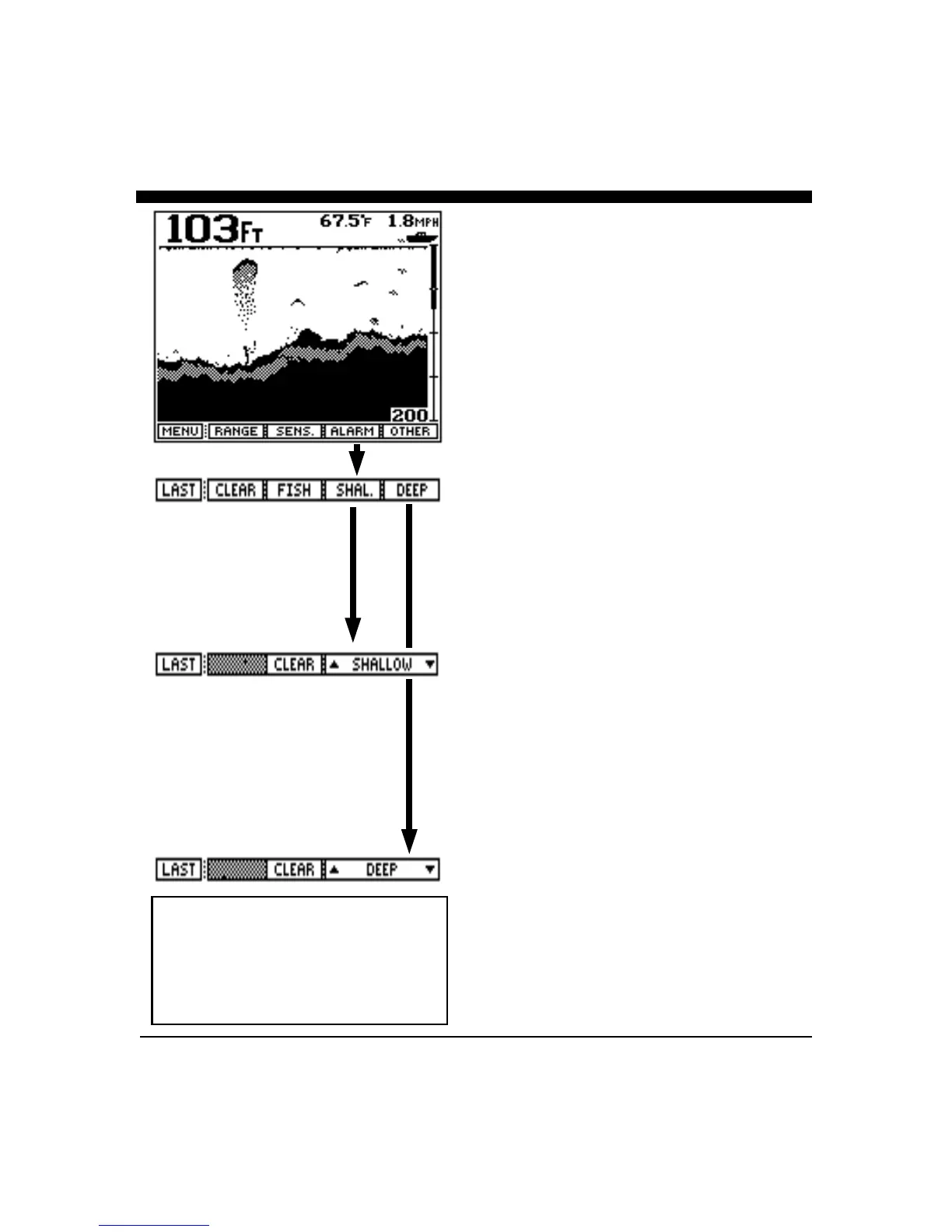
To adjust or clear the alarm settings, press the soft key
labeled “ALARM” to bring up the alarm menu choices.
Pressing the "Deep" or "Shal." soft keys brings up sub-
menus to set, adjust or clear the Shallow, Deep and Zone
Alarms. As either the “∩” or “∪” keys are pressed and
held down, or the front panel knob is rotated, a vertical
bar on the left side of the screen (just below the boat icon)
shows the area covered by the depth alarm. Whenever a
solidly displayed target appears within the depth range
covered by the alarm bar, the audible alarm sounds to
warn you of underwater targets or changing bottom
conditions.
The Shallow Alarm is often used to alert the user to
shallowing bottom conditions and the presence of
underwater targets such as fish. The Deep Alarm is often
used in conjunction with the Shallow Alarm to define a
depth range. If the depth becomes less or greater than the
alarm settings, the audio alarm will sound as a warning.
A Zone Alarm can be created by using both the Shallow
and Deep Alarms. If the Shallow and the Deep alarm
bars on the left side of the display are “overlapped” (that
is, the Shallow Alarm bar overlaps the Deep Alarm bar) a
new Zone Alarm will result and be displayed.
Pressing the “FISH” softkey activates the fish alarm.
This alarm will activate when the unit detects suspended
NOTE: The FISH Alarm is activated and
cleared independant of other alarms.
When activated, the softkey labeled
“FISH” will be shown in reverse video
(white on black). Press the softkey again to
clear the FISH Alarm



 To Next Page