(37PO) I637USB USB PUMP ENGLISH 4.875” X 7.25” 05/17/2022
37
PO
READ AND SAVE THESE INSTRUCTIONS
Page 5
TROUBLESHOOTING GUIDE
PROBLEM CAUSE SOLUTION
Air pump does
not work
• The external power adapter/
supply output is not correct.
• Pump running continuously for
30 minutes, motor protection
system activated.
• Pump continuously connected
to a portable USB charger and
idled, hence the portable USB
charger is in rest mode.
• Make sure the output of the external power
adapter, such as USB Wall Charger, Portable
USB Charger, 12V Car Charger or USB Port
is rated 5V / 2A or more. See “INFLATION”
section.
• Switch off and disconnect the line cord from
the power adapter/ supply. Let the pump rest
for 1 minute before restarting.
• Disconnect and reconnect the USB cable to
the portable USB charger.
Air bed not fully
infl ated after
5 - 7 minutes
of infl ation
• The external power adapter/
supply output amperage (A) is
less than 2A.
• The manual inflation port cap is
not securely closed.
• Make sure the output of the external power
adapter, such as USB Wall Charger, Portable
USB Charger, 12V Car Charger or USB Port
is rated 5V
/ 2A or more. See “INFLATION”
section.
• Push the cap firmly into the manual inflation
port.
Air leaking from
the pump panel
or compartment
cover
• The control dial is not in the off
mark (
) position.
• The manual inflation port cap is
not securely closed.
• Turn the control dial to the off mark
( )
position after inflation is completed.
• Push the cap firmly into the manual inflation
port.
DEFLATION
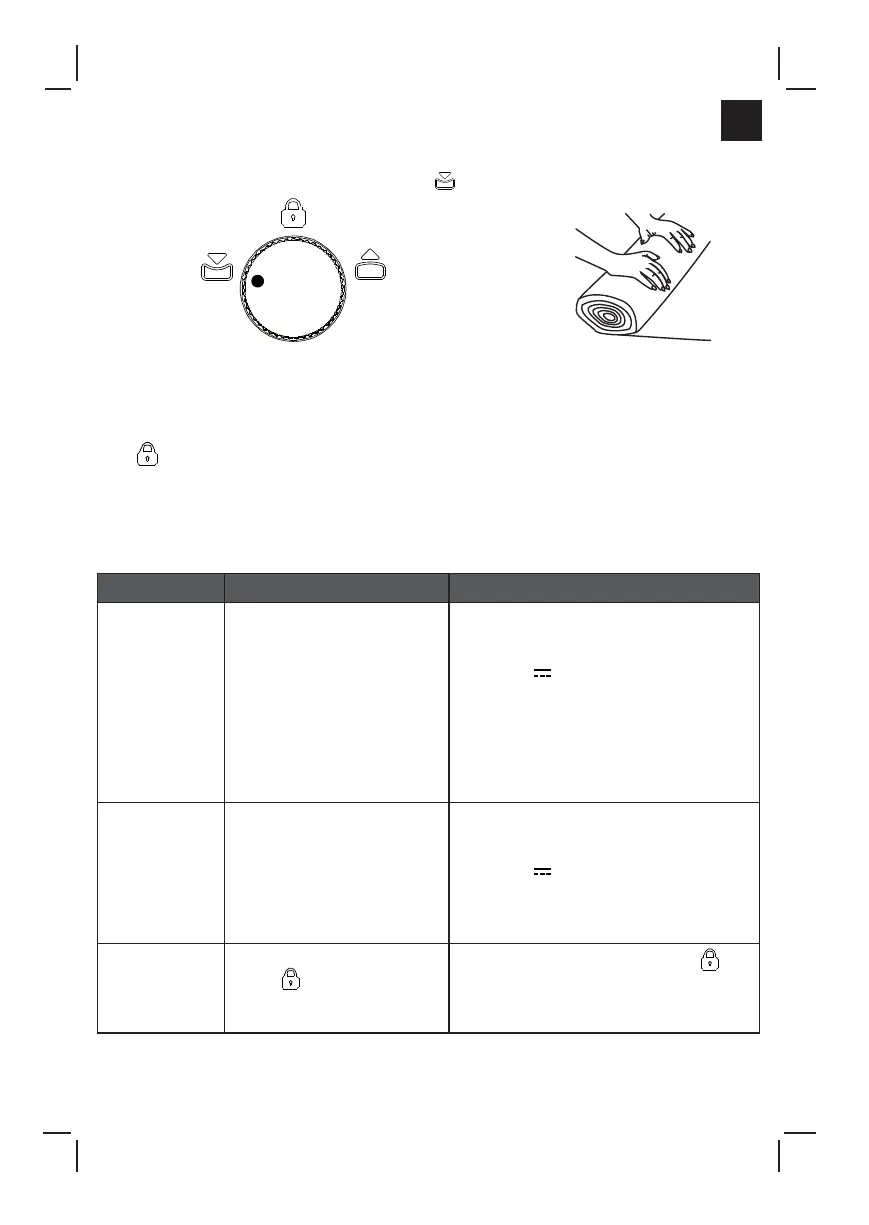
1. Connect the USB cable to an appropriate external power adapter. See Fig (2-5).
2. Turn the control dial to the
deflation mark (
). See Fig (9).
3. With the air bed fully deflated begin rolling the air bed from the end opposite of the pump
towards the end where the pump is located. See Fig (10).
4. When all the air is removed from the air bed, turn the control dial back to the off mark
(
) closing the valve.
5. Disconnect the USB cable from the external power adapter, place it inside the cord
compartment and close the cover. Make sure the USB cable is free of twists, kinks or
knots.
FIG (10)
FIG (9)
Deflation
mark



 To Next Page